

Week of 9/21/26
Bug Fixes
Web
- Fixed an issue where clicking a promotional banner CTA that led to a free Plan join flow showed a blank white loading modal for several seconds.
- Fixed an issue where Hosts weren’t receiving “new member joined” notifications.
- Fixed an issue where “Message All Members” ignored a member’s Network-level mute setting and recency preferences.
- Fixed an issue where apostrophes displayed as incorrectly in email notification previews.
- Fixed an issue where clicking a table-of-contents link opened a new tab instead of jumping to that spot on the same page.
- Fixed an issue where Limited Members joining a network-access Plan bypassed the Plan’s and Network’s Landing Space routing and landed on the default tab instead.
- Fixed an issue where referral visits were tracked but purchases weren’t attributed to the referring affiliate.
- Fixed an issue where chips showed an unintended shadow in their pressed state.
- Fixed an issue where an embedded survey link was unresponsive when clicked.
- Fixed an issue where the Manage Plan Products wizard showed two “Next” buttons on its Manage and Message steps.
- Fixed an incorrect Dutch translation
- Fixed an issue where sensitive custom field answers could be accidentally collected publicly instead of staying private.
- Fixed an issue where clicking the voice message button cleared any text already typed in the Chat compose bar.
- Fixed an issue where the navigation panel shifted position when opening a Space or Collection menu.
- Fixed an issue where members couldn’t reactivate or resubscribe to a Plan after a cancellation or failed card payment.
- Fixed an issue where the Event calendar wasn’t syncing to Google Calendar.
- Fixed an issue where the Plan Space Access editor showed both a “Next” and a “Confirm and Submit” button on its final step.
- Fixed an issue where Hosts couldn’t see Scheduled Posts created by other Hosts.
- Fixed an issue where the Network name displayed in solid black, making it unreadable in dark mode on mobile browsers.
- Fixed an issue where a member’s completion checkmark stayed on a Course item even after all its completion criteria were disabled.
- Fixed an issue where a Zoom link in the Space Welcome Email was truncated.
- Fixed an issue where Admin API requests for a member’s avatar URL returned an Access Denied error.
- Fixed an issue where visiting certain Landing Pages showed a “Something has gone wrong” error instead of the correct view.
- Fixed an issue where Income Reports listed Apple iOS fees inflated for some Hosts.
- Fixed an issue where a custom field notification’s link didn’t scroll to the referenced field.
- Fixed an issue where checkout link names kept the billing interval label in English even on non-English Networks.
- Fixed an issue where the option to leave a conversation was missing from some group Chats.
- Fixed an issue where members weren’t receiving notifications for comments on their own Post.
- Fixed an issue where deleting a Post could leave its comments behind, causing broken links to the deleted content.
- Fixed an issue where the leaderboards feature on the Originals plan got reset to disabled unexpectedly.
- Fixed an issue where the “You voted” label on Poll posts appeared squished with very tight letter spacing.
- Fixed an issue where a member’s Pending Payment entry for a Plan could show an inconsistent currency version of the same bundle.
- Fixed an issue where some subscriptions failed to cancel properly, resulting in members being double-billed.
- Fixed an issue where a published Landing Page failed to load for the Host to edit.
- Fixed an issue where a successful Stripe payment sometimes didn’t create the subscription or grant the member access.
- Fixed an issue where a duplicated “more activities” button overlapped the Network logo on mobile web.
- Fixed an issue that could trigger an “Asset Attached to Another Model” error.
- Fixed an issue where viewing a Post’s comments could return a server error when the request contained a non-numeric ID.
- Fixed an issue where the spam filter incorrectly blocked a legitimate guest Post.
- Fixed an issue where Livestream recordings showed as Completed but failed to load.
iOS
- Fixed an issue where tapping a Welcome Checklist link from a private message didn’t open it on screen.
- Fixed an issue where Chat message lists rendered blank across all Spaces, even after restarting the app.
- Fixed an issue where a custom field notification’s link didn’t scroll to the referenced field.
Android
- Fixed an issue where picture posts showed raw placeholder text instead of rendering hashtags and media properly.
Week of 9/14/26
Updated
Smarter Landing Pages
When someone arrives on your Landing Page ready to join, purchase a Plan, or join your Waitlist, the next step should be obvious. Now, Landing Page header buttons automatically show the most relevant action for each visitor. Sign In will always appear. The other button will depend on what’s available:- Invited or referred visitors will see Join
- Multiple Plans will show Join Now
- One Plan will show that Plan’s button, such as Access, Buy, or Subscribe
- An open Waitlist with no Plans will show Join Waitlist
- An open Network without Plans or a Waitlist will show Join
- A gated Network with nothing else to join will show Sign In only
Cohost Can Take On Even More
Cohost now has 22 more tools to help with the day-to-day work of running your Network. You can ask Cohost to help with things like:- Content & engagement — comment on Posts, edit comments, react to Posts, remove reactions, and edit published Posts
- Leads & members — invite a lead, look up Profile Fields and their available choices, review sent announcements, and check join requests
- Marketing Banners — create, update, view, target, and delete Marketing Banners
- Payments — view Payment Plans, member subscriptions, and one-time purchases
See everything Cohost can do →
Clearer Purchase Reporting in Google Analytics
Paid web purchases now include a transaction ID in Google Analytics, making it easier to match purchases back to Stripe and understand exactly what’s driving revenue. For example, if you run a promotion for a course and GA4 shows 25 purchases, you can use those transaction IDs to match each purchase in Stripe and confirm the sales and revenue the campaign actually generated.Mighty Insights Remembers Your Date Range
When you select a date range in Mighty Insights, it now stays selected as you move between tabs. So if you’re reviewing last month, last quarter, or another specific period, you won’t need to reset your dates on every dashboard.Bug Fixes
Web
- Fixed an issue where YouTube videos always resumed from the same timestamp instead of resuming from each member’s own progress.
- Fixed an issue where Chat notifications showed an unread message even when there were no unread messages.
- Fixed an issue where promo codes didn’t automatically apply when using a Plan Share link.
- Fixed an issue where post content couldn’t be copied and pasted into a Course lesson.
- Fixed an issue where the Bookmarked DMs view didn’t scroll to show additional conversations.
- Fixed an issue where adding members to a Chat showed a “Something went wrong” error even though the members were added successfully.
- Fixed an issue where Chat conversation list timestamps were hard to read in dark mode.
- Fixed an issue where post thumbnails failed to render in the Feed list view for native video and link posts.
- Fixed an issue where a failed post save left the composer stuck with no way to recover.
- Fixed an issue where Apple Pay checkout totals ignored the Free Trial upgrade discount.
- Fixed an issue where the Space auto-join and landing flow showed Network info instead of Space or Plan info, with a cropped icon and a “See more” link pointing to the wrong description.
- Fixed an issue where selecting a Personal Meeting ID still generated a generic meeting code.
- Fixed an issue where some Network landing pages failed to load due to a script error.
- Fixed an issue where the private Chat compose bar blocked sending an image-only message with the Enter key when Enter-to-send was turned on.
- Fixed an issue where the Past Events filter was missing from some Spaces even though the standard Events feature was enabled.
- Fixed an issue where the email verification modal displayed raw HTML instead of formatted text.
- Fixed an issue where archived Spaces appeared as selectable options in a Plan’s Space Access dropdown and only failed when saved.
- Fixed an issue where a Course lesson stayed invisible to members even when its visibility was set to Visible.
- Fixed an issue where adding a member to a Plan through the Admin API didn’t trigger Purchased or Accessed Plan automations.
- Fixed an issue where the header Plan CTA always read “Join Now” instead of showing the Featured Plan’s own label, such as “Buy.”
- Fixed an issue where screen readers and keyboard navigation skipped the Gamification header area on desktop.
- Fixed an issue where a Course section was silently demoted to draft after a video failure, with no way for the Host to see, publish, or diagnose it.
- Fixed an issue where editing a Post could leave a published Course lesson stuck in “processing” status and invisible to members.
- Fixed an issue where an ampersand didn’t display correctly in the Floating Player title.
- Fixed an issue where Scheduled Posts never published and stayed stuck in “scheduled” status.
- Fixed an issue where the French “event ended” message showed a stray character before the exclamation mark.
- Fixed an issue where a promotional banner kept showing after a member was removed from its target audience, until the page was refreshed.
- Fixed an issue where a Space wouldn’t open and showed a “deleted space” message instead.
- Fixed an issue where automated outgoing DMs were incorrectly marked as unread for the Host.
- Fixed an issue where a Story Block’s background didn’t contrast enough with the page background.
- Fixed an issue where the recommended star icon in chips didn’t match the surrounding text color, appearing dark gray in dark mode.
- Fixed an issue where Hosts got an error accessing Image Suggestions on their Network.
- Fixed an issue where starting a new version of a legacy imported Branded App timed out.
- Fixed an issue where a YouTube Shorts video disappeared from an article after saving, despite previewing successfully in the editor.
- Fixed an issue where members marked unsubscribed or blacklisted had transactional emails suppressed, locking passwordless members out of their accounts.
iOS
- Fixed an issue where embedded content on a page repeatedly failed to load after the web view process was killed multiple times.
- Fixed an issue where a member’s activity streak got stuck and stopped updating.
- Fixed an issue where expanding “See more” on Private Responses could expose private answers in the public view.
Android
- Fixed an issue where the Feed scroll position reset mid-scroll on some Android devices.
- Fixed an issue where transparent images showed a white background instead of staying transparent.
- Fixed an issue where signed-out members using the Branded App were taken to in-app sign-in instead of the browser, blocking them from buying a web-only Plan.
- Fixed an issue where a truncated gift link could open without showing the correct gift.
Week of 9/7/26
Updated
Cohost Can Now Work with Your Images
Cohost can now accept image uploads across web, iOS, and Android and use them as part of what it’s helping you create. Upload a single image in chat (support for multiple images in the future!), tell Cohost where you want it used, and it can help apply it across your Network.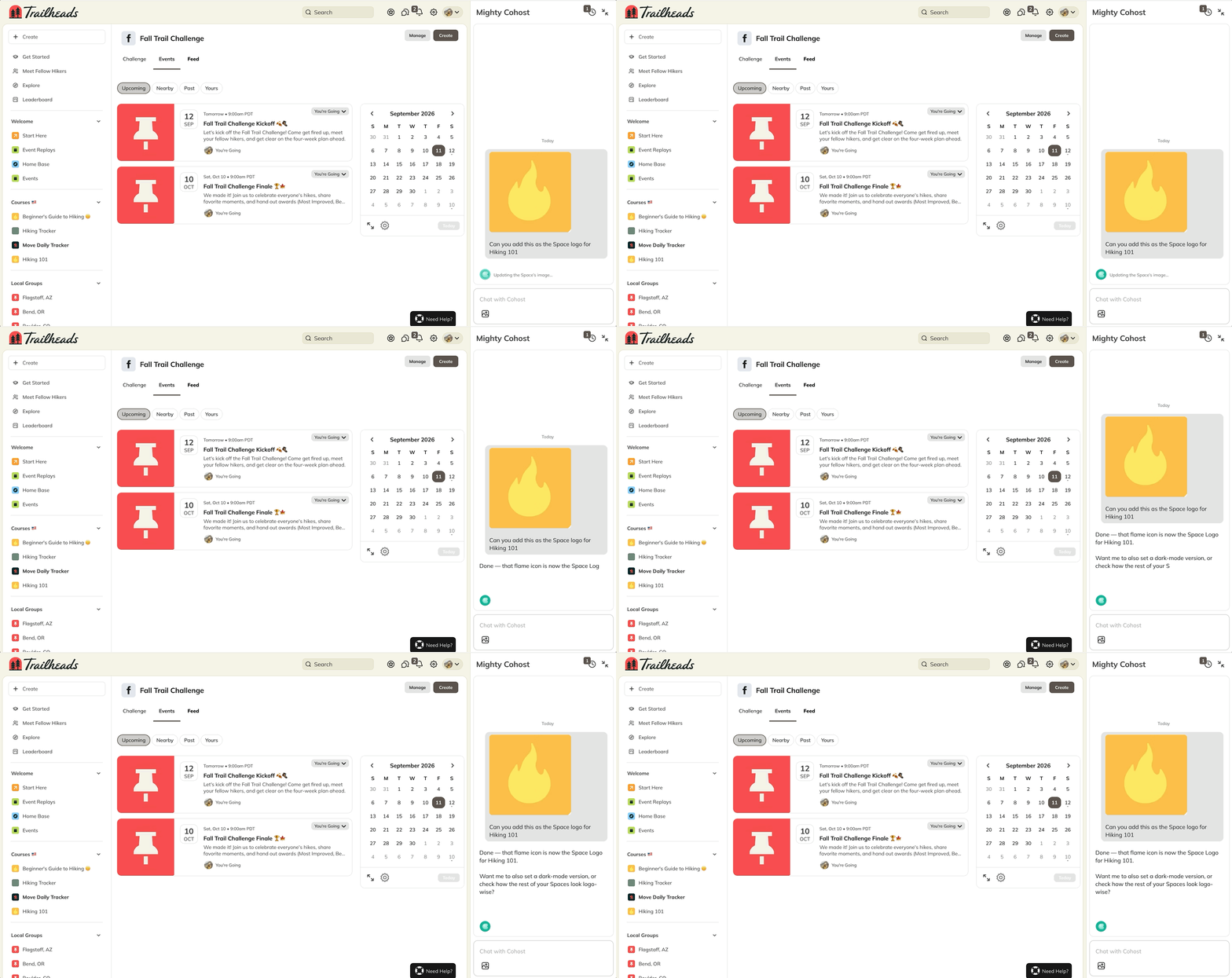
- Network branding — logos, Primary Images, Global Header Brand images, Landing Page images, colors, and more
- Spaces — logos, banners, branding images, and colors
- Content — Event headers, thumbnails, Article headers, video thumbnails, and Course or Lesson images
- Member experiences — Badges and Recognition graphics
Automatically Add Members to Free Plans
You can now automatically add members to a free or non-paid Plan as an Automation Action. That means you can move someone directly into the right next experience without asking them to click an invite or take another step. For example, you could:- Add someone to a follow-up program after they complete something
- Move members into the next stage of a cohort or journey
- Give access to a free Plan based on a Tag, Badge, or other Automation trigger
Better AI-Generated Images
AI image generation in Mighty just got an upgrade. Generated images are now faster and higher quality, making it easier to create visuals that fit the content and experiences you’re building.Bug Fixes
Web
- Fixed an issue where bold formatting changes on Landing Pages did not appear after they were saved.
- Fixed an issue where Limited Members were removed from some Chat participant lists.
- Fixed an issue where Limited Members were unable to open some Chats and announcements.
- Fixed an issue where Plan invite links sometimes sent members to the wrong Plan at checkout.
- Fixed an issue where deleting a Flex Space that was the last product in a Plan left the Space stuck instead of deleting it.
- Fixed an issue where some uploaded videos displayed an unsupported video source error.
- Fixed an issue where pagination did not always load additional members on the All Members page.
- Fixed an issue where paragraphs displayed incorrectly in some email notifications.
- Fixed an issue where Native Video quality became blurry after upload.
- Fixed an issue where valid locations did not appear when searching the Location field on a profile.
- Fixed an issue where custom Livestream names were replaced by the Event title on long-running recurring Events.
- Fixed an issue where some members encountered an error during sign-in or onboarding before the page finished loading.
- Fixed an issue where Limited Members were removed from 1:1 Chats, preventing them from sending messages on mobile.
- Fixed an issue where valid video URLs hosted on Amazon S3 returned an “Error processing URL” message.
- Fixed an issue where the country selector for phone number fields selected the wrong country when multiple countries shared the same calling code.
- Fixed an issue where the currency selector on the Network About page was invisible in Light Mode.
- Fixed an issue where paid Plan prices did not appear for signed-out visitors.
- Fixed an issue where Limited Members were missing from some Chat participant lists and member pickers.
- Fixed an issue where Limited Members did not appear in the mobile Chat recipient picker for Hosts.
- Fixed an issue where hidden content in a Post appeared as visible text in the mobile apps.
- Fixed an issue where Chat displayed an empty “Say hello” state when message history failed to load.
- Fixed an issue where members with an outstanding two-factor authentication step were signed out when opening a Plan link.
- Fixed an issue where Promo Codes attached to Plan invite links were not applied.
- Fixed an issue where video playback started at an unnecessarily low quality based on outdated connection information.
- Fixed an issue where video playback stopped after playback links expired.
- Fixed an issue where video playback got stuck repeatedly retrying a segment that failed to load.
- Fixed an issue where link previews displayed a broken image when the provider icon could not be loaded.
- Fixed an issue where some comments displayed incorrectly when they contained links.
- Fixed an issue where Cohost showed an unread notification for a conversation the Host had just started.
- Fixed an issue where Cohost asked Hosts to approve creating a Post or Poll without showing the content that would be published first.
iOS
- Fixed an issue where Space names in the Feed could not be tapped.
- Fixed an issue where Streak milestone icons were missing from the Feed.
- Fixed an issue where Article titles beginning with a hashtag displayed raw HTML.
- Fixed an issue where @mention search stopped after a space, preventing members with multi-word names from being mentioned.
- Fixed an issue where online status indicators were missing from Posts in the Feed.
- Fixed an issue that caused the app to crash while loading some paginated lists.
- Fixed an issue that caused the app to crash while clearing locally stored data.
- Fixed an issue where tapping a Space Chat notification opened the Chat list instead of the specific Chat.
- Fixed an issue where Space Hosts without a Network role could not access Requests to Join.
- Fixed an issue where deep-linked Comment notifications briefly opened at the top of the Post before jumping to the Comment.
- Fixed an issue where some Feed content displayed a “content not supported” message.
- Fixed an issue where Live Chat messages and notifications did not appear in real time until the app was restarted.
- Fixed an issue where image file names appeared as clickable text in Posts.
- Fixed an issue where the account deletion option had an incorrect German translation.
Android
- Fixed an issue where the Cast button could fail when a Network’s theme was missing a required color setting.
- Fixed an issue where some members with a password became stuck during sign-in without an option to use an email sign-in code.
- Fixed an issue where Android translations unexpectedly reverted to English.
- Fixed an issue where changing a URL while composing a Post did not update its link preview.
- Fixed an issue where Chat replies arriving before the original message did not appear correctly.
- Fixed an issue where members with active paid access were sent back to the Replays list when opening some Posts.
- Fixed an issue where some embedded podcast players continuously buffered instead of playing.
- Fixed an issue where @mention search stopped after three words, preventing members with longer names from being mentioned.
- Fixed an issue where Livestream audio did not play through an already-connected Bluetooth headset.
Week of 8/31/26
Updated
37 New Cohost Actions in 2 Weeks
Last week, we added 19 more day-to-day actions to Cohost, including:- Sending DMs to specific members
- Adding or removing Tags and Badges
- Creating Posts in Spaces
- Making Course content visible or hidden
- Creating, managing and scheduling polls and posts
- RSVPing to Events and updating recurring Events
- Looking up members, adding profile fields, and managing invites
Bug Fixes
Web
- Fixed an issue where members could not update their payment method.
- Fixed an issue where some members were charged successfully but remained in a “Pending Payment” state.
- Fixed an issue where some members saw a recurring “Plan not available for purchase” error.
- Fixed an issue where Limited Members received an “Unable to Join” error when accessing a new Plan through an invite.
- Fixed an issue where mobile signups through a Plan invite failed.
- Fixed an issue where deleting a Space that was the last one in a Plan left the Space stuck instead of deleting it.
- Fixed an issue where mailto links did not save in the Course editor.
- Fixed an issue where a Lesson set to Visible remained hidden from members.
- Fixed an issue where @mention search failed when searching for members using multiple name terms.
- Fixed an issue where some Landing Page formatting changes did not appear after they were saved.
- Fixed an issue where Hosts received a “Permission Denied” error when saving Network branding images.
- Fixed an issue where Landing Pages failed to save in some cases.
- Fixed an issue where social link previews did not display an image.
- Fixed an issue where transactional emails remained suppressed for some members, preventing them from signing in.
- Fixed an issue where Zoom Events displayed a generic error instead of explaining why the Event could not be saved.
- Fixed an issue where Chrome autofill made the email address difficult to see on the sign-in screen in light mode.
- Fixed an issue where Post content appeared duplicated and incorrectly sized in Notify All emails.
- Fixed an issue where expired invite links did not explain that the invite had expired.
- Fixed an issue where a paid invoice did not update a member’s Plan status.
- Fixed an issue where some Livestream viewers saw “Livestream ended” while the stream was still live.
- Fixed an issue where Livestream recording durations did not match the actual recording length.
- Fixed an issue where audio messages displayed a “Loading Failed” error.
- Fixed an issue where video playback degraded or buffered repeatedly in Chrome.
- Fixed an issue where Cohost approval buttons became unresponsive after reopening the Cohost panel.
- Fixed an issue where Cohost created duplicate Collections when a Collection name did not exactly match an existing Collection.
- Fixed an issue where Cohost returned an incomplete list of Events by leaving out non-recurring Events.
- Fixed an issue where scheduled Automations did not correctly respect some member roles.
- Fixed an issue where a pop-up Automation skipped Limited Members after they were approved for a Plan.
- Fixed an issue where Admin API member creation responses stopped returning the member’s email address.
iOS
- Fixed an issue where some Cohost conversations froze.
- Fixed an issue where the Cohost Chat jumped when the keyboard or compose bar changed size.
- Fixed an issue where Cohost conversations incorrectly appeared in the regular Chat list.
- Fixed an issue where a member’s own message briefly disappeared and reappeared while Cohost was responding.
- Fixed an issue where the Cohost working indicator overlapped or remained visible after a response started.
- Fixed an issue where a member’s position in a Cohost conversation shifted when a streaming response finished.
- Fixed an issue where some Community Values did not appear.
- Fixed an issue where date formats did not follow the member’s device locale.
- Fixed an issue where some Cohost conversations froze.
- Fixed an issue where the Cohost Chat jumped when the keyboard or compose bar changed size.
- Fixed an issue where Cohost conversations incorrectly appeared in the regular Chat list.
- Fixed an issue where a member’s own message briefly disappeared and reappeared while Cohost was responding.
- Fixed an issue where the Cohost working indicator overlapped or remained visible after a response started.
- Fixed an issue where a member’s position in a Cohost conversation shifted when a streaming response finished.
- Fixed an issue where some Community Values did not appear.
- Fixed an issue where date formats did not follow the member’s device locale.
- Fixed an issue where some Cohost conversations froze.
- Fixed an issue where the Cohost Chat jumped when the keyboard or compose bar changed size.
- Fixed an issue where Cohost conversations incorrectly appeared in the regular Chat list.
- Fixed an issue where a member’s own message briefly disappeared and reappeared while Cohost was responding.
- Fixed an issue where the Cohost working indicator overlapped or remained visible after a response started.
- Fixed an issue where a member’s position in a Cohost conversation shifted when a streaming response finished.
- Fixed an issue where some Community Values did not appear.
- Fixed an issue where date formats did not follow the member’s device locale.
- Fixed an issue where some Cohost conversations froze.
- Fixed an issue where the Cohost Chat jumped when the keyboard or compose bar changed size.
- Fixed an issue where Cohost conversations incorrectly appeared in the regular Chat list.
- Fixed an issue where a member’s own message briefly disappeared and reappeared while Cohost was responding.
- Fixed an issue where the Cohost working indicator overlapped or remained visible after a response started.
- Fixed an issue where a member’s position in a Cohost conversation shifted when a streaming response finished.
- Fixed an issue where some Community Values did not appear.
- Fixed an issue where date formats did not follow the member’s device locale.
Android
- Fixed an issue where SSO sign-in could leave members stuck in the browser instead of returning them to the app.
- Fixed an issue where some apps repeatedly asked members to update even when no newer app version was available.
- Fixed an issue where canceled uploads could continue processing.
- Fixed an issue where some app screens crashed when a message appeared while no active screen was available.
- Fixed an issue where translations were not being updated correctly.
- Fixed an issue where center-aligned Post images appeared left-aligned.
Week of 8/24/26
Updated
Schedule Automations Further Ahead
You can now delay Automation Actions for up to one year, making it easier to create thoughtful member journeys that unfold over days, weeks, or months. For example, you can:- Send a check-in two weeks after someone joins
- Assign a Badge or send a message later in a member’s journey
- Send a reminder a few days before the next step in a course or program
Schedule Cohost Actions
Cohost can now help with 19 more day-to-day actions—like sending DMs, adding or removing Tags and Badges, creating posts, and making Course content visible or hidden. These new actions, plus many Cohost can already take, can also be scheduled for a specific date and time. For example, you can ask Cohost to:- “Welcome Kyle to the community tomorrow at 12pm.”
- “Give Sandra the Founding Member Badge on Monday at 6am.”
- “Message all members in my October Cohort on Friday at 9am.”
Clearer Churn & Renewal Metrics
We’ve updated Churn Rate inside of the Plans tab in Mighty Insights™ so it’s easier to understand how well you’re retaining paying members.What’s new:
- Churn Rate now shows the percentage of paid members who actually lapse during the selected period.
- The metric previously called Churn Rate is now Renewal Rate, reflecting what happens when members reach a renewal decision.
- A new churn trend chart separates annual, monthly, and blended churn over time.
Bug Fixes
Web
- Fixed an issue where the Profile page crashed for some members.
- Fixed an issue where the Notify and Don’t Notify buttons did not respond when publishing a Post in some Spaces.
- Fixed an issue where Hosts received a generic error when pausing an Automation.
- Fixed an issue where a Completed Lesson Automation could run more than once for the same member and Lesson, resulting in duplicate points.
- Fixed an issue where Plan carousels appeared cropped on mobile web.
- Fixed an issue where a member’s profile timezone changed without them updating it.
- Fixed an issue where some Pro Plan Landing Pages displayed only the first 25 Spaces included in the Plan.
- Fixed an issue where some SSO members remained signed in after their access was revoked by their identity provider.
- Fixed an issue where the Cohost compose bar became unresponsive after opening the three-dot menu on mobile web.
- Fixed an issue where some Automations were incorrectly suspended because of a link restriction.
- Fixed an issue where Automation suspension notifications did not explain why the Automation was suspended.
- Fixed an issue where some Pro members were logged out sooner than expected.
- Fixed an issue where a Lesson marked as visible remained hidden from members.
- Fixed an issue where member Streaks stopped increasing despite continued daily activity.
- Fixed an issue where Course content failed to load when the Table of Contents was turned off.
- Fixed an issue where some Course materials failed to load because of a permissions error.
- Fixed an issue where Promotional Banner description fields displayed an unnecessary scrollbar.
- Fixed an issue where the Custom Profile Field creation form extended outside of its panel.
- Fixed an issue where some UK Hosts were locked out of a newly created Network.
- Fixed an issue where the notification badge on Cohost did not respond when clicked.
- Fixed an issue where the Collect Taxes option disappeared when Quaderno was disconnected, preventing Hosts from turning off tax collection.
- Fixed an issue where the Chat reaction menu remained open on mobile web and blocked message text.
- Fixed an issue where updating a Post could cause the Calendar to crash.
- Fixed an issue where the New Chat button displayed the wrong tooltip.
- Fixed an issue where Plan share links incorrectly showed a “Plan not available” error.
- Fixed an issue where Hosts could not save edits to some Space Pages.
- Fixed an issue where the Invite by Email field did not respond to taps on touch devices.
- Fixed an issue where automated direct messages incorrectly appeared as unread to the sender.
- Fixed an issue where the Recent Members section in Chat failed to load.
- Fixed an issue where search results included Comments from Lessons where Comments were turned off.
iOS
- Fixed an issue where replies in some Chats silently failed to send.
- Fixed an issue where a member’s new Post took too long to appear in the Activity Feed.
- Fixed an issue where article content on a Post could not be accessed with VoiceOver.
- Fixed an issue where raw HTML or embed code appeared in Feed previews.
- Fixed an issue where disabled Poll answer buttons did not appear disabled.
- Fixed an issue where video uploads continued retrying after leaving the composer, resulting in failed uploads.
Android
- Fixed an issue where Vimeo embeds sometimes appeared blank after scrolling away from them and returning.
- Fixed an issue where the keyboard did not appear in text fields on some devices.
- Fixed an issue where the Event tab incorrectly showed new activity when there was none.
- Fixed an issue where Feed Posts displayed incorrectly after returning from a Post.
- Fixed an issue where some Chat replies failed to send.
- Fixed an issue where resolved Cohost approval buttons did not appear disabled.
Week of 8/17/26
Updated
Headless API
The Headless API is now in general release. Every community on Mighty has its own people, goals, and ways of participating, and the Headless API unlocks the ability for Hosts to create custom experiences that are entirely unique to their community — while still seamlessly co-existing with native Mighty features. Available on the Scale Plan and up, this opens up new possibilities for Mighty Pro Hosts with a development team and for non-technical Hosts interested in vibe coding alike. Some example use cases: a habit tracker that helps members make progress toward a shared goal, a personality quiz members can use to discover more about themselves, a daily journal for reflection throughout a course, a survey that gives members a voice in what comes next, or a custom bookmarklet for quickly sharing links back to the community.Cohost Feels Faster & More Responsive
Cohost now gives you a clearer view into what it’s doing while it works. On web (with mobile coming next week), longer responses will begin appearing as they’re generated, like a typewriter effect. Plus, when Cohost takes an action, you’ll also see more specific updates—like “Creating the ‘Game Day’ Space”—so you know exactly what’s happening. These updates make it easier to follow along as Cohost takes on more work across your Mighty Network and give you more confidence when handing tasks off.Bug Fixes
Web
- Fixed an issue where Cohost response text disappeared partway through a response.
- Fixed an issue where Cohost working indicators flickered or jumped between states.
- Fixed an issue where an open Cohost conversation incorrectly showed a new response as unread.
- Fixed an issue where Spaces created by Cohost did not appear in the left navigation until the page was refreshed.
- Fixed an issue where members could not edit the email field on the sign-in screen.
- Fixed an issue where comments on Events disappeared after being posted.
- Fixed an issue where Chat notifications did not scroll to the referenced message when opened.
- Fixed an issue where Hosts did not receive email notifications for new members or Chat messages.
- Fixed an issue where the “Remove from Plan” option was missing for some members.
- Fixed an issue where Typeform embeds displayed a loading screen instead of the form.
- Fixed an issue where scheduled Posts required an extra confirmation after selecting “Don’t Notify.”
- Fixed an issue where LinkedIn and Facebook sign-in failed.
- Fixed an issue where the livestream Chat panel appeared blank.
- Fixed an issue where custom searchable profile fields returned less relevant results as members typed.
- Fixed an issue where signed-out visitors could not load Comments and Replies.
- Fixed an issue where Posts incorrectly appeared as deleted.
- Fixed an issue where Single Event creators could not edit their Event.
- Fixed an issue where Hosts could not add images while editing a Comment.
- Fixed an issue where the “Finish Registration” button did not respond during onboarding.
- Fixed an issue where the Event thumbnail upload button did not respond during Event creation.
- Fixed an issue where Space profile photos appeared broken when an Events page first loaded.
- Fixed an issue where incorrect or missing images appeared across multiple Spaces.
- Fixed an issue where one-time purchase receipts showed the newest saved card instead of the card actually charged.
- Fixed an issue where social sharing previews displayed outdated Network information after Landing Page changes.
- Fixed an issue where “View as Member” on mobile web prevented Hosts from expanding the navigation menu.
- Fixed an issue where Cohost Automations did not correctly update the selected Host after the Host was changed.
- Fixed an issue where external embeds that use a microphone lost microphone access after being saved.
- Fixed an issue where members could not complete some embedded experiences.
- Fixed an issue where the “Require Mighty sign-in” option was missing from embedded content in the Lesson editor.
- Fixed an issue where video playback progress was recorded while a Host was viewing the Network as a member.
- Fixed an issue where Vimeo links failed when Mighty could not retrieve the video thumbnail.
- Fixed an issue where the Invite Send button was disabled.
- Fixed an issue where some Hosts were missing download links for uploaded videos.
iOS
- Fixed an issue where the app froze after viewing Streak data on a member profile.
- Fixed an issue where Live Chat messages and notifications stopped appearing in real time.
- Fixed an issue where livestream viewers saw a black screen during reconnects.
- Fixed an issue where Event cards were missing attendee profile photos.
- Fixed an issue where members were not warned before sharing members-only content.
- Fixed an issue where accepting a Speaker invitation failed without a clear message.
- Fixed an issue where Limited Members were redirected away from their profiles.
- Fixed an issue where Hot Cold Poll result bars displayed incorrectly.
- Fixed an issue where VoiceOver read content behind open popups.
- Fixed an issue where Hot Cold Poll sliders could not be used with VoiceOver.
- Fixed an issue where the app sometimes froze and required a restart.
- Fixed an issue where Space rows in the navigation drawer were not labeled for VoiceOver.
- Fixed an issue where Post images did not include useful VoiceOver descriptions.
- Fixed an issue where some Feed screens incorrectly announced “Main Feed” in VoiceOver.
- Fixed an issue where past Events continued to show RSVP controls.
- Fixed an issue where Event RSVP controls did not update correctly after a member changed their response.
- Fixed an issue where Poll results did not show the member’s profile photo on their selected option.
- Fixed an issue where Events could not be deleted.
Android
- Fixed an issue where long-pressing a reaction opened the reaction picker instead of the list of members who reacted.
- Fixed an issue where some Vimeo embeds froze and did not play.
- Fixed an issue where links and hashtags did not open correctly from some Space Feeds.
- Fixed an issue where a popup opened invisibly and blocked interaction with the screen.
- Fixed an issue where Cohost Chat text was not vertically centered.
- Fixed an issue where members could edit custom profile fields that did not belong to them.
- Fixed an issue where Google sign-in failed on some apps.
Week of 8/10/26
Updated
More Image Download Formats
Images are now easier to download, reuse, and share! You can now choose between PNG, JPG, and AVIF when downloading images from the Feed, Articles, and Course Lessons on web and mobile.- On web, select Download Image from the three-dot menu and choose your preferred format. If a post includes multiple images, they’ll download together in a ZIP file.
- On mobile (iOS 8.279.80 and Android 8.279.47), simply long press an image and choose the format you want.
Keep Automations Running as Your Team Changes
Important workflows shouldn’t stop just because the person who created them is no longer part of your Network. Here’s what’s changed:- Automations from former Hosts are now reassigned to a current Host so they can keep running.
- The Automation moves to the longest-tenured Host, who will receive a notification.
- Actions like Badges, invitations, and Plan access will run as the reassigned Host.
- Send DM Automations are the exception, they’ll still pause if the original sender is no longer a Host.
Bug Fixes
Web
- Fixed an issue where some Automations were not reassigned correctly.
- Fixed an issue where the Cohost panel was jumpy or lagged when resized.
- Fixed an issue where Cohost animations were choppy when starting a new conversation.
- Fixed an issue where large Course Spaces got stuck during duplication.
- Fixed an issue where recurring Zoom Events synced without the correct scheduled time.
- Fixed an issue where Cohost showed an endless loading state after reopening the panel.
- Fixed an issue where “Only Show My RSVPs” calendar feeds included recurring Events marked as Not Going.
- Fixed an issue where Cohost responses disappeared when a message was sent during a pending approval.
- Fixed an issue where Chat images did not load correctly.
- Fixed an issue where media was not saved correctly when editing Posts.
- Fixed an issue where past Event rewatch links did not open the link.
- Fixed an issue where Landing Page buttons opened in the same window instead of a new tab.
- Fixed an issue where the left navigation highlight stayed on the previous Space after opening another Space’s About page.
- Fixed an issue where livestream viewers saw a black screen or an incorrect “livestream ended” message during an active broadcast.
- Fixed an issue where Event notifications displayed the wrong time.
- Fixed an issue where custom Landing Page URLs created broken buttons.
- Fixed an issue where sign-in failed with a blank error screen on some custom domains.
- Fixed an issue where media uploads failed in the Landing Page editor.
- Fixed incorrect Brazilian Portuguese translations that made some actions difficult to understand.
- Fixed an issue where Promo Codes lists displayed only the first page of results.
- Fixed an issue where Plan messages missed newly joined members.
- Fixed an issue where Hosts could not assign multiple Course sections, Lessons, and Quizzes at once.
- Fixed an issue where Discovery Settings tooltips were difficult to read in light mode.
- Fixed an issue where Hot Cold Polls failed to publish even when the question was within the character limit.
- Fixed an issue where embedded link previews failed to load during periods of high traffic.
- Fixed an issue where Hosts could not move a Course section to another Space.
- Fixed an issue where custom field responses took too long to save.
- Fixed an issue where the Chat filter bar was overlapping.
- Fixed an issue where members appeared multiple times in recurring Event RSVP lists.
- Fixed an issue where Native Video playback stalled or buffered on desktop web.
iOS
- Fixed an issue where login failed with an incorrect password or “too many failed attempts” message even when the same credentials worked on web.
- Fixed an issue where People Explorer showed outdated members after switching Spaces.
- Fixed an issue where social sign-in led to a missing profile-question error during account creation.
Android
- Fixed an issue where the Global Feed Filter and Sort menu did not open.
- Fixed an issue where online status indicators were missing from Posts in the Global Feed.
- Fixed an issue where Posts in the Global Feed were missing their Space attribution.
- Fixed an issue where Event card spacing displayed incorrectly.
- Fixed an issue where Poll results were missing member profile photos.
- Fixed an issue where the comment icon did not update after a member commented.
- Fixed an issue where the video play button was missing from the Feed.
- Fixed an issue where Course navigation titles displayed encoded special characters instead of the intended text.
- Fixed an issue where switching between light and dark mode caused readability problems.
Week of 8/3/26
Updated
Cohost Approval Cards Are Here
Cohost can now take on more work while keeping you in control of important decisions. When you ask Cohost to take an action that requires confirmation, it will pause and show you an Approval Card before anything happens. Depending on the action, you may see a simple confirmation or an extra warning for changes that are harder—or impossible—to undo. This means you can confidently ask Cohost to do more, knowing you’ll still have the final say. Alongside Approval Cards, we’ve also added 16 new Cohost capabilities, opening up even more ways to get things done directly through Cohost! 🙌Better Guidance for New Networks
Starting with an empty Network can make it hard to know what to do first. New empty states now provide helpful guidance and recommended next steps throughout the product, making it easier to start building, invite people in, and create momentum. This is available on web now, with mobile to follow.Faster Mighty Insights™
We’ve made a behind-the-scenes improvement to Mighty Insights™ to help reports and data load faster. There are no changes to how your metrics are calculated—just a faster experience when you’re checking in on what’s happening across your Network.Bug Fixes
Web
- Fixed an issue where MP3 files downloaded instead of opening for playback.
- Fixed an issue where the Network logo appeared as a blank box on Landing Pages when no custom logo was set.
- Fixed an issue where private Chat messages and threads could appear blank.
- Fixed an issue where the Edit Account link during onboarding returned members to the payment page instead of Account Settings.
- Fixed an issue where older Posts could be duplicated unexpectedly long after publishing.
- Fixed an issue where realtime Feed updates could crash while the Network was loading.
- Fixed an issue where revoked Zapier API keys could continue being reused.
- Fixed an issue where Reported Content links did not open the reported Post.
- Fixed an issue where Plan order differed between Landing Page carousels and the sign-up Plans page.
- Added drag-and-drop support for profile photo uploads.
- Fixed an issue where Hosts could not save changes in some Lessons.
- Fixed an issue where Landing Page benefit text did not update consistently.
- Fixed an issue where the Network Switcher email verification flow returned a generic error.
- Fixed an issue where the “Move to Plan” option was missing for some members.
- Fixed an issue where the Waitlist page failed to load for Network Moderators.
- Fixed an issue where Hosts did not receive notifications when tagged by members.
- Fixed an issue where new members joining through a Plan invite did not see the welcome pop-up.
- Fixed an issue where Chat file and PDF attachments appeared as plain text instead of clickable links.
- Fixed an issue where Chat push notifications stopped after the first message for some members.
- Fixed an issue where Space duplication failed when Courses contained archived or blocked assets.
- Fixed an issue where Event times displayed incorrectly for members in AEST.
- Fixed an issue where the member card “More” menu could not be scrolled when it extended beyond the screen.
- Fixed an issue where Settings search did not reveal matches inside collapsed sections.
- Fixed an issue where the Network logo was cropped on Landing Pages.
- Fixed an issue where former members continued receiving emails after deleting their accounts.
- Fixed an issue where Native Video uploads appeared blurry while processing.
- Fixed an issue where the Plan filter was shown to Network Moderators who did not have access to Plans.
- Fixed an issue where Member View could become out of sync and fail to load Messages.
iOS
- Fixed an issue where editing a Poll after it received responses could fail with a privacy error.
- Fixed an issue where bookmarked Question Posts displayed unnecessary pagination controls.
Android
- Fixed an issue where special characters such as ”&” displayed incorrectly in Featured Posts.
- Fixed an issue where Question Posts could appear blank in the Feed.
- Fixed an issue where the audio player seek control was not visible.
Week of 7/27/26
Updated
Flexible Group Chats
Conversations can now grow alongside your Network. You can now add and remove participants, rename conversations, leave chats you’re no longer part of, and create group chats with more than nine members. The real opportunity here is in introductions. Notice two members who’d hit it off? Connect them, make a quick intro, then step back and let the conversation flow.Larger File Uploads
Hosts, moderators, and members (when enabled) can now upload files up to 250 MB, making it easier to share presentations, PDFs, Keynote files, ZIP files, and more. Hosts also have a new setting in Admin → Member Settings to control whether members can upload larger files. It’s turned off by default, giving you flexibility while helping to manage storage.Gamification Metrics
Mighty Insights™ now includes Points Received and Current Points in the Host & Member Engagement table. Easily spot your most active contributors and recognize them!Smarter Embeds
Custom embedsautomatically match your Network’s theme, including light and dark mode, colors, and font. Whether you’re embedding custom tools, vibe-coded apps, or third-party content, the goal is the same one behind everything else this month: the tools should disappear into the background, so what people notice is each other.Bug Fixes
Web
- Fixed an issue where the Feed header was too tall on mobile web.
- Fixed an issue where Plan messages only reached members in the first Space included in the Plan.
- Fixed an issue where thumbnails displayed with incorrect proportions on mobile web.
- Fixed an issue where Hosts could not access the Leads Requests page to approve requests.
- Fixed an issue where installment Plan details did not appear for some members.
- Fixed an issue where moderators could edit comments written by other members.
- Fixed an issue where Hot Cold Poll creation failed.
- Fixed an issue where Hosts could not move Course sections to another Space.
- Fixed an issue where Custom Field responses took too long to save.
- Fixed an issue where members appeared more than once in recurring Event RSVP lists.
- Fixed an issue where the Event calendar corners displayed incorrectly.
- Fixed an issue where custom favicons did not appear in Google search results.
- Fixed an issue where link previews displayed incorrect images.
- Fixed an issue where Chat did not scroll to the first unread message.
- Fixed an issue where the Plans page failed to load.
- Fixed an issue in Mighty Insights™ where the “All Spaces” new members metric double-counted Hosts who were also members of individual Spaces.
- Fixed an issue in Mighty Insights™ where the “Last 3 Completed Months” date range did not use full calendar months.
iOS
- Fixed an issue where moderators could edit comments written by other members.
- Fixed an issue where reselecting a feature did not return members to the top of the page.
- Fixed an issue where notification links did not clearly highlight the relevant comment or open replies in the correct thread.
Android
- Fixed an issue where Community Values a member had not earned were missing.
- Fixed an issue where the Chat message field and keyboard could disappear in right-to-left languages.
- Fixed an issue where changing between light and dark mode caused readability problems.
Week of 7/20/26
Updated
Dedicated Mobile Space Banners
Your Spaces can now have a dedicated banner just for mobile! On web and Android (version 8.276.81), as a Space Host you can upload separate banner images for desktop and mobile. iOS will be soon to follow! Heading to Space Admin > Space Branding > Imagery, will show you this new option. This gives you more control over how your Spaces look across devices, helping your branding shine on every screen.Easier Plan Creation
Creating a new plan is now more intuitive. As a Host, when creating a new Plan, you’ll now see a Create Plan button in the upper-right corner instead of a ”+” icon.Prevent Accidental Overwrites
When editing Posts, Articles, Events, and other content on web, you’ll now be notified if someone else has saved changes while you’re editing. This helps to avoid accidentally overwriting other work!Bug Fixes
Web
- Fixed an issue where special characters displayed incorrectly in ConvertKit Posts.
- Fixed an issue where a badge overlapped the Network name on smaller screens.
- Fixed an issue where the Members table bulk action menu used inconsistent title casing.
- Fixed an issue where Hosts could not re-approve previously declined requests.
- Fixed an issue where the Network language unexpectedly switched to English.
- Fixed an issue where the time delay icon in Automations was cut off.
- Fixed an issue where members received duplicate “going live” notifications for a single livestream.
- Fixed an issue where the Rejoin Network button and invite links didn’t work correctly after a member was removed.
- Fixed an issue where members couldn’t join some free-to-join Spaces because of an error loading resources.
- Fixed an issue where Network and member profile photos displayed with incorrect styling.
- Fixed an issue where updating a member’s email address was blocked while using Member View.
- Fixed an issue where Cohost could open the wrong conversation during Network creation.
- Fixed an issue where Hosts could accidentally start duplicate livestream broadcasts.
- Fixed an issue where account linking could fail, preventing linked Networks from appearing in the Network Switcher.
- Fixed an issue where duplicate livestream recordings could be deleted when a Space was removed.
- Fixed an issue where GIFs couldn’t be selected.
- Fixed an issue where errors could occur while closing the editor.
- Fixed an issue where saving a Zoom Event could fail if it was edited by someone other than the original creator.
- Fixed an issue where some NVENC-encoded videos stalled during playback in Chrome.
- Fixed an issue where Ambassador reward text displayed incorrectly on invite forms.
- Fixed an issue where email addresses overflowed their table cells on the Leads page.
- Fixed an issue where Chat conversations couldn’t be renamed before the first message was sent.
- Fixed an issue where Infinite Question Engine couldn’t be enabled.
Android
- Fixed an issue where fullscreen Course videos hid system navigation, preventing members from moving between lesson components.
- Fixed an issue where Image with Background Posts didn’t display the Continue button.
Week of 7/13/26
Updated
Waitlists
Waitlists are now in general release. This feature (web only) helps Hosts build interest and excitement before launching their Mighty Network or a new offering, so Hosts can launch with a warm list of future members ready and waiting. Hosts can create Waitlists directly from Landing Pages, collect leads, automatically invite people when they’re ready to launch, and manage everything from one place (Admin > Marketing > Waitlists).Faster Video Uploads
We’ve completed a major behind-the-scenes upgrade! Videos are now faster after they’re uploaded—meaning less waiting and a smoother viewing for everyoneBug Fixes
Web
- Fixed an issue where Welcome Checklist reminder notifications didn’t stop sending.
- Fixed an issue where some member profile information was displayed incorrectly when viewed by another member.
- Fixed an issue where native video captions were lost during metadata updates.
- Fixed an issue where YouTube thumbnails didn’t appear for newly published articles.
- Fixed an issue where the Admin Members page failed to load.
- Fixed an issue where plan cancellations removed member access immediately instead of at the end of the billing period.
- Fixed an issue where formatting was removed from bulk messages when they were delivered.
- Fixed an issue where Leaderboards timed out while loading.
- Fixed an issue where members received email notifications when a Host duplicated an article.
- Fixed an issue where directly adding existing members to a free Plan silently failed.
- Fixed an issue where searching Automations by trigger or action was unavailable.
- Fixed an issue where column headers on the Admin Spaces page displayed in all caps.
- Fixed an issue where transactional emails were blocked for unsubscribed members.
- Fixed an issue where native video uploads failed after temporary storage errors.
- Fixed an issue where editing a Zoom Event without a meeting ID returned an error.
- Fixed an issue where livestream recordings were deleted when their Space was removed.
- Fixed an issue where members joining through a Plan invite link didn’t see the welcome experience.
- Fixed an issue where scheduled Plan changes left members stuck in a pending state.
- Fixed an issue where Event registration automatically closed based on responses other than “Going.”
- Fixed an issue where creating YouTube embeds through Grouper returned an error.
iOS
- Fixed an issue where long comments and replies were cut off.
- Fixed an issue where notification links opened a Post at the top instead of scrolling to the relevant comment.
- Fixed an issue where SoundCloud embeds remained blank in Course Lessons.
Week of 7/6/26
Updated
Network MCPs Are Here
You can now connect your Mighty Network to AI assistants like ChatGPT, Claude, Gemini, and more. This feature is available on the Scale Plan and up. Once connected, you (and optionally your members) can interact with your community using natural language.Authenticated iFrames and Vibe Coding on Mighty
Hosts on the Scale Plan and up now have a set of powerful new options that allow you to create custom (or vibe coded) experiences embeddable directly into your Mighty Network. Get started by checking out our new Vibe Coding on Mighty Help Center article. Here are some of the new updates that make this magic all possible:- Hosts and moderators can now freely embed any iframe (including for custom or vibe coded projects) — no more waiting for Mighty to approve it.
- We’ve created a set of starter sample projects on Lovable to instantly “remix” and edit to your liking before publishing and adding (as an iframe embed) into your Network.
- Just drop in your vibe coded app as an embed, let your members connect to it (just like granting a custom calendar app access to your Google Calendar, as a real-world example), and you’re good to go.
- On the Scale Plan and up and interested in the Mighty API beta? Let us know.
- Finally, Hosts will now see an option when embedding any iframe to give the embed full width on desktop browsers.
An Improved Invite Experience
We’ve improved the experience for member-to-member invites. Previously, invite links took prospective members directly to account creation, without giving them any context about your Mighty Network first. Now, when a Landing Page is enabled, invite links will take prospective members there before they’re prompted to create an account. It’s a small change that creates a much better first impression — and can help improve the join experience for new members!Bug Fixes
Web:- Fixed an issue where native video captions could fail permanently instead of retrying automatically.
- Fixed an issue where some HDR videos would not play correctly on iOS.
- Fixed an issue where livestream recordings could fail when restarting a livestream.
- Fixed an issue where closed or migrated Networks could incorrectly reactivate former members and send welcome emails.
- Fixed an issue where Space names incorrectly required at least 4 characters instead of 3.
- Fixed an issue where searching Automations by trigger or action stopped working.
- Fixed an issue where Zoom recordings could become stuck buffering on Mac and Windows.
- Fixed an issue where voice note uploads could lose duration and waveform information.
- Fixed an issue where archived assets could continue counting against storage after being restored.
- Fixed an issue where videos could return 404 errors after editing or moving content.
- Fixed an issue where SSO buttons could not be selected during member onboarding.
- Fixed an issue where Space duplication could fail when coursework contained large assets.
- Fixed an issue where Space Hosts couldn’t move Posts to eligible Spaces in bulk.
- Fixed an issue where Zoom recordings could freeze during playback in Courses on Chrome for iPad.
- Fixed an issue where Feed composer placeholder text displayed incorrect text.
- Fixed an issue where former members could incorrectly receive automated messages after a Network was deactivated.
- Fixed an issue where Feed updates could crash in realtime under certain conditions.
- Fixed an issue where private chats became inaccessible for some full members.
- Fixed an issue where group chats could still resolve removed members.
- Fixed an issue where users could accidentally purchase the same plan multiple times.
- Fixed an issue where the Landing Page Sign In button could lose its branded styling.
- Fixed an issue where embedded cover assets could become unavailable even though they were recoverable.
- Added support for additional embedded content providers.
- Fixed an issue where SoundCloud embeds could remain blank in Course lessons.
- Fixed an issue where streak calendars displayed incorrectly on iOS 26.
- Fixed an issue where Group Chat renames were not saved correctly.
- Fixed an issue where header videos in Spaces would not play.
- Fixed an issue where videos opened from notifications or email links would not play.
- Fixed an issue where videos in Posts would not play in some Networks.
- Fixed an issue where members removed from a Group Chat could remain in the live conversation.
- Fixed an issue where the Course quiz Start button could become unresponsive.
- Fixed an issue where long-pressing an emoji reaction opened the emoji picker instead of the member list.
- Fixed an issue where attendee profile photos were clipped on Event cards.
- Fixed an issue where tapping a Post author’s profile opened the full profile instead of the profile preview.
- Fixed an issue where the global Feed filter remained docked unnecessarily while scrolling.
Week of 6/29/26
Updated
Custom Language for Member Account Removal
Hosts can now customize the messaging members see (Admin → Members → Member Settings) when they deactivate or delete their account. Instead of only seeing Mighty-specific language, Hosts can add their own Network-specific messaging to explain what happens next, creating a clearer and more personalized experience for members. Available on the universal app now, with Pro app support to follow.Headless API Beta
The Headless API has officially moved from Alpha to Beta, on the path to full General Release. As part of the Beta, you now have access to new Headless API capabilities:- Courses — read and write information related to Lessons, Sections, and more
- Chats — read and write information related to Space Chats
- Invisible Auth — implement your own authentication flow without displaying Mighty’s standard sign-in and OAuth screens
Bug Fixes
Web:- Fixed an issue where blocked users could still trigger notifications.
- Fixed an issue where posts showed the last-edited date instead of the original creation date.
- Fixed an issue where signed-in members couldn’t share answers.
- Fixed an issue where Space share links expired too soon.
- Fixed incorrect Brazilian Portuguese translations for “Unmute.”
- Fixed an issue where Info Card padding displayed incorrectly.
- Fixed an issue where daily streak calendars appeared squished on mobile web.
- Fixed an issue where profile photos did not fill their containers in conversation lists.
- Fixed an issue where chat activity was visible to non-members in public Spaces.
- Fixed an issue where Collection loading showed an incorrect error state.
- Fixed an issue where duplicated articles opened the original article instead of the new draft.
- Fixed an issue where Courses Grid View appeared as Simple View for visitors.
- Fixed an issue where hashtags and @mentions were not linked in the Feed.
- Fixed an issue where Calendly embeds disappeared after saving an article.
- Fixed an issue where chats failed to load with a permissions error.
- Fixed an issue where livestreams incorrectly showed as ended.
- Fixed an issue where Hosts couldn’t duplicate Spaces.
- Fixed an issue where leaving a paid Flex Space removed access unexpectedly.
- Fixed an issue where chat message profile photos and names were cut off.
- Fixed an issue where emojis overflowed in Windows Chrome.
- Fixed an issue where the blur background control could black out video.
- Fixed an issue where livestream UI stayed visible after a broadcast ended.
- Fixed an issue where Vimeo embeds autoplayed audio in Firefox.
- Fixed an issue where pasted URL previews disappeared after sending a message.
- Fixed an issue where video action tooltips were clipped.
- Fixed an issue where adding images caused the layout to jump.
- Fixed an issue where two-column layouts were unstable while editing.
- Fixed an issue where embedded content could incorrectly show as unsupported.
- Fixed an issue where Activity Feed stories redundantly displayed “added a poll.”
- Fixed an issue where previously inactive members could incorrectly trigger “Joined the Network” automations.
- Fixed an issue where Cohost design settings appeared to save successfully but did not persist.
- Fixed an issue where semantic search returned less relevant results when sorting by newest.
- Fixed an issue where profile edits could trigger unnecessary unsaved-changes warnings.
- Fixed an issue where members could see duplicate introduction posts after updating their profiles.
- Fixed an issue where limited members could not join Courses.
- Fixed an issue where automation trial emails did not display header videos correctly.
- Fixed an issue where event filters displayed in the wrong position above the calendar.
- Fixed an issue where shared event links used event thumbnails instead of cover images.
- Fixed an issue where hyperlinks were not visible on mobile apps despite displaying correctly on web.
- Fixed an issue where invite notifications could be missed during temporary database connection failures.
- Fixed an issue where the settings flyout header rendered beneath the navigation bar.
- Fixed an issue where member milestone celebrations displayed inconsistent progress.
- Fixed an issue where Custom Navigation could fail to load in Chrome.
- Fixed an issue where mobile web comments could not include line breaks.
- Fixed an issue where Course preview badges appeared on every section and post.
- Fixed an issue where removing members could time out and leave memberships in an incomplete state.
- Fixed an issue where newly created Courses defaulted to the wrong view.
- Fixed an issue where calendar date indicators lacked proper spacing.
- Fixed an issue where video uploads could fail silently without an error message.
- Fixed an issue where Featured Post thumbnails were cropped incorrectly on desktop.
- Fixed an issue where comment reply boxes were hidden at smaller viewport sizes.
- Fixed an issue where prices could not be entered when manually adding a currency.
- Fixed an issue where the Location field in Member Settings displayed incorrect placeholder behavior.
- Fixed an issue where starter Spaces appeared in the wrong order.
- Fixed an issue where Featured content required a refresh before updates appeared.
- Fixed an issue where payment receipts displayed the wrong billing interval.
- Fixed an issue where the Host mute indicator did not always appear during livestreams.
- Added support for additional embedded content providers.
- Fixed an issue where the app could crash after opening an external announcement link.
- Fixed an issue where the app could hang on launch for some members.
- Fixed an issue where high CPU usage affected livestream audio and video.
- Fixed an issue where the camera indicator could remain active after ending a livestream.
- Fixed an issue where videos disappeared from Lessons after playback.
- Fixed an issue where Space posts could return a 404 error.
- Fixed an issue where Zoom links in posts could break.
- Fixed an issue where the app could crash during livestreams.
- Fixed an issue where the app could crash when opening.
Week of 6/22/26
Updated
A Faster, More Polished Android Feed
The Android feed has been completely refreshed to create a faster, smoother, and more consistent experience in all Feeds.Bug Fixes
Web:- Fixed an issue where blocked users could still trigger notifications.
- Fixed an issue where posts showed the last-edited date instead of the original creation date.
- Fixed an issue where signed-in members couldn’t share answers.
- Fixed an issue where Space share links expired too soon.
- Fixed incorrect Brazilian Portuguese translations for “Unmute.”
- Fixed an issue where Info Card padding displayed incorrectly.
- Fixed an issue where daily streak calendars appeared squished on mobile web.
- Fixed an issue where avatars did not fill their containers in conversation lists.
- Fixed an issue where chat activity was visible to non-members in public Spaces.
- Fixed an issue where collection loading showed an incorrect error state.
- Fixed an issue where duplicated articles opened the original article instead of the new draft.
- Fixed an issue where Courses Grid View appeared as Simple View for visitors.
- Fixed an issue where hashtags and @mentions were not linked in the Feed.
- Fixed an issue where Calendly embeds disappeared after saving an article.
- Fixed an issue where chats failed to load with a permissions error.
- Fixed an issue where livestreams incorrectly showed as ended.
- Fixed an issue where Hosts couldn’t duplicate Spaces.
- Fixed an issue where leaving a paid Flex Space removed access unexpectedly.
- Fixed an issue where chat message avatars and names were cut off.
- Fixed an issue where emojis overflowed in Windows Chrome.
- Fixed an issue where the blur background control could black out video.
- Fixed an issue where livestream UI stayed visible after a broadcast ended.
- Fixed an issue where Vimeo embeds autoplayed audio in Firefox.
- Fixed an issue where pasted URL previews disappeared after sending a message.
- Fixed an issue where video action tooltips were clipped.
- Fixed an issue where adding images caused the layout to jump.
- Fixed an issue where two-column layouts were unstable while editing.
- Fixed an issue where embedded content could incorrectly show as unsupported.
- Fixed an issue where Activity Feed stories redundantly displayed “added a poll.”
- Fixed an issue where previously inactive members could incorrectly trigger “Joined the Network” automations.
- Fixed an issue where Cohost design settings appeared to save successfully but did not persist.
- Fixed an issue where semantic search returned less relevant results when sorting by newest.
- Fixed an issue where profile edits could trigger unnecessary unsaved-changes warnings.
- Fixed an issue where members could see duplicate introduction posts after updating their profiles.
- Fixed an issue where limited members could not join Courses.
- Fixed an issue where automation trial emails did not display header videos correctly.
- Fixed an issue where event filters displayed in the wrong position above the calendar.
- Fixed an issue where shared event links used event thumbnails instead of cover images.
- Fixed an issue where hyperlinks were not visible on mobile apps despite displaying correctly on web.
- Fixed an issue where invite notifications could be missed during temporary database connection failures.
- Fixed an issue where the settings flyout header rendered beneath the navigation bar.
- Fixed an issue in Mighty Insights where limited member counts could differ from the counts shown in the product.
- Removed location metadata from native video files to improve privacy and security.
- Fixed an issue where the in-app browser showed a black screen for HTTP links.
- Fixed an issue where the emoji picker category selector scrolled to the wrong section.
- Fixed an issue where group chats had an unexpected gap below the nav header.
- Fixed an issue where new reactions didn’t resize message cells correctly.
- Fixed an issue where comments were delayed after selecting a photo.
- Fixed an issue where the admin sheet header layout displayed incorrectly.
- Fixed an issue where embedded links could refresh incorrectly in the compose bar.
- Fixed an issue where event header videos didn’t play.
- Fixed an issue where emoji reactions were clipped in feed cards.
- Fixed an issue where multi-speaker livestreams could get stuck.
- Fixed an issue where spell check corrections didn’t apply.
- Fixed an issue where processing videos showed a gray box.
- Fixed an issue where RSVP attendee counts appeared on events with RSVPs disabled.
- Fixed an issue where keyboard shortcuts did not work when sending livestream chat messages on iPad.
- Fixed an issue where viewers could incorrectly see a “Livestream has ended” message when a Host started a livestream from the waiting room.
- Fixed an issue where embedded post links did not render correctly in feeds.
- Fixed an issue where the bookmark icon displayed incorrectly.
- Fixed an issue where Space titles flashed in feed headers.
- Fixed an issue where blocked member status was not shown consistently.
- Fixed an issue where the Chromecast button was missing from livestreams.
- Fixed an issue where push permissions appeared enabled after being rejected.
- Fixed an issue where emojis did not appear in posts.
- Fixed an issue where replies didn’t appear until reloading.
- Fixed an issue where event cards needed better contrast.
- Fixed an issue with active status indicator proportions.
- Fixed an issue where Space avatars were too large in the feed.
- Fixed an issue where feed filter styling displayed incorrectly.
- Fixed an issue where comment icons did not show after replying to a post.
Week of 6/8/26
Updated
A Fresh New Look for Cohost
Cohost got a visual refresh this week, bringing a cleaner and more modern chat experience to web; mobile coming soon. Cohost messages are now left-aligned; Host messages are right-aligned for an easier-to-scan conversation view.More Embedded Content Providers
Added support for additional embedded content providers, so you can bring even more of your favorite tools into Mighty.Improved Subscription Churn Reporting
Subscription Churn reporting in Mighty Insights™ is now more accurate for plans with multiple coupon configurations.Bulk Actions for 10,000+ Members
Hosts can now select more than 10,000 members at once for bulk actions.”New Messages” Indicator in Livestream Chat
Livestream chat now shows a “New Messages” indicator when you’ve scrolled up, so you never miss new activity.Reorder Recognitions
A highly requested quality-of-life improvement is now live. Hosts can drag and drop to reorder Recognitions, making it easier to customize how values appear throughout your Network.Subject Title for Message All Members
Hosts can now add a subject when sending a Message All announcement on web and mobile. This subject is used as the primary text across email, push, and in-app notifications, replacing the generic “Your Host sent you a message” messaging.Bug Fixes
Web:- Fixed an issue where moving a Flex Space between Collections could show an empty destination dropdown.
- Fixed an issue where livestream participant and speaker counts could become inconsistent across devices.
- Fixed an issue where custom event thumbnails did not appear in event lists.
- Fixed an issue where revoked or unsubscribed invite links could still show a non-functional “Copy Link” option.
- Fixed an issue where archiving a chat closed the chat window unexpectedly.
- Fixed an issue where muting a camera or microphone caused livestream tiles to resize incorrectly.
- Fixed an issue where event preview images did not appear in feeds.
- Fixed an issue where custom field values containing emojis displayed incorrectly.
- Fixed an issue where conversation list avatars displayed incorrectly.
- Fixed an issue where Space avatars displayed incorrectly in chat and notifications.
- Fixed an issue where Cohost could display messages from previous conversations after a refresh.
- Fixed an issue where article links could absorb newly typed text while editing.
- Fixed an issue where course section duplication could fail.
- Fixed an issue where notification avatars displayed incorrectly.
- Fixed an issue where scheduled posts could reappear after deletion.
- Fixed an issue where lesson links shared to LinkedIn did not generate previews.
- Fixed an issue where Recognitions could not be searched.
- Fixed an issue where Zapier-created local events could use the wrong timezone.
- Fixed an issue where video thumbnails could not be edited while uploads were still processing.
- Fixed an issue where public landing pages did not refresh newly published content.
- Fixed an issue where livestream chat could become permanently blank.
- Fixed an issue where pasted ampersands (&) displayed incorrectly in polls.
- Fixed an issue where a sent chat message could incorrectly be marked as unread.
- Fixed an issue where settings flyouts flashed or resized unexpectedly when switching tabs.
- Fixed an issue where accessing or editing some Events could incorrectly show a “Space has been deleted” error.
- Fixed an issue where removed members could not rejoin after plan deactivation.
- Resolved an issue that caused Mighty Insights dashboards to show incomplete recent activity data.
- Fixed an issue where tapping “Join Livestream” could fail on active events.
- Fixed an issue where invited speakers could disappear shortly after joining a livestream.
- Fixed an issue where livestream audio and microphone levels dropped when using device speakers.
- Fixed an issue where speaker removal messages appeared for users who were still active speakers.
- Fixed an issue where users could not see themselves after being promoted to a speaker.
- Fixed an issue where livestream participant lists could appear empty.
- Fixed an issue where livestream viewer counts could reset incorrectly.
- Fixed an issue where opening Spaces or Lessons could incorrectly redirect to a web page.
- Fixed an issue where comment counts did not update correctly after posting.
- Fixed an issue where event creator profiles could not be opened from events.
- Fixed an issue where SoundCloud embeds did not render correctly.
- Fixed an issue where comments could not be posted on iOS 26.
- Fixed an issue where streak updates did not refresh automatically.
- Fixed an issue where livestream participant names overlapped chat comments.
- Fixed an issue where external-link notifications did not open correctly.
- Fixed an issue where chat conversations could not be bookmarked.
- Fixed an issue where email verification could incorrectly fail during account creation.
- Fixed an issue where Space headers were missing titles.
- Fixed an issue where media in Quick Posts displayed with incorrect spacing.
- Fixed an issue where moderators could edit other members’ comments.
- Fixed an issue where the emoji picker could not be opened from the reaction tray.
- Fixed an issue where video processing states were not shown correctly in feeds.
- Fixed an issue where livestream participant names overlapped chat comments.
- Fixed an issue where streak updates did not refresh automatically.
- Fixed an issue where comment indicators did not update after replying to a post.
- Fixed an issue where feed pagination could continuously retry after an error instead of showing a retry state.
- Fixed an issue where external-link notifications did not open correctly.
Week of 6/1/26
Updated
Chromecast Support for Livestreaming
Chromecast support is now available for livestreaming on Android, making it even easier for you to watch live events on the big screen.Text Formatting in Automated DMs
Hosts can now use bold, italics, and other text formatting in the Send DM Automation Action.Rich Link Previews for API & Zapier Posts
Posts created through the Admin API, Mighty API, and Zapier support the same rich link previews you see when posting directly inside Mighty.Semantic Search & AI Search Summaries
Launched a smarter search experience that helps you find exactly what you’re looking for—without needing the perfect keyword.Livestream Speaker Role Reliability
Livestream now automatically reconciles speaker role changes, reducing cases where speaker invites were missed or participants were incorrectly returned to viewer status.Chat Bookmarks and Filters
Hosts and members can now bookmark entire conversations and quickly filter their inbox to find what matters most. What’s new:- Bookmark full conversations right from the three-dot menu
- New filters for All, Unread, Bookmarked, Private, Spaces, and Muted
- The toggle to show or hide muted conversations has moved to Personal Settings → Chat
Bug Fixes
Web:- Fixed an issue where blocked users could still trigger notifications.
- Fixed an issue where posts showed the last-edited date instead of the original creation date.
- Fixed an issue where signed-in members couldn’t share answers.
- Fixed an issue where Space share links expired too soon.
- Fixed an issue where daily streak calendars appeared squished on mobile web.
- Fixed an issue where profile photos did not show correctly in conversation lists.
- Fixed an issue where chat activity was visible to non-members.
- Fixed an issue where Collection loading showed an incorrect error state.
- Fixed an issue where duplicated articles opened the original article instead of the new draft.
- Fixed an issue where Courses Grid View appeared as Simple View for visitors.
- Fixed an issue where hashtags and @mentions were not linked in the feed.
- Fixed an issue where Calendly embeds disappeared after saving an article.
- Fixed an issue where chats failed to load with a permissions error.
- Fixed an issue where livestreams incorrectly showed as ended.
- Fixed an issue where Hosts couldn’t duplicate Spaces.
- Fixed an issue where leaving a paid Space removed access unexpectedly.
- Fixed an issue where chat message avatars and names were cut off.
- Fixed an issue where emojis overflowed in Windows Chrome.
- Fixed an issue where the blur background control could black out video.
- Fixed an issue where livestream UI stayed visible after a broadcast ended.
- Fixed an issue where Vimeo embed audio autoplayed in Firefox.
- Fixed an issue where pasted URL previews disappeared after sending.
- Fixed an issue where video action tooltips were clipped.
- Fixed an issue where adding images caused the layout to jump.
- Fixed an issue where removed members couldn’t rejoin after plan deactivation.
- Fixed an issue where two-column layouts were unstable while editing.
- Fixed an issue in Mighty Insights where the Course Completion table excluded course spaces without recent activity.
- Fixed an issue where embedded content could incorrectly show as unsupported.
- Fixed an issue where activity feed stories redundantly displayed “added a poll.”
- Fixed an issue where previously inactive members could incorrectly trigger “Joined the Network” automations.
- Fixed an issue where semantic search returned less relevant results when sorting by newest.
- Fixed an issue where the in-app browser showed a black screen for HTTP links.
- Fixed an issue where the emoji picker category selector scrolled to the wrong section.
- Fixed an issue where group chats had an unexpected gap below the nav header.
- Fixed an issue where new reactions didn’t resize message cells correctly.
- Fixed an issue where comments were delayed after selecting a photo.
- Fixed an issue where the admin sheet header layout displayed incorrectly.
- Fixed an issue where embedded links could refresh incorrectly in the compose bar.
- Fixed an issue where event header videos didn’t play.
- Fixed an issue where emoji reactions were clipped in feed cards.
- Fixed an issue where multi-speaker livestreams could get stuck.
- Fixed an issue where spell check corrections didn’t apply.
- Fixed an issue where processing videos showed a gray box.
- Fixed an issue where RSVP attendee counts appeared on events with RSVPs disabled.
- Fixed an issue where keyboard shortcuts did not work when sending livestream chat messages on iPad.
- Fixed an issue where the bookmark icon displayed incorrectly.
- Fixed an issue where Space titles flashed in feed headers.
- Fixed an issue where blocked user status was not shown consistently.
- Fixed an issue where push permissions appeared enabled after being rejected.
- Fixed an issue where emojis did not render in posts.
- Fixed an issue where replies didn’t appear until reloading.
- Fixed an issue where event carousel cards needed better contrast.
- Fixed an issue where embed popups showed unnecessary titles.
- Fixed an issue with event carousel spacing.
- Fixed an issue with active status indicator proportions.
- Fixed an issue where Space avatars were too large in feed attribution.
- Fixed an issue where Space titles were missing from feed headers.
- Fixed an issue where uploaded videos displayed with incorrect spacing in Posts.
Week of 5/25/26
Updated
Livestream Tab Close Warning
You’ll now see a warning before closing your browser tab during a livestream, helping prevent accidental exits.Kit Tags for Limited Members
Kit tags are now generated for limited members, keeping your Kit integration in sync across your full member base.Bug Fixes
Web:- Fixed an issue where Hosts couldn’t move large course sections between Spaces.
- Fixed an issue where members became stuck on quizzes.
- Fixed an issue where featured article images appeared stretched in Discovery.
- Fixed an issue where Cohost opened in an incorrect half-screen state.
- Fixed an issue where the event body text alignment displayed incorrectly.
- Fixed an issue where email change validation incorrectly blocked updates.
- Fixed an issue where onboarding “Confirm Access” buttons became unresponsive.
- Fixed an issue where plan invite emails mislabeled invitees as previous members.
- Fixed an issue where articles failed to load after linked livestream recordings were deleted.
- Fixed an issue where the “Invite To” filter loaded indefinitely.
- Fixed an issue where livestream disconnects occurred after rejecting speaker invites.
- Fixed an issue where speaker boxes remained visible after leaving the livestream.
- Fixed an issue where duplicate notifications appeared after free trial purchases.
- Fixed an issue where native video uploads failed during processing.
- Fixed an issue where custom field sorting displayed in the wrong order.
- Fixed an issue where payment setup errors persisted after clearing Space selections.
- Fixed an issue where Cohost could not be typed into during Zoom calls.
- Fixed an issue where notification links routed to the wrong content.
- Fixed an issue where Cohost email notification links failed to open the panel.
- Fixed an issue where Cohost responded incorrectly to automated DMs.
- Fixed an issue where the landing page image editor failed to open on legacy landing pages.
- Fixed an issue where bulk-moving members between plans did not fully remove access from the original plan.
- Fixed an issue where canceled plan memberships showed incorrect actions for Hosts.
- Fixed an issue where invite counts did not match total invited members.
- Fixed inconsistent fonts in plan descriptions and profile fields.
- Fixed missing spacing and formatting in article previews.
- Fixed an issue where page tabs scrolled to the bottom unexpectedly.
- Fixed an issue where featured Space cards appeared clipped.
- Fixed an issue where the SSO privacy popup failed to appear.
- Fixed an issue where embedded video thumbnails displayed incorrect play button colors.
- Fixed an issue where the “Start a Conversation” feature failed.
- Fixed an issue where location confirmation did not clear after selection.
- Fixed an issue where Save buttons overlapped content.
- Fixed an issue where the bottom of webview pages could not be fully viewed.
- Fixed inconsistent heights in Welcome Checklist cards.
- Fixed an issue where push notification deep links failed after switching Networks.
- Fixed an issue where livestream keyboards overlapped chat messages.
- Fixed an issue where the back arrow did not work on post screens for some Android versions.
- Fixed an issue where plan carousels did not preview additional cards.
- Fixed an issue where Space colors did not match Network branding.
- Fixed an issue where Cohost deep links did not open correctly.
- Fixed an issue where chat scrolling did not stay pinned to the latest messages.
Week of 5/11/26
Updated
Cohost on Mobile
Cohost is now easier to access on mobile—making it simpler for Hosts to get help, continue conversations, and build on the go.What’s new:
- Cohost now lives in the bottom navigation bar
- Your Profile icon has moved to the upper right corner next to the Network switcher
- Improved conversation history and accessibility
Plan Milestone Trigger
You can now automate actions based on how long someone has been a member of a specific Plan. This new trigger focuses specifically on Plan membership milestones and fires once when a member reaches the selected milestone day. It works across subscription, installment, and free plans, and is available on the Scale plan and up. This creates new opportunities for onboarding, milestone celebrations, and engagement follow-ups.Chromecast Support on Android
Members can now cast videos directly from the Mighty Networks Android app (version 8.266.45) to Chromecast-enabled TVs. A huge upgrade for communities looking to create a more seamless viewing experience across devices!Cleaner Pages & Single Events Experience
We’ve made a small but impactful change to Pages and Single Events. The “Only Visible to Hosts” banner has been removed, creating a cleaner viewing experience and editing experience! Host-only actions like Edit and Hidden/Visible toggles now live more naturally within the feature tab menu alongside other management actions.iOS Prompt to Update App
Members using older versions of the iOS app will now receive a helpful prompt encouraging them to update their app once per week. This new feature helps reduce issues caused by outdated app versions—making it easier for members to stay up to date with the latest improvements, fixes, and features.Bug Fixes
Web:- Fixed an issue where Hosts couldn’t move large course sections between Spaces.
- Fixed an issue where members became stuck on quizzes.
- Fixed an issue where featured article images appeared stretched in Discovery.
- Fixed an issue where Cohost opened in an incorrect half-screen state.
- Fixed an issue where the event body text alignment displayed incorrectly.
- Fixed an issue where email change validation incorrectly blocked updates.
- Fixed an issue where onboarding “Confirm Access” buttons became unresponsive.
- Fixed an issue where plan invite emails mislabeled invitees as previous members.
- Fixed an issue where articles failed to load after linked livestream recordings were deleted.
- Fixed an issue where the “Invite To” filter loaded indefinitely.
- Fixed an issue where livestream disconnects occurred after rejecting speaker invites.
- Fixed an issue where speaker boxes remained visible after leaving the livestream.
- Fixed an issue where duplicate notifications appeared after free trial purchases.
- Fixed an issue where livestreams did not warn users before closing the browser tab.
- Fixed an issue where native video uploads failed during processing.
- Fixed an issue where custom field sorting displayed in the wrong order.
- Fixed an issue where payment setup errors persisted after clearing Space selections.
- Fixed an issue where Cohost could not be typed into during Zoom calls.
- Fixed an issue where notification links routed to the wrong content.
- Fixed an issue where Cohost email notification links failed to open the panel.
- Fixed an issue where Cohost responded incorrectly to automated DMs.
- Fixed an issue where the landing page image editor failed to open on legacy landing pages.
- Fixed an issue where Kit tags for limited members were not generated correctly.
- Fixed an issue where bulk-moving members between plans did not fully remove access from the original plan.
- Fixed an issue where canceled plan memberships showed incorrect actions for Hosts.
- Fixed an issue where invite counts did not match total invited members.
- Fixed inconsistent fonts in plan descriptions and profile fields.
- Fixed missing spacing and formatting in article previews.
- Fixed an issue where page tabs scrolled to the bottom unexpectedly.
- Fixed an issue where featured Space cards appeared clipped.
- Fixed an issue where the SSO privacy popup failed to appear.
- Fixed an issue where embedded video thumbnails displayed incorrect play button colors.
- Fixed an issue where the “Start a Conversation” feature failed.
- Fixed an issue where location confirmation did not clear after selection.
- Fixed an issue where Save buttons overlapped content.
- Fixed an issue where the bottom of webview pages could not be fully viewed.
- Fixed inconsistent heights in Welcome Checklist cards.
- Fixed an issue where push notification deep links failed after switching Networks.
- Fixed an issue where livestream keyboards overlapped chat messages.
- Fixed an issue where the back arrow did not work on post screens for some Android versions.
- Fixed an issue where plan carousels did not preview additional cards.
- Fixed an issue where Space colors did not match Network branding.
- Fixed an issue where Cohost deep links did not open correctly.
- Fixed an issue where chat scrolling did not stay pinned to the latest messages.
Week of 5/4/26
Updated
💬 Mark Chats Read/Unread
You can now mark chats as read or unread on both web and mobile. You can now:- Mark messages as read or unread at the message level
- See a “new message” divider showing where you left off
- Mark:
- Individual messages
- Entire conversations
- All chats at once
Want to learn more? Check out the full article!
🤖 Cohost Can Build for You
Cohost just got a major upgrade. You can now ask Cohost to help build and set up key parts of your Network—from Spaces to pricing to structure—so you can move faster and spend more time growing your community.🚀 What Cohost Can Do Today
Cohost can now help you build, organize, and grow your community faster. You can use Cohost to:- Create Spaces, Collections, and Payment Plans
- Generate names, pricing ideas, sales copy, descriptions, and access setup
- Refine your Big Purpose and personalize recommendations based on your community goals and Ideal Member
- Search the Help Center, surface helpful resources, and guide you directly to the right settings pages
- Get coaching on community building, engagement, and growth strategies
Increased Automation Points
The maximum number of Automation Points has increased from 1,000 to 5,000, giving you more room to build out advanced automations.Fullscreen Video Playback on Android
Native video playback on Android now supports fullscreen, for a better viewing experience.”Reset Course Progress” on Android
You can now reset your progress on a course after completing it, right from the Android app.Feed Filters & Sorting on Android
Feed filters and sorting are now available on Android, making it easier to find the content you’re looking for.Bug Fixes
Web:- Fixed an issue where limited members could see paid Space previews in search results.
- Fixed an issue where event cancellation emails were sent automatically without Host action.
- Fixed an issue where duplicate automation triggers caused premature Space access.
- Fixed an issue where clearing Global Search opened an Event draft unexpectedly.
- Fixed an issue where Daily Digest emails displayed in English for Spanish-language Networks.
- Fixed an issue where browser autofill caused login loops during sign-in.
- Fixed an issue where chat spaces scrolled unexpectedly on mobile web.
- Fixed an issue where livestreams continued showing as live after ending.
- Fixed an issue where speaker invites during livestreams were delayed or not delivered.
- Fixed inconsistent push notifications after onboarding on branded apps.
- Fixed an issue where Cohost-created plans didn’t appear immediately in Space plan lists.
- Fixed an issue where plans remained stuck in “Pending Payment” after successful payment.
- Fixed an issue where Android app data was missing in Admin.
- Fixed an issue where chat replies displayed in the wrong order.
- Fixed an issue where invite emails showed duplicate join buttons.
- Fixed an issue where purchase confirmation emails were not sent after checkout.
- Fixed an issue where auto-DM automations triggered repeatedly instead of once.
- Fixed an issue where Hosts didn’t receive notifications for trial subscriptions.
- Fixed an issue where deactivating multiple plans triggered a temporary error.
- Fixed an issue where billing intervals were ignored on logged-in checkout links.
- Fixed an issue where custom thumbnails didn’t display correctly in YouTube confetti popups.
- Fixed an issue where recent members disappeared in Space chat.
- Fixed an issue where removing the last Space in a bundle caused the wizard to get stuck.
- Fixed an issue where images in comments didn’t open correctly in the lightbox.
- Fixed an issue where fullscreen controls didn’t work correctly on web video players.
- Fixed an issue where Cohost could load indefinitely.
- Fixed an issue where AI Member Similarity displayed English text on Spanish-language Networks.
- Fixed alignment issues in dropdown icons and controls.
- Fixed an issue where “Last Active” displayed incorrectly on profiles.
- Fixed an issue where AI Course Outline generation could get stuck indefinitely.
- Fixed an issue where Loom video embeds showed incorrect thumbnails in automations.
- Fixed an issue where formatted plan admin messages lost paragraph spacing.
- Fixed an issue where livestream stage invites were not received reliably.
- Fixed an issue where disconnecting Stripe could leave accounts stuck in a disabling state.
- Fixed an issue where members couldn’t update credit card details despite successful bank approval.
- Fixed an issue where Cohost surfaced internal plan names instead of public-facing names.
- Fixed an issue where the Home tab activity indicator disappeared after navigation.
- Fixed an issue where bookmarks didn’t work correctly.
- Fixed an issue where notifications did not appear correctly in the bottom navigation.
- Fixed an issue where livestream chat keyboard dismissal did not work correctly.
- Fixed a crash when opening the app from a chat notification.
- Fixed an issue where profile picture save controls were not visible.
- Fixed an issue where livestream audio routed incorrectly instead of using Bluetooth devices.
- Fixed an issue where Space feature tabs overlapped content while scrolling.
- Fixed incorrect translations for feed date ranges.
- Fixed an issue where Cohost first messages sometimes failed to load.
- Fixed stale chat state after deleting the last message in a conversation.
- Fixed a crash when closing file attachments in chat.
- Fixed an issue where dark mode notifications displayed unreadable titles.
- Fixed an issue where livestream speaker invitations displayed raw HTML.
- Fixed an issue where members couldn’t reply to comments on their own posts.
- Added Chromecast support for video playback.
Week of 4/27/26
Updated
🤖 Explore Plan now has Cohost
Cohost is now available on Explore Plans, making it even easier to discover, plan, and take action without leaving your workflow.Bug Fixes
Web:- Fixed an issue where users got stuck in a loop when canceling onboarding.
- Fixed an issue where promotional banner buttons linked incorrectly.
- Fixed an issue where some post content types didn’t render properly.
- Fixed an issue where video thumbnails generated incorrectly for vertical uploads.
- Fixed an issue where automation changes were not saved when switching scope to Network level.
- Fixed an issue where checkout didn’t show credit card fields for non-members.
- Fixed an issue where video posts didn’t render properly.
- Fixed an issue where member info disappeared after search in the Member List.
- Fixed an issue where moving a Space caused feed content and events to disappear.
- Fixed an issue with inconsistent link preview descriptions for Network URLs.
- Fixed an issue where course order appeared disorganized on mobile.
- Fixed an issue where leaving a livestream showed incorrect messaging.
- Fixed an issue where limited members couldn’t be tagged in Space chat.
- Fixed an issue where the CSV upload dropdown had poor visibility.
- Fixed an issue where iOS plan creation showed incorrect behavior in the wizard.
- Fixed an issue where certain Network configurations blocked account creation.
- Fixed an issue where a feed layout bug caused a large sidebar to appear.
- Fixed an issue where the “More Information” link didn’t work in the cookie modal.
- Fixed an issue where Wistia videos didn’t load correctly on landing pages.
- Fixed an issue where plan moves canceled the original subscription incorrectly.
- Fixed an issue where the feed didn’t paginate correctly on smaller screens.
- Fixed an issue where landing page text was cut off on mobile web.
- Fixed an issue where polls broke when using ampersands.
- Fixed an issue where the feed failed to load intermittently.
- Fixed an issue where limited members didn’t see chat activity indicators.
- Fixed an issue where plans didn’t appear in collection carousels.
- Fixed an issue where users couldn’t enter full email addresses at sign-in.
- Fixed an issue where poll options wrapped incorrectly.
- Fixed an issue where linked images didn’t open correctly.
- Fixed an issue where dropdowns were misaligned.
- Fixed an issue where landing page styles were missing in production.
- Fixed an issue where Hosts didn’t receive “Notify All” notifications.
- Fixed an issue where sorting caused errors.
- Fixed an issue where duplicate search bars appeared in the Members tab.
- Fixed an issue where UI borders disappeared in the create menu.
- Fixed an issue where billing addresses couldn’t be edited.
- Fixed an issue where the “Forgot Password” link was missing after disabling SSO.
- Fixed an issue where pop-up automations fired multiple times.
- Fixed an issue where limited members couldn’t reply in Space chat in some cases.
- Fixed an issue where joining a Network showed an invalid email error.
- Fixed an issue where cookie settings didn’t open correctly.
- Fixed an issue where Welcome Checklist items were missing from the feed.
- Fixed an issue where member list filters returned incorrect results.
- Fixed an issue where feed filters were not applied on initial load.
- Fixed an issue where Flex Spaces couldn’t be searched in Admin.
- Fixed an issue where AI summaries showed incorrect sources.
- Fixed an issue where canceled subscriptions were removed from Admin unexpectedly.
- Fixed an issue where the feed prompt didn’t render correctly on mobile view.
- Fixed an issue where video thumbnails cropped incorrectly for vertical videos.
- Fixed an issue where Cohost responses didn’t appear on web.
- Fixed an issue where tooltips were hidden behind the table header.
- Fixed an issue where switching between Host and member caused missing UI elements.
- Fixed an issue where chat messages appeared cut off in private chats.
- Increased the maximum number of points supported in automations from 1,000 to 5,000.
- Fixed an issue where Hosts couldn’t send direct messages.
- Fixed an issue where invite share links didn’t work and Spaces appeared locked.
- Fixed an issue with waiting room recovery not working properly.
- Fixed an issue where livestream member count displayed incorrectly.
- Fixed an issue with localization showing incorrect or untranslated text.
- Fixed an issue where unread indicators were slow or not appearing correctly.
- Fixed an issue where autoscroll to unread messages didn’t work.
- Fixed an issue where the new activity indicator didn’t dismiss correctly.
- Fixed an issue where recognition responses displayed incorrect URLs.
- Fixed an issue where the status bar overlapped on certain devices.
- Fixed an issue where notification dot sizing was incorrect.
- Fixed an issue where tapping Home didn’t scroll to the top.
- Fixed an issue where feed date translations displayed incorrectly.
- Fixed an issue where audio routed incorrectly instead of using Bluetooth devices during livestreams.
- Fixed an issue where People Explorer used a dark background in light mode.
- Fixed an issue where Space branding images didn’t display on mobile.
- Fixed an issue where SoundCloud embeds didn’t play in Lessons.
- Fixed an issue where join options were missing for “anyone can join” Spaces.
- Fixed an issue where promo banner buttons didn’t open landing page URLs.
Week of 4/20/26
Updated
Bulk Archive Spaces
Following last week’s bulk unarchive release, you can now archive Spaces in bulk as well. Head to Admin → Spaces & Navigation → Spaces to:- Select multiple (or all) Spaces
- Archive them all at once
Extended Free Trial Options
You now have even more flexibility with free trials.New Accessibility Resource
On both iOS and Android under Personal Settings → Appearance, there’s now a helpful link to the article where members can learn more about additional accessibility settings available to them both within Mighty and through their operating system settings.Unstable Internet Alerts
You’ll now see an alert on web and mobile web when your internet connection becomes unstable, so you know right away if something might affect your experience.Bug Fixes
Web:- Fixed an issue where plan images didn’t show in the plan carousel.
- Fixed an issue where users got stuck in a loop when canceling onboarding.
- Fixed an issue where promotional banner buttons linked incorrectly.
- Fixed an issue where some post content types didn’t render properly.
- Fixed an issue where video thumbnails generated incorrectly for vertical uploads.
- Fixed an issue where automation changes were not saved when switching scope to Network level.
- Fixed an issue where checkout didn’t show credit card fields for non-members.
- Fixed an issue where video posts didn’t render properly.
- Fixed an issue where member info disappeared after search in the Member List.
- Fixed an issue where moving a Space caused feed content and events to disappear.
- Fixed an issue with inconsistent link preview descriptions for Network URLs.
- Fixed an issue where course order appeared disorganized on mobile.
- Fixed an issue where leaving a livestream showed incorrect messaging.
- Fixed an issue where limited members couldn’t be tagged in Space chat.
- Fixed an issue where the CSV upload dropdown had poor visibility.
- Fixed an issue where iOS plan creation showed incorrect behavior in the wizard.
- Fixed an issue where certain Network configurations blocked account creation.
- Fixed an issue where a feed layout bug caused a large sidebar to appear.
- Fixed an issue where the “More Information” link didn’t work in the cookie modal.
- Fixed an issue where Wistia videos didn’t load correctly on landing pages.
- Fixed an issue where plan moves canceled the original subscription and triggered notification errors.
- Fixed an error when Hosts tried to send a direct message.
- Fixed an issue where invite share links didn’t work and Spaces appeared locked.
- Fixed an issue with waiting room recovery not working properly.
- Fixed an issue where People Explorer used a dark background in light mode.
- Fixed an issue where the Space branding image didn’t display.
- Fixed an issue where People Explorer used a dark background in light mode.
- Fixed an issue where the Space branding image didn’t display.
Week of 4/13/26
Updated
Cohost Improvements
We’ve made major behind-the-scenes updates to make Cohost faster, more reliable, and ready for what’s next. Cohost is now quicker and more accurate than ever before! This work gives us an even stronger foundation for what’s following shortly, including even more context awareness and powerful agentic capabilities (have Cohost just do things FOR you, with your approval/review).Bulk Unarchive Spaces
Managing your Spaces just got easier! Head to Admin > Spaces & Navigation > Spaces where you will see the ability to select multiple (or all) archived Spaces and unarchive them at once. This is a big step toward more bulk actions to help you manage your Spaces at scale.Verified Host/Moderator Icons on iOS
Verified badges for Hosts and Moderators are now live on iOS, helping members quickly recognize trusted leaders in your community.Improved Link Previews
When you share a link to a Lesson, the preview will now show the Lesson’s image (instead of the Course’s image), making link previews more descriptive than ever.Horizontal Table Scrolling
Tables can now be scrolled horizontally without a trackpad, making them easier to view on any device.Real-Time Requests to Join
The Requests to Join page now updates in real time, so Hosts always see the latest requests without refreshing.Bug Fixes
Web:- Fixed an error when renaming a Space from the 3-dot menu.
- Fixed an issue where banned or removed members appeared in @mentions.
- Fixed an issue with removing contributions from banned or removed members.
- Fixed an issue where Hosts couldn’t be demoted in plan-based Spaces.
- Fixed an issue where Direct Add couldn’t search for multiple members.
- Fixed an issue where invite status was stuck on “Invite Sent.”
- Fixed an issue where the notifications menu loaded slowly.
- Fixed an issue with incorrect “Joined” and “Last Visited” dates.
- Fixed an issue where chat jumped and typing appeared slow in Cohost.
- Fixed an issue where the event picker showed events from all Spaces in Automations.
- Fixed an issue with formatting in Kit event content.
- Fixed an issue with timezone inconsistencies.
- Fixed an issue where the message button appeared incorrectly in the member list.
- Fixed an issue where Direct Add didn’t work.
- Fixed an issue where incorrect pricing showed after changing plan intervals.
- Fixed an issue where “Hide From Feed” didn’t work in Global Events.
- Fixed an issue where notification settings saved without membership data.
- Fixed an issue with bulk removal timing out.
- Fixed an issue where the “Inactive” filter showed active members.
- Fixed an issue where the wrong author showed in featured lessons.
- Fixed an issue where Page Settings buttons were cropped.
- Fixed an error when non-members joined a waiting room.
- Fixed an issue where the Welcome Checklist preview was broken.
- Fixed an issue where legacy plans couldn’t be searched.
- Fixed an issue where messages displayed top-to-bottom instead of bottom-to-top.
- Fixed an error when sending a message.
Week of 4/6/26
Updated
Context in Chat Messages (iOS)
Following last week’s web release, context in chat messages is now live on iOS as well as web and Android. Replies now include a preview of the original message, so conversations stay clear and connected.Unlimited Spaces & Multi-Feature Spaces
Every plan on Mighty Networks now includes Unlimited Spaces and Multi-feature Spaces This gives you more freedom to structure your community, combine features, and scale without limits.Picture-in-Picture on Android
Picture-in-picture support is now available for video playback on Android, so you can keep watching while you multitask.Combine Lessons & Quizzes into Sections
You can now combine lessons and quizzes into a single section within a course, making it easier to structure your curriculum.Bug Fixes
Web:- Fixed an issue where GIFs appeared wobbly.
- Fixed an issue where draft events couldn’t be deleted.
- Fixed an issue where the “Commented on a Post” automation trigger showed posts from incorrect Spaces.
- Fixed an issue where scheduled automations didn’t fire.
- Fixed an issue where Plan Invites sent duplicate emails.
- Fixed an issue where members couldn’t comment on posts with no existing comments.
- Fixed an issue where livestreams terminated when exceeding the scheduled time.
- Fixed UI overlap issues with images and text on the welcome checklist and app banner.
- Fixed an issue where storage appeared full even after content was deleted.
- Fixed an issue where reordering the Welcome Checklist caused unexpected redirects.
- Fixed an issue where join email notifications referenced the Network instead of a single Space.
- Fixed an issue where short livestream recordings displayed incorrectly.
- Fixed an issue where chat was missing when joining livestreams via mobile web.
- Fixed an issue where plan details couldn’t be viewed from a member’s profile.
- Fixed an issue where Spaces were archived unexpectedly.
- Fixed an issue where featured course lessons showed the wrong author.
- Fixed an issue where Wistia video embeds didn’t work on landing pages.
- Fixed an issue where the free trial checkout button remained disabled after entering payment details.
- Fixed an issue where members were auto-added to Spaces they previously left after renewing.
- Fixed inconsistent notifications when members joined auto-join Spaces.
- Fixed an issue where Invite and Chat buttons didn’t appear for limited members.
- Fixed an issue where limited members added to the Network didn’t update to full member status immediately.
- Fixed an issue where deleted tags appeared on member profiles.
- Fixed an issue where limited members couldn’t download PDFs in courses.
- Fixed an issue where emojis appeared as monochrome.
- Fixed an issue where the edit profile cover image used an incorrect width on iPad.
- Fixed an issue where the app failed to load despite reinstalls and updates.
- Fixed an issue where the “Review Results” button was not clickable on a quiz.
- Fixed an issue where emojis appeared enlarged on mobile.
- Fixed an issue where some icons appeared larger than expected.
- Fixed an issue where lessons didn’t load on mobile.
- Fixed an issue where line breaks were lost after returning to the editor.
- Fixed an issue where the LIVE indicator and recurring event badges displayed incorrectly.
- Fixed an issue where emoji reactions on comments were delayed or not visible.
- Fixed an issue where the app crashed when opening videos.
- Fixed an issue where picture-in-picture closed videos when exiting fullscreen.
- Fixed an issue where events with RSVP disabled still showed “1 Going.”
Week of 3/30/26
Updated
Livestreaming Improvements
We’re now live with a much-requested update that connects Events and Livestreams into one seamless experience — making it easier for Hosts to start and for members to join.Livestream Waiting Room
Livestream Waiting Rooms and an improved Event start experience are now live, connecting Events and Livestreams into one seamless flow — making it easier for Hosts to start and for members to join. What’s new:- Hosts can start a livestream directly from the Event page
- A waiting room opens 30 minutes before the livestream begins, with a countdown and pre-live chat
- Once the livestream begins, members move in from the waiting room automatically
Context in Chat Messages (Android)
Now, when members or Hosts reply to messages from things like Events or Recognitions, we include a clickable preview of the original message—so no one loses context.Week of 3/23/26
Updated
Livestreaming Off-Camera Improvements
Livestreams can now automatically hide participants whose cameras are off, instead of showing them as a tile with just an avatar — keeping livestreams clean and focused on active speakers. Available on web and mobile. What’s new:- A new Hide camera-off speakers option in the Ready to Go form, also available mid-livestream under Settings → Other
- Hidden participants are still heard and can manage the livestream, and reappear automatically once their camera turns back on
- Hosts can now add an Event to a livestream up to 30 minutes before it starts (previously 20 minutes)
- Hosts sharing their screen can turn off their own speaker tile so it doesn’t cut off the slides
Week of 3/16/26
Updated
Profile Preview Updates
Profiles have been redesigned to feel more human, more informative, and easier to explore across your community!Plan Member View
On web, you can now see your Network exactly as a member on a specific plan would—before they ever join. Check out the demo!Cohost Side Panel
Cohost is now available as a convenient side panel, making it easy to get help and guidance without leaving your current page.iOS Updates
Search now defaults to the Network level, making it easier for members to discover people, posts, and content across your entire community.Pro iOS Updates
We’ve completed a major rewrite of the iOS app, improving speed and stability for a smoother overall experience.Bug Fixes
Web:- Fixed an issue where Tags were barely visible in dark mode.
- Fixed an issue with duplicating landing pages.
- Fixed an issue where the number of app users didn’t match downloads in the member list file.
- Fixed an issue where the month label text wrapped incorrectly.
- Fixed an issue where external livestream event links redirected to themselves.
- Fixed an issue where the app crashed when responding with a Zoom link in comments.
- Fixed an issue where fonts loaded inconsistently.
- Fixed an issue where quick post background photos didn’t load in light mode.
Week of 3/9/26
Updated
Easier Automation Management
Managing multiple automations just got a lot simpler! You can now filter the Automations list by Triggers or Actions and use search to quickly find exactly what you need. This is especially helpful if you’re running many automations and want to quickly locate or edit a specific workflow.Mobile Improvements
Custom Landing Spaces Fix Returning members on iOS will now land in their assigned custom landing Space, making sure they see the right content when they open your community. Faster, Smoother iOS App We’ve completed a major rewrite of the iOS app, improving speed and stability for a smoother overall experience. Android Verified Icons (coming soon to iOS) Verified Host and Moderator icons are now available on Android, making it easier for members to recognize trusted leaders in your community. Default Network Search on iOS (Coming Soon) Search on iOS will soon default to the Network level, helping members find people, posts, and content across your entire community faster.New in Cohost
We’re continuing to roll out a major wave of improvements to Cohost. Here’s what’s new this week:- The latest updates from the Mighty Help Center
- A new batch of anonymized “win” examples from some of our most successful communities
- Updated corrections and anti-hallucination instructions
Vimeo & YouTube Embeds in Event Descriptions (Android)
Vimeo and YouTube embeds are now visible in event descriptions on Android.Bug Fixes
Web:- Fixed an issue where video thumbnails broke on some Pages and Lessons.
- Fixed a visual issue where some content was obscured on iPads.
- Fixed an issue where the Events feature was covered by the Home icon on iPads.
- Fixed an issue where profiles appeared shaky when scrolling.
- Fixed an issue where native videos disappeared after being played once.
Week of 3/2/26
Updated
Leaderboard Countdown Clock
Leaderboards now include a countdown clock so members can see exactly when rankings will refresh next! In addition, we also added a new API endpoint for expanded integrations.New Automation Triggers & Updates
These two new triggers open up new ways to automate onboarding, celebrate member milestones, and build momentum in your community. Member Milestone (Scale and up) Automatically trigger actions when a member reaches a certain number of days since joining your Network or a specific Space—perfect for celebrating anniversaries or sending milestone messages. Points Trigger (Launch and up) Trigger automations the first time a member reaches a set number of points, making it easy to encourage recognition and reward active members.PLUS
Triggers and Actions now have clearly organized categories, and you can type ahead to quickly find exactly what you’re looking for!Mobile Updates
We’ve also made several improvements to make conversations and navigation smoother across mobile. Mobile Comments- Replies now open in a dedicated thread view for clearer conversations
- iOS: New compose bar matching the chat style
- Additional UX/UI improvements
- New Space Feed filter to help members find content faster
- Edge-to-edge color improvements (no more purple showing)
- Improved chat loading for a smoother messaging experience
- Visual padding refinements across the app
- Coming Soon: Host and moderator verified icons
New in Cohost
We’re continuing to roll out a major wave of Cohost improvements. Here’s what’s new this week:- The latest updates from the Mighty Help Center
- A new batch of anonymized “win” examples from some of our most successful communities
- Updated corrections and anti-hallucination instructions
Video Downloads for Comment Videos
Video downloads are now enabled for videos shared in comments.Host Billing Updates
This update modernizes the experience of purchasing a Plan and makes checkout faster and easier. What’s changed: one-click payment options — Apple Pay, Google Pay, and Link — are now available, with more providers to come. Auto-complete for billing addresses reduces friction during checkout.Bug Fixes
Web:- Fixed an issue where limited members could toggle private DM chat in their profiles.
- Fixed an issue where multiple Zapier triggers were sent for a single event.
- Fixed an error when adding Community Values.
- Updated cancellation copy for plans with Network access.
- Fixed an issue where posts appeared as one continuous block of text on iOS.
- Fixed an issue where a hyperlink to a Collection wouldn’t open on mobile.
- Fixed an issue where an avatar failed to load after going in and out of a replies thread.
- Fixed an issue where tapping a share link within a Course caused endless loading and didn’t open the content.
Week of 2/23/26
Updated
Top Recognizers Leaderboard
Our new Top Recognizers Leaderboard shines a spotlight on the members who consistently celebrate and uplift others in your Mighty Network. Now available on web and mobile.Download Native Videos
You can now download any native video posted in your Network!- Look for the new download icon in the upper-right corner of a video
- Space Hosts can download videos within their Space
- Moderators and Members can re-download their own videos
”Referred by Member(s)” — Now in Audiences
This powerful addition lets Hosts create a custom Audience based on who invited a member—using each member’s unique referral link available in the Invite feature. It unlocks the ability to:- Show custom promotional banners to a specific member’s referrals
- Trigger targeted Automations
- Tag referrals for syncing with external systems
- Direct referrals to the right coach’s Space
- Include referrals from multiple members (e.g., ANY coach)
- Or exclude referrals entirely (targeting everyone except referred members)
Android Updates
Android is getting some great new updates!Now Live
Network Search Default Originally released only on web, this feature is now out on Android and coming to iOS soon! Color Update We resolved a color issue where a purple banner appeared on some devices.Bug Fix: Smoother Web Chats
Previously, when sending a message in web chats (DMs, Space Chats, and threads), the input field would lose focus—forcing you to click back in before typing again. Not anymore!New in Cohost
We’re continuing to roll out a major wave of Cohost improvements. Here’s what’s new this week:- The latest updates from the Mighty Help Center
- Updated corrections and anti-hallucination instructions
Location Metadata Removed from Bulk Video Downloads
Location metadata has been removed from the bulk video download option on eligible plans, to help protect member privacy.Unsubscribe Toggle for Cohost Reminder Emails
Members can now toggle their unsubscribe preference for Cohost reminder emails.New Community Design Page
A new page in Admin lets Hosts add their Community Design™ details, like Big Purpose and Best Year Ever. Once completed, Hosts can chat with Cohost for tailored suggestions and guidance — the first step toward a more powerful Cohost that can deliver personalized recommendations.Bug Fixes
Web:- Fixed an issue where password resets were not sent to those unsubscribed.
- Fixed an issue where invitation links were not received by those unsubscribed.
- Fixed an issue where replying to a thread in a DM displayed incorrectly.
- Fixed an issue where text in Event “Send Message” overflowed.
- Fixed an issue where removing Network access from a plan didn’t update members to limited.
- Fixed an issue with duplicating a landing page.
- Fixed an issue where checkout messaging incorrectly indicated a free trial when moving plans.
- Fixed an issue causing native videos on landing pages to play audio only.
- No updates.
- Fixed an issue with changing profile images.
- Fixed an issue where comment and chat input fields were obscured by the keyboard.
Week of 2/16/26
Updated
Member View
Member View (Launch plan and up) lets you see exactly what members see—so you can confirm access, troubleshoot visibility and gated content, preview promotions, validate your setup, and resolve support questions faster!Member View - Specific Member
Network Hosts can now view their community as a specific member (full or limited) — a read-only experience that’s great for troubleshooting common member issues like access and notifications. This removes the need for test accounts.Mighty Insights™ Filter
Added a “Last Completed 3 Months” filter to quickly view recent activity.New in Cohost
Here’s the latest this week:- The latest and greatest updates from the Mighty Help Center
- An updated set of corrections/anti-hallucination instructions
- NEW: A new intro and two follow-up reminders (now A/B testing) for new free trial Hosts that don’t interact with Cohost
Leaderboard Links Hidden for Networks Without Leaderboards
Leaderboard links are no longer shown for Networks where Leaderboards aren’t enabled.Improved Leaderboard Display for Transparent Profile Images
The Leaderboard display has been improved to look great with transparent profile images.Bug Fixes
Web:- Fixed an issue where the profile image was shifted and the member’s name appeared incorrectly
- Fixed an issue where accessing Space Admin from the Collections menu triggered a “space has been deleted” error
- Fixed an issue with long-press reply in chat
- Fixed an issue where icon buttons on the profile header didn’t work properly
Week of 2/9/26
Updated
Leaderboards are now live!
They’re about your values. They make your culture visible. They reinforce the behaviors you want more of. And they’re completely yours—whether you call it a leaderboard or something else entirely. Communities that have defined their values—what we call the Mighty Game—are seeing 2× the engagement and growing 2× faster than communities that haven’t.Host and moderator Toggle
Some of you reached out to let us know that you would like the option to either include or exclude Network Hosts and moderators from the rankings…this is now possible!Verified Network Host and Moderator Icons
It’s now even clearer when someone in your community is a verified Network-level Host or Moderator. You’ll see a new icon next to their names across various areas of the product (now live on web, with mobile rolling out shortly). Network Hosts display a shield with a checkmark next to their name, and Network Moderators display a shield without a checkmark (in a different color), making roles instantly recognizable at a glance.Space and Admin Menu Updates
We’ve improved navigation and access to key actions with:- New shortcuts in the Space menu
- A new Manage button
- Expanded access via the three-dot menu in the left navigation
Default Search at the Network Level
Search results now include content from all Spaces by default, with the option to filter down to the current Space if needed. This update flips the previous behavior and makes it easier to find what you’re looking for, faster. Now live on web, with mobile rolling out shortly.New in Cohost
We’re hard at work on a big wave of powerful updates to our Cohost feature, and we’re now including a weekly roundup of new Cohost capabilities for you to explore. Here’s the latest this week:- The latest and greatest updates from the Mighty Help Center
- Access to a new set of 101 Community Ideas that could make you $15k (or more!) this year
- A fresh set of anonymized real-world “wins” from successful communities across Mighty
- An updated set of corrections/anti-hallucination instructions
Improved Plan Restrictions
This update enforces limits on Hosts, moderators, and Spaces based on your Plan. Legacy Plans keep their existing features if Hosts upgrade to a new Plan. Existing Networks on new Plans can keep their current setup if they’re over the limit, but won’t be able to add more until they’re back within limits. Any downgrade shows Hosts limits based on their newly selected Plan.Bug Fixes
Web:- Fixed an issue where members could access a hidden Page Editor via URL.
- Fixed a typo in a notification for the ambassador program.
- Fixed an issue where the currency dropdown wasn’t clickable on the Space About page.
- Fixed an issue where the radio button in “Add Header Media” was cut off.
- Fixed an issue where “Try Free” allowed checkout and credit card entry.
- Clarified messaging for member account deactivation on non-paid Networks
- Fixed an issue where a Host going live was displayed as “Listener”.
Week of 2/2/26
Updated
New Trigger: Custom Profile Photo
We’ve added a new trigger (Launch and up) based on a simple but powerful action: uploading a custom profile photo. You can pair it with any Automation Action, like awarding a badge or sending a DM, to instantly reward members for settling into the community and personalizing their profile.Mobile Updates
Android We’ve released two visual improvements that refine how the app icon appears on the home screen and improve the experience when switching between Networks.New in Cohost
We’re hard at work on a big wave of powerful updates to our Cohost feature, and we’re now including a weekly roundup of new Cohost capabilities for you to explore. Here’s the latest this week:- The latest and greatest updates from the Mighty Help Center
- A new set of learnings and suggestions to help you build and grow your community
- An updated set of corrections/anti-hallucination instructions
Bug Fixes
Web:- Fixed an issue where poll counts were displayed twice.
- Fixed an issue where leaving a Space redirected members incorrectly.
- Fixed an issue where Hosts could see the Cohost Admin/Settings page in a Space.
- Fixed an issue where members appeared to automatically opt out of email sharing.
- Fixed an issue where the Reported Members tab didn’t load.
- Fixed an issue where the Recognition flyout showed oversized buttons.
- Fixed an issue where the dark mode header color didn’t display correctly.
- Fixed an issue where menu options were cut off on iPad.
- Resolved an issue preventing proper access blocking for API-created users not present in an SSO user list.
- Resolved a display issue for revoked API keys.
Week of 1/26/26
Updated
Emoji Reactions are now live in Space chats and private messages. Just mouse over any chat message on web (or tap and hold on mobile) to easily add an emoji reaction. Next up? We’ll be bringing emoji reactions to the posts in your feed Spaces too. Happy emoji-ing! 😀 This new feature allows a one-time purchase plan to be split into multiple payments. We’ll also soon be adding additional interval options for subscription plans. When creating a Plan, you’ll see a new dropdown in the pricing type: You’ll then choose:- The total cost of the plan
- How many months the payments will be spread across
- Comments are now OFF by default for the Page feature, but can be turned back on in any Space as desired.
‘Vibe Code’ Your Own Member Map
There are already some great existing embeddable options like Google My Maps or Proxi, but it’s also now possible to easily create your own using the Mighty API (Scale Plan and up).Read all about it!
New Sent Invite Filters
To make Host lives easier than ever, we’ve added additional filters to the Sent Invites list: Adjusted ‘Members Near You’ Distance We’ve adjusted the distance for displaying members near you on web and mobile in the People Explorer feature to be a maximum of 300km (a little over 180 miles). This will make it easier for you and your members to determine more accurately who is nearby.Improvement to ‘Show Similarities’
Previously, Show Similarities considered custom fields when comparing two members—but if their About or Intro sections were empty (which can be common), the feature wouldn’t surface any similarities, even when those members shared matching custom field answers. Not anymore! Show Similarities now works when any custom fields match, even if the About and Intro sections are empty.New Filter Added to Mighty Insights™!
We have added a much-requested filter for “Last Completed Quarter” to Mighty Insights™!New in Cohost
We’re in progress on a big wave of powerful updates to our Cohost feature, and we’re now including a weekly roundup of new Cohost capabilities for you to explore. Here’s the latest this week:- The latest and greatest updates from the Mighty Help Center
- A big new set of learnings and advice from our Community Design™ program
- An updated batch of anonymized real Host “wins” to inspire and guide you
- An updated set of corrections/anti-hallucination instructions
Promo Codes Auto-Apply on Plan Share Links
Promo codes now automatically apply when added to a Plan Share link, making it faster for prospective members to redeem an offer.Passwordless Sign In
Passwordless Sign In is now live for all Networks. Anyone with a Mighty Network account but no password set is now prompted to sign in with an emailed verification code instead of a password reset or magic link. This mainly affects members seeded via Payment or CSV migrations, along with older accounts created without passwords.Bug Fixes
Web:- Fixed a visual issue when switching between grid and other views in Courses
- Fixed an issue with items not properly bolding with new activity
- Widened the “edit comments” input field.
- Fixed an issue with the “Share your answer” button not working as expected for questions and polls
- Fixed an issue preventing a member from being removed from a plan
- Fixed an @mention menu display issue
- Fixed an issue with the emoji picker appearing incorrectly
- Fixed the auto-collapse Space header functionality within the Space Chat feature
- Fixed the microphone icon not converting to white for the dark mode live stream button
- Fixed a visual issue with the Course preview on the Space About page in Google Chrome
- Adjusted the comment editing UI in Courses for better cancel/save button placement
- Fixed the back button not working properly when bookmarking