

Add Your Custom Terms
To add your policy:- Send your URL using the Need Help button in your Mighty Network or email help@mightynetworks.com.
- Include the name you want displayed (up to 29 characters). Your name will be followed by one of these options:
- Terms
- Conditions
- Terms & Conditions
- Policies
- Privacy Policy
How Your Custom Terms Appear to Members
Landing Page Footer
Your custom terms appear in the footer using the name you provided. Example: Trailheads Terms
Account Creation
When someone creates an account, they’ll see this text above the Create Account button. “I agree to [Custom Terms] and the Terms of Use and Privacy Policy of the service provider.”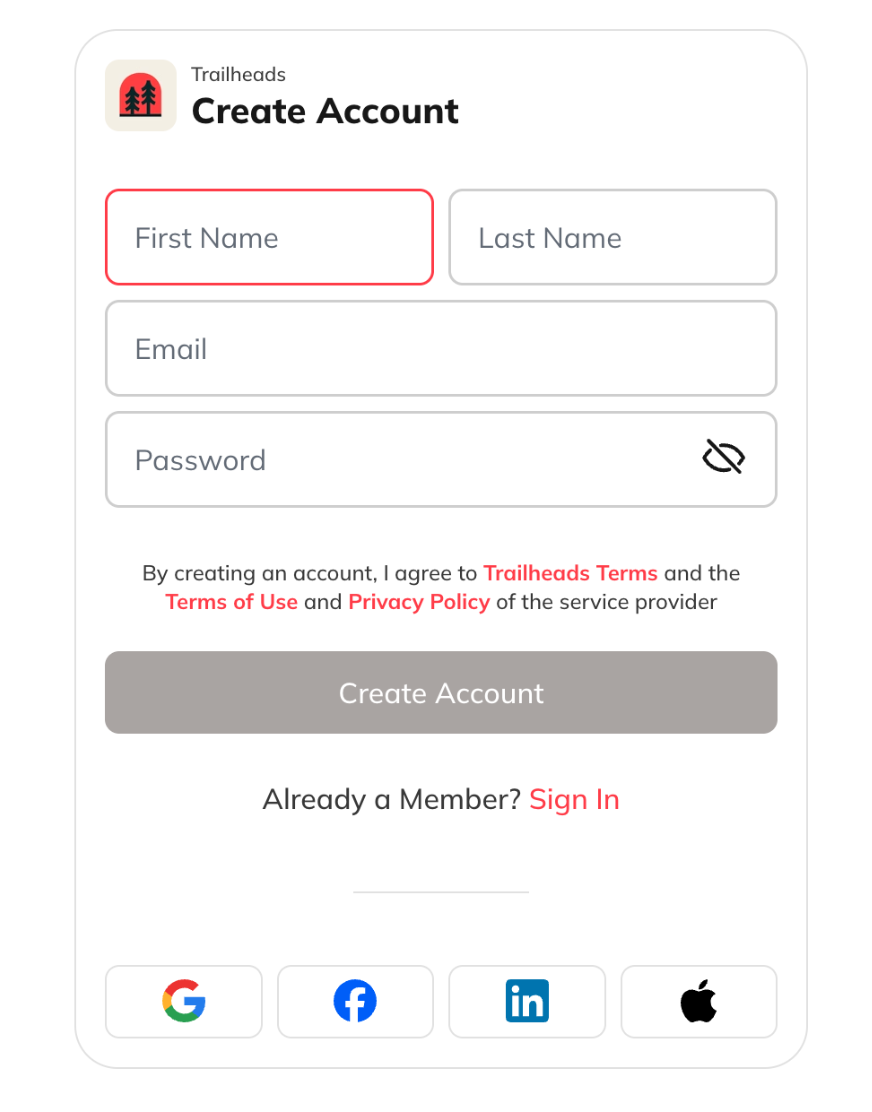
During Checkout (Networks Using Plans)
On the payment confirmation page, new members will see links to:- Privacy Policy
- Terms of Use
- Your Custom Terms
Members in GDPR Countries
Members in GDPR-compliant countries see three checkboxes:- Terms Agreement (required):“By creating an account, I agree to [Your Network’s] Terms and Mighty Networks’ Terms of Use and Privacy Policy.”
- Activity Updates (optional): Opt in to receive email updates about activity in your Mighty Network.
- Marketing Emails (optional): Opt in to your external mailing list for newsletters or offers.
Additional Notes
- Mighty Networks does not send marketing emails to your members.
- Even if someone opts out of marketing emails, their email address will still appear in your downloadable member list, along with their preference.
- Members who joined before you added Custom Terms won’t be automatically prompted to accept the new terms.