> ## Documentation Index
> Fetch the complete documentation index at: https://docs.mightynetworks.com/llms.txt
> Use this file to discover all available pages before exploring further.
# Mighty Discovery and the Network Switcher
People come to Mighty looking for their people: others who share their interests, understand their goals, or are on a similar journey.
Soon, Mighty Discovery and the Network Switcher will create a more connected path from finding the right Network to becoming part of it.
**Mighty Discovery** will open another front door to your Network, helping people who are already exploring Mighty discover what you’ve built.
**The Network Switcher** will keep your Network—and the relationships, progress, and experiences inside it—within easy reach after members join.
Together, they’ll make it easier for the right people to find one another and keep coming back.
## **What is Mighty Discovery?**
Mighty Discovery will be a new place for people to explore Networks across Mighty and find one built around what matters to them.
People will be able to:
* Browse Networks selected around different interests and experiences.
* Receive relevant recommendations.
* Explore Networks by category.
* Search for a Network by name or topic.
* Start a Network of their own if they don’t find what they need.
This gives your Network another opportunity to reach people beyond the audience and marketing channels you’ve already built.
Someone looking to grow their career, deepen a practice, make progress toward a goal, or meet people who understand their experience could discover that your Network is exactly the place they’ve been looking for.
Mighty Discovery will be available on desktop and mobile web and in Mighty’s iOS and Android apps.
## **How Can I Get My Network Ready?**
Your Network Listing will be your first impression for someone discovering you on Mighty.
Use it to tell the story of your Network: who it brings together, what members can experience, and why someone will want to become part of it.
To get ready:
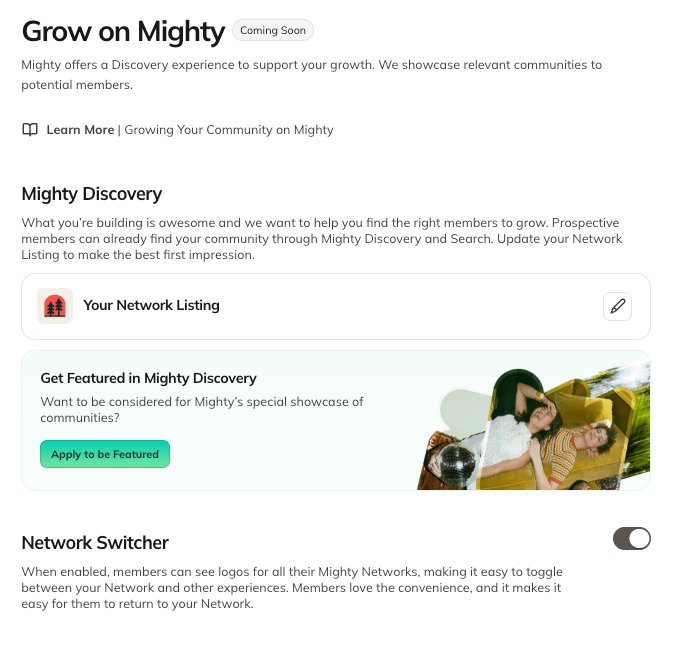
1. Complete your Network Listing in **Admin > Marketing > Grow on Mighty**.
2. Apply to be featured in Mighty Discovery
 ## **How Can I Apply to Be Featured?**
To apply:
1. Go to **Admin > Marketing > Grow on Mighty**.
2. Complete your Network Listing.
3. Review your eligibility.
4. Submit your application.
Once approved, your Network will be eligible to appear in Mighty Discovery wherever it meets the criteria for that experience. It may also be selected by the Mighty team for a curated section.
Approval will make your Network eligible for placement but will not guarantee that it is always featured.
To qualify, your Network will need to:
* Be on a paid Mighty Plan.
* Be Discoverable. Under [Admin > Privacy](https://docs.mightynetworks.com/for-hosts/setting-up-your-network/how-do-i-set-the-privacy-settings-for-my-network#how-do-i-set-the-privacy-settings-for-my-network), make sure you have selected "Anyone" under Who Can Find Your Network.
* Your application will be reviewed and approved by the Mighty team.
## **How Can I Apply to Be Featured?**
To apply:
1. Go to **Admin > Marketing > Grow on Mighty**.
2. Complete your Network Listing.
3. Review your eligibility.
4. Submit your application.
Once approved, your Network will be eligible to appear in Mighty Discovery wherever it meets the criteria for that experience. It may also be selected by the Mighty team for a curated section.
Approval will make your Network eligible for placement but will not guarantee that it is always featured.
To qualify, your Network will need to:
* Be on a paid Mighty Plan.
* Be Discoverable. Under [Admin > Privacy](https://docs.mightynetworks.com/for-hosts/setting-up-your-network/how-do-i-set-the-privacy-settings-for-my-network#how-do-i-set-the-privacy-settings-for-my-network), make sure you have selected "Anyone" under Who Can Find Your Network.
* Your application will be reviewed and approved by the Mighty team.
.png?fit=max&auto=format&n=EfGL2odRK74p9k-y&q=85&s=f178a9974a17f27705372947accd7f4d) ## **What is a Network Detail Page?**
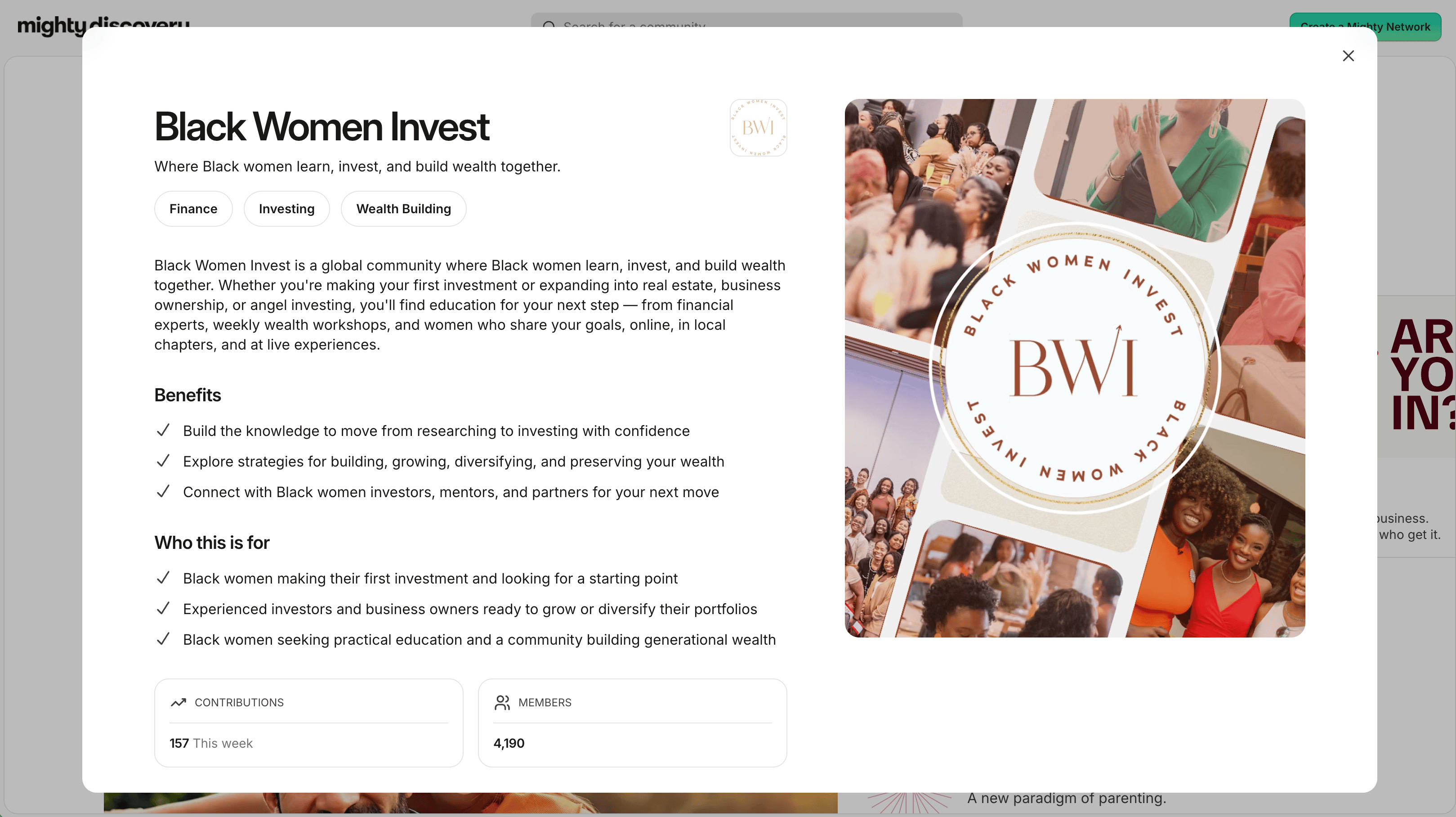
When someone selects a Network from Mighty Discovery or Network Search, they’ll be able to visit its Network Detail Page before deciding to join.
The page will help people understand:
* Who your Network is for.
* What they can experience there.
* Who is bringing everyone together.
* How they can take the next step.
The information will come from your Network Listing.
Your Network Listing will combine information from your Basics and Imagery.
You’ll also be able to customize the call to action on your Network Detail Page to send people to a Plan, Landing Page, or external page.
## **What is a Network Detail Page?**
When someone selects a Network from Mighty Discovery or Network Search, they’ll be able to visit its Network Detail Page before deciding to join.
The page will help people understand:
* Who your Network is for.
* What they can experience there.
* Who is bringing everyone together.
* How they can take the next step.
The information will come from your Network Listing.
Your Network Listing will combine information from your Basics and Imagery.
You’ll also be able to customize the call to action on your Network Detail Page to send people to a Plan, Landing Page, or external page.
 ## **What is the Network Switcher?**
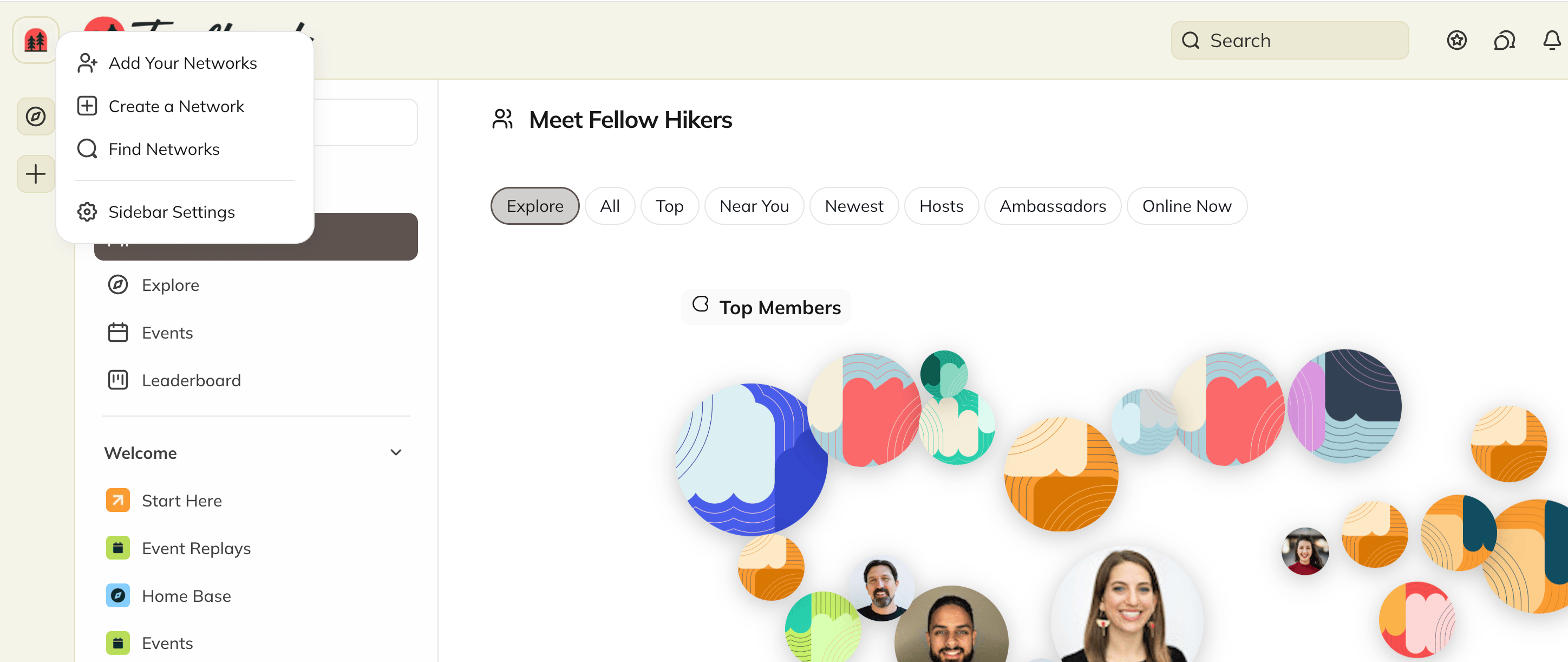
The Network Switcher will give members one place to see the Mighty Networks they already belong to and easily move between them.
No signing out. No searching for an old link.
Their Networks—and the people, progress, and experiences inside them—will stay within easy reach, which means more time engaging.
Members will see their Mighty Networks together in one place—even if they joined using different email addresses. They’ll also be able to add another account using a quick verification code and choose which Networks appear in their Switcher.
## **What is the Network Switcher?**
The Network Switcher will give members one place to see the Mighty Networks they already belong to and easily move between them.
No signing out. No searching for an old link.
Their Networks—and the people, progress, and experiences inside them—will stay within easy reach, which means more time engaging.
Members will see their Mighty Networks together in one place—even if they joined using different email addresses. They’ll also be able to add another account using a quick verification code and choose which Networks appear in their Switcher.
 Profiles, activity, and history will remain separate in each Network, so what happens inside your Network will stay part of their experience there.
## **Where Will the Network Switcher Be Available?**
The Network Switcher will be available on desktop web, mobile web, and within Mighty's iOS and Android apps, giving members a simpler way to return, participate, and keep people and the experiences they value within easy reach. It will not appear within Mighty Pro branded apps, and can optionally be disabled on desktop and mobile web for Mighty Pro plans.
Your Network will need to have the Network Switcher enabled to qualify for featured placement in Mighty Discovery.
Together, Mighty Discovery and the Network Switcher will create a more connected experience on Mighty—helping the right people discover your Network and making it easier for members to return to the relationships, progress, and experiences they value. We’re excited for you to experience what’s coming.
Stay tuned for more details on when these features will be live for your Network!
Questions? [Reach out to our team](https://docs.mightynetworks.com/for-hosts/setting-up-your-network/how-do-i-get-help#how-do-i-get-help) via the “Need Help” button in your Network.
This documentation is built and hosted on [Mintlify](https://mintlify.com), a developer documentation platform.
Profiles, activity, and history will remain separate in each Network, so what happens inside your Network will stay part of their experience there.
## **Where Will the Network Switcher Be Available?**
The Network Switcher will be available on desktop web, mobile web, and within Mighty's iOS and Android apps, giving members a simpler way to return, participate, and keep people and the experiences they value within easy reach. It will not appear within Mighty Pro branded apps, and can optionally be disabled on desktop and mobile web for Mighty Pro plans.
Your Network will need to have the Network Switcher enabled to qualify for featured placement in Mighty Discovery.
Together, Mighty Discovery and the Network Switcher will create a more connected experience on Mighty—helping the right people discover your Network and making it easier for members to return to the relationships, progress, and experiences they value. We’re excited for you to experience what’s coming.
Stay tuned for more details on when these features will be live for your Network!
Questions? [Reach out to our team](https://docs.mightynetworks.com/for-hosts/setting-up-your-network/how-do-i-get-help#how-do-i-get-help) via the “Need Help” button in your Network.
This documentation is built and hosted on [Mintlify](https://mintlify.com), a developer documentation platform.