> ## Documentation Index
> Fetch the complete documentation index at: https://docs.mightynetworks.com/llms.txt
> Use this file to discover all available pages before exploring further.
# What Are Promoted Spaces?
**Promoted Spaces** help Hosts and moderators highlight important or interesting Spaces they want members to discover.
Promoted Spaces appear in your Network’s left navigation panel with a **star icon** that matches the Space color (which you can customize in **[Space Branding](https://docs.mightynetworks.com/for-hosts/setting-up-your-network/how-do-i-set-up-my-space-branding)**).
## How to Promote a Space
[Space Hosts and moderators](https://docs.mightynetworks.com/for-hosts/admin-and-moderation/what-permissions-do-space-hosts-and-space-moderators-have) can promote any Space that’s visible to **[Anyone in the Network](https://docs.mightynetworks.com/for-hosts/setting-up-your-network/how-do-i-set-the-privacy-settings-for-my-network)**.
**To promote a Space:**
1. Open the **three-dot menu** next to the Space name in the left navigation, **or**
2. From the **list of Spaces** within a Collection, select **Promote in Navigation Panel.**
Once promoted, the Space will appear with a star icon in your Network navigation for members who haven’t joined it yet.
[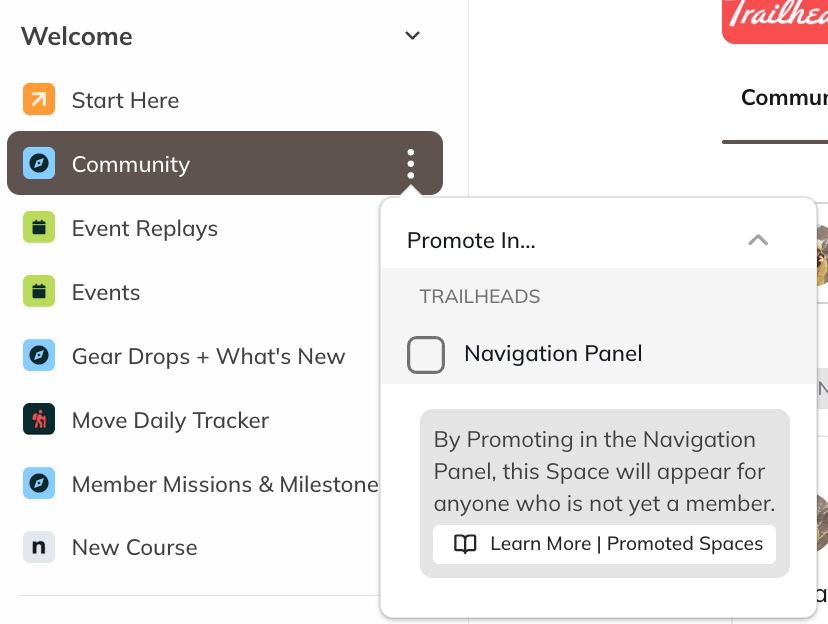 ](/images/for-hosts/setting-up-your-network/what-are-promoted-spaces/Screenshot-2025-11-06-at-1_43_37-PM.png)
## How Members See Promoted Spaces
[
](/images/for-hosts/setting-up-your-network/what-are-promoted-spaces/Screenshot-2025-11-06-at-1_43_37-PM.png)
## How Members See Promoted Spaces
[ ](/images/for-hosts/setting-up-your-network/what-are-promoted-spaces/Screenshot-2025-11-06-at-1_45_43-PM.png)
When a Space is promoted:
* Members who **aren’t yet part of the Space** will see a **star icon** next to it in the left navigation.
* After they **join the Space**, the star icon disappears for that member.
This makes Promoted Spaces a simple way to surface new or featured Spaces without cluttering the navigation.
## How Hosts and Moderators See Promoted Spaces
Hosts and moderators will only see the **star icon** for Spaces they are *not* members of.
To see all currently promoted Spaces in your Mighty Network, go to:**Admin > Navigation and Spaces > Space List.**
](/images/for-hosts/setting-up-your-network/what-are-promoted-spaces/Screenshot-2025-11-06-at-1_45_43-PM.png)
When a Space is promoted:
* Members who **aren’t yet part of the Space** will see a **star icon** next to it in the left navigation.
* After they **join the Space**, the star icon disappears for that member.
This makes Promoted Spaces a simple way to surface new or featured Spaces without cluttering the navigation.
## How Hosts and Moderators See Promoted Spaces
Hosts and moderators will only see the **star icon** for Spaces they are *not* members of.
To see all currently promoted Spaces in your Mighty Network, go to:**Admin > Navigation and Spaces > Space List.**