> ## Documentation Index
> Fetch the complete documentation index at: https://docs.mightynetworks.com/llms.txt
> Use this file to discover all available pages before exploring further.
# Can I Add Marketing Pixels to My Mighty Network?
Yes! Once you’ve upgraded to the [**Launch Plan or higher**](https://docs.mightynetworks.com/for-hosts/meet-mighty/whats-included-in-the-mighty-networks-courses-plan), you can add your own **marketing pixels**—including a Facebook (Meta) Pixel or TikTok Pixel—to track conversions from your ads and optimize your campaigns.
## Events Tracked by Meta and TikTok Pixels
Mighty Networks currently supports several standard tracking events:
* **CompleteRegistration:** Triggers when a new member joins your Mighty Network.
* **AddPaymentInfo:** Fires whenever a user adds payment information.
* **InitiateCheckout:** Fires when a user begins the checkout process.
* **CompletePurchase (TikTok)** / **Purchase (Facebook):** Fires when a purchase is completed.
 ## How to Add Your Marketing Pixels
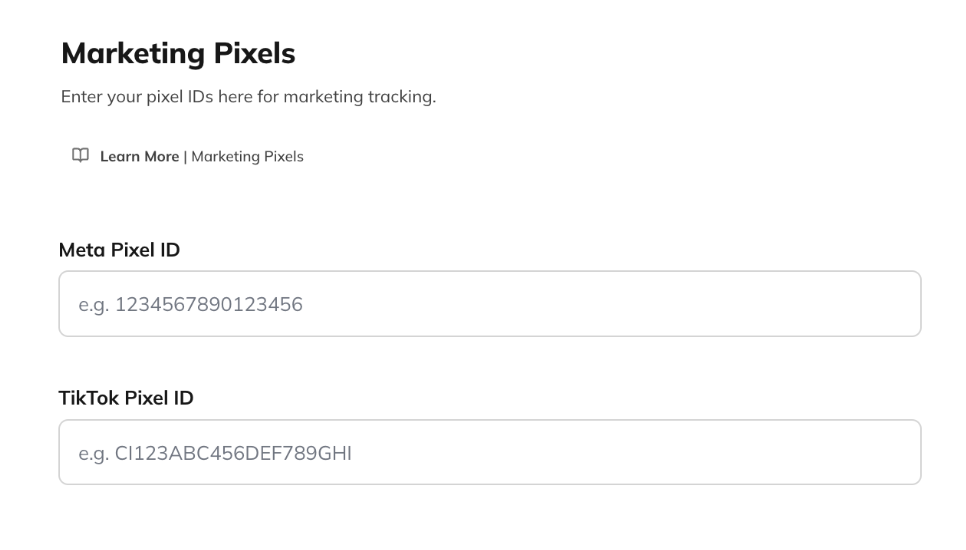
1. Go to **Admin > Integrations > Marketing Pixels.**
2. Enter your **Meta Pixel ID** or **TikTok Pixel ID.**
3. Read and accept the [**Terms of Use**](https://www.mightynetworks.com/terms-of-use?utm_source=intercom\&utm_medium=getting_started\&utm_campaign=our_policies\&utm_content=) to activate tracking.
Once added, your pixel will immediately begin tracking eligible events.
## How to Add Your Marketing Pixels
1. Go to **Admin > Integrations > Marketing Pixels.**
2. Enter your **Meta Pixel ID** or **TikTok Pixel ID.**
3. Read and accept the [**Terms of Use**](https://www.mightynetworks.com/terms-of-use?utm_source=intercom\&utm_medium=getting_started\&utm_campaign=our_policies\&utm_content=) to activate tracking.
Once added, your pixel will immediately begin tracking eligible events.
 ## Cookie Banner and Privacy Settings
When you enable Marketing Pixels, your Cookie Privacy Banner will automatically display a **“Do Not Sell”** button, giving members control over whether their information is tracked.
If a member selects **“Do Not Sell,”** their activity will not be tracked.
## Cookie Banner and Privacy Settings
When you enable Marketing Pixels, your Cookie Privacy Banner will automatically display a **“Do Not Sell”** button, giving members control over whether their information is tracked.
If a member selects **“Do Not Sell,”** their activity will not be tracked.
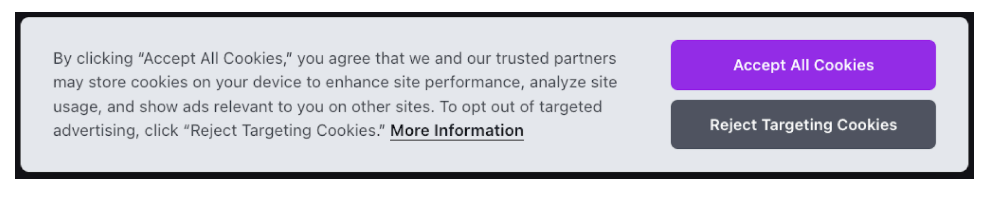
 If you don’t use Marketing Pixels, members instead see a **“Reject Targeting Cookies”** option on the banner.
 If you add pixels later, members will be **re-prompted** with the updated cookie banner.
This ensures transparency and compliance with global privacy standards.
### About the “CompleteRegistration” Event
When a new member completes registration **and accepts all cookies**, Mighty Networks temporarily activates your pixel to fire the **CompleteRegistration** event.
The pixel is **not maintained during regular site usage**, ensuring strong privacy protection and optimal site performance.
If you add pixels later, members will be **re-prompted** with the updated cookie banner.
This ensures transparency and compliance with global privacy standards.
### About the “CompleteRegistration” Event
When a new member completes registration **and accepts all cookies**, Mighty Networks temporarily activates your pixel to fire the **CompleteRegistration** event.
The pixel is **not maintained during regular site usage**, ensuring strong privacy protection and optimal site performance.