> ## Documentation Index
> Fetch the complete documentation index at: https://docs.mightynetworks.com/llms.txt
> Use this file to discover all available pages before exploring further.
# How Do I Move Content Between Spaces?
You can move content between Spaces in your Mighty Network—and keep interactions and RSVPs when supported.
## Move Articles, Posts, and Events
If the Article or Post is pinned in the **[Welcome or Featured sections](https://docs.mightynetworks.com/for-hosts/content-and-messaging/how-do-i-create-and-manage-featured-and-welcome-sections)**, unpin it before moving.
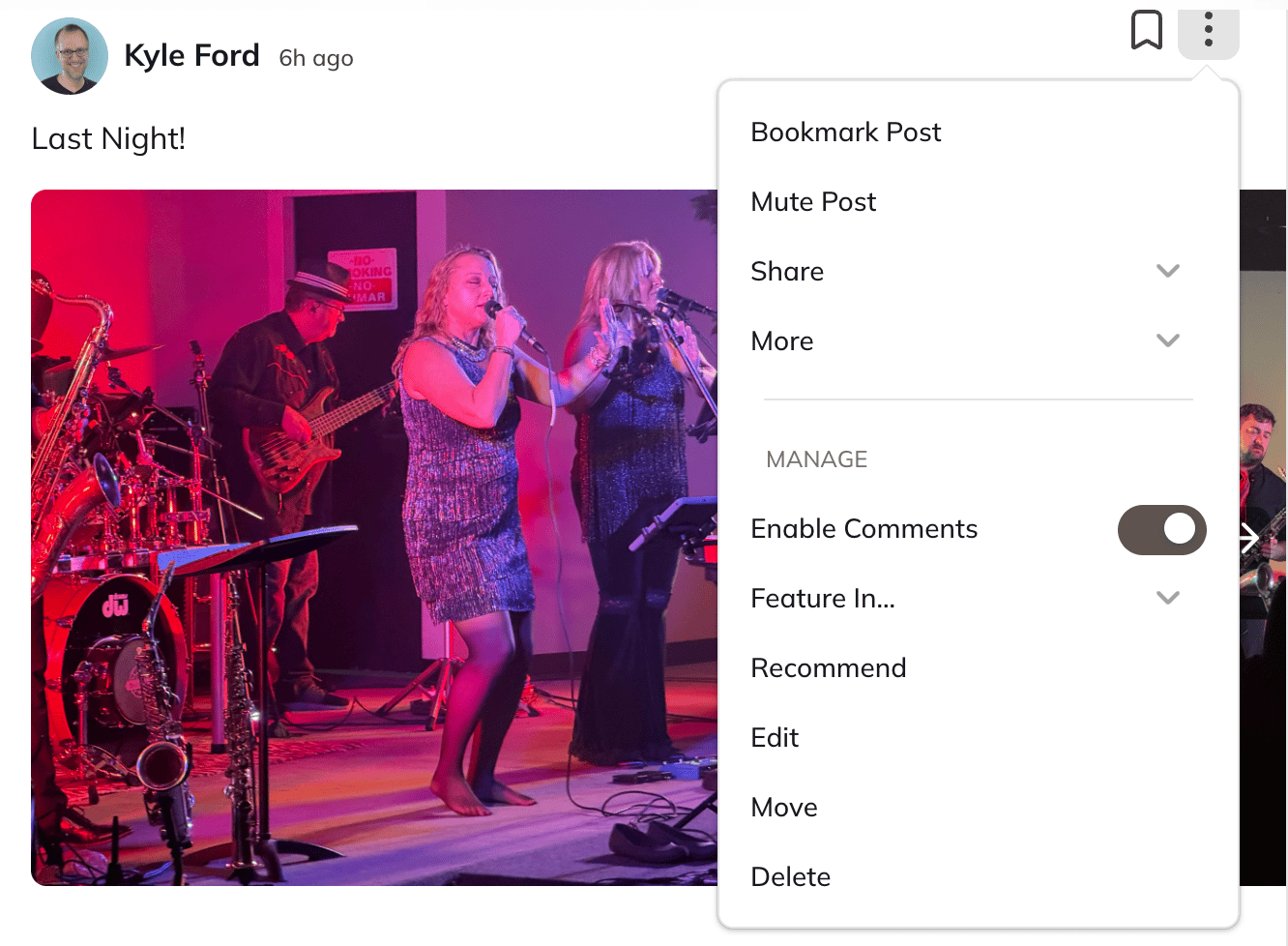
1. Open the **three-dot menu** next to the post.
2. Select **Move**.
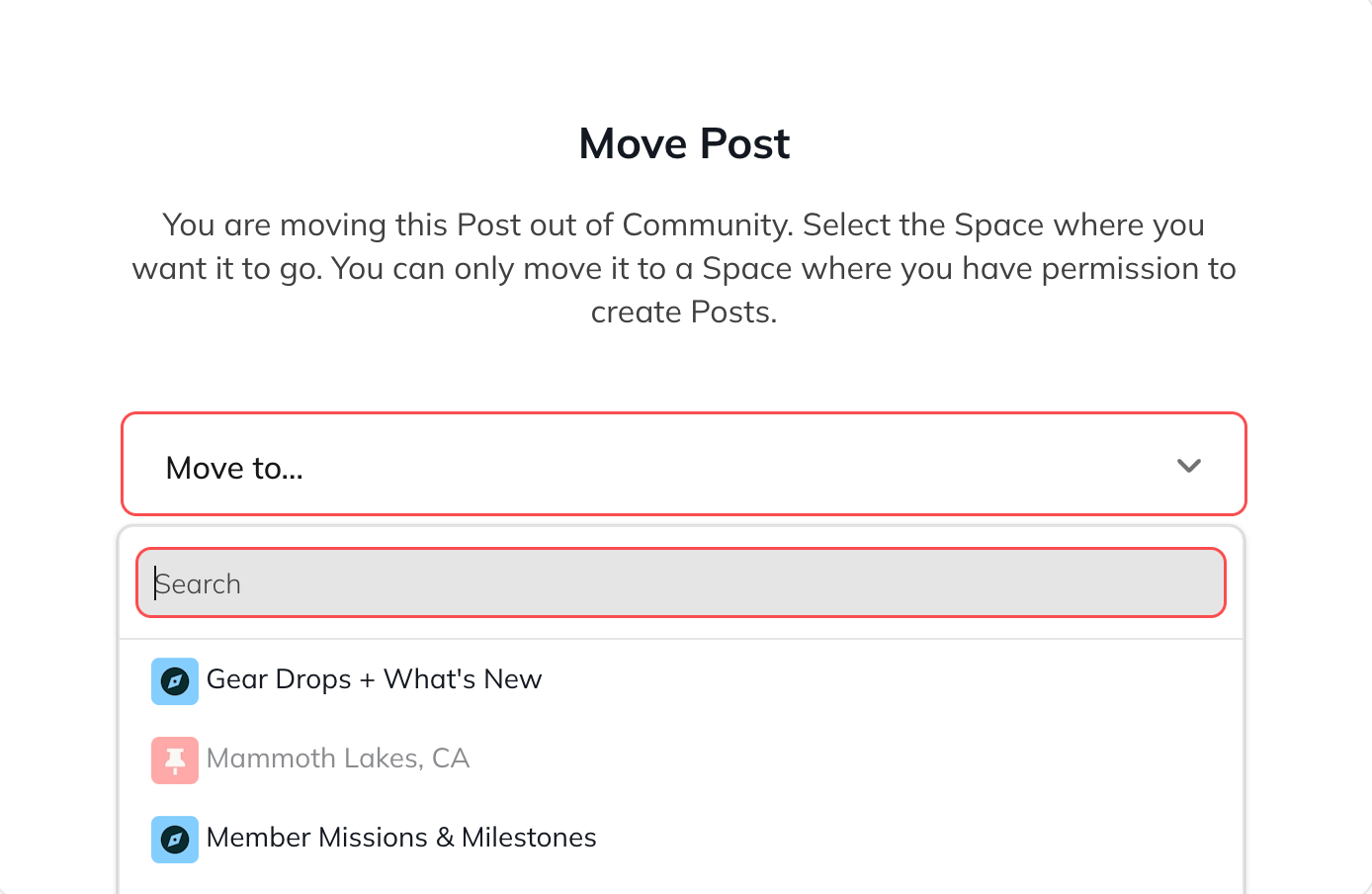
3. Choose the Space you want to move the content to.
4. If a Space is greyed out, that means the content type isn’t enabled in that Space.To enable it, go to the Space > **gear icon > [Space Features](https://docs.mightynetworks.com/for-hosts/setting-up-your-network/how-do-i-add-features-to-a-space) > Feed > Manage**, then toggle on the content type (Posts, Articles, Events, etc.).
[ ](/images/for-hosts/content-and-messaging/how-do-i-move-content-between-spaces/Screenshot-2025-11-21-at-1_55_26-PM.png)
[
](/images/for-hosts/content-and-messaging/how-do-i-move-content-between-spaces/Screenshot-2025-11-21-at-1_55_26-PM.png)
[ ](/images/for-hosts/content-and-messaging/how-do-i-move-content-between-spaces/Screenshot-2025-11-21-at-1_56_09-PM.png)
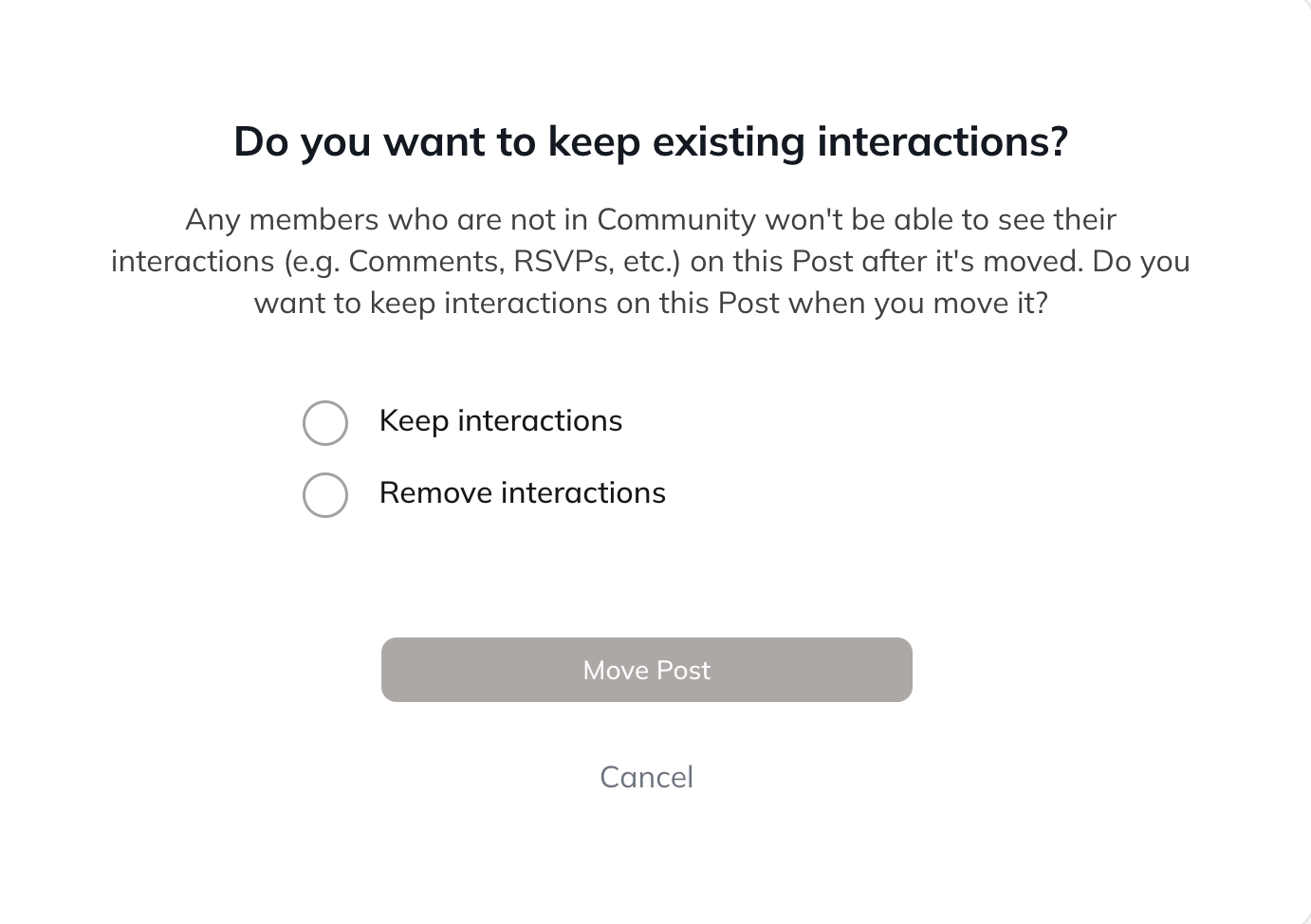
Next, choose whether you want to **keep or remove interactions**.
[
](/images/for-hosts/content-and-messaging/how-do-i-move-content-between-spaces/Screenshot-2025-11-21-at-1_56_09-PM.png)
Next, choose whether you want to **keep or remove interactions**.
[ ](/images/for-hosts/content-and-messaging/how-do-i-move-content-between-spaces/Screenshot-2025-11-21-at-1_57_13-PM.png)
### About Moving Events
* Only the **event creator** can move an Event.
* When moving an Event, the creator will see the option to **keep RSVPs**.
* You can duplicate an Event and change the Space if needed.
### Scheduled posts
Scheduled posts cannot be moved.To move a scheduled post:
1. Copy the content into a new Post, Article, or Question.
2. Reschedule the new post.
3. Delete the original.
## Move Lessons, Sections, and Quizzes
You can move **[Lessons](https://docs.mightynetworks.com/for-hosts/courses/how-do-i-organize-my-course-with-overviews-sections-and-lessons)**, [Sections,](https://docs.mightynetworks.com/for-hosts/courses/how-do-i-organize-my-course-with-overviews-sections-and-lessons) and **[Quizzes](https://docs.mightynetworks.com/for-hosts/courses/how-do-i-add-a-quiz-to-my-course)** to another Space.
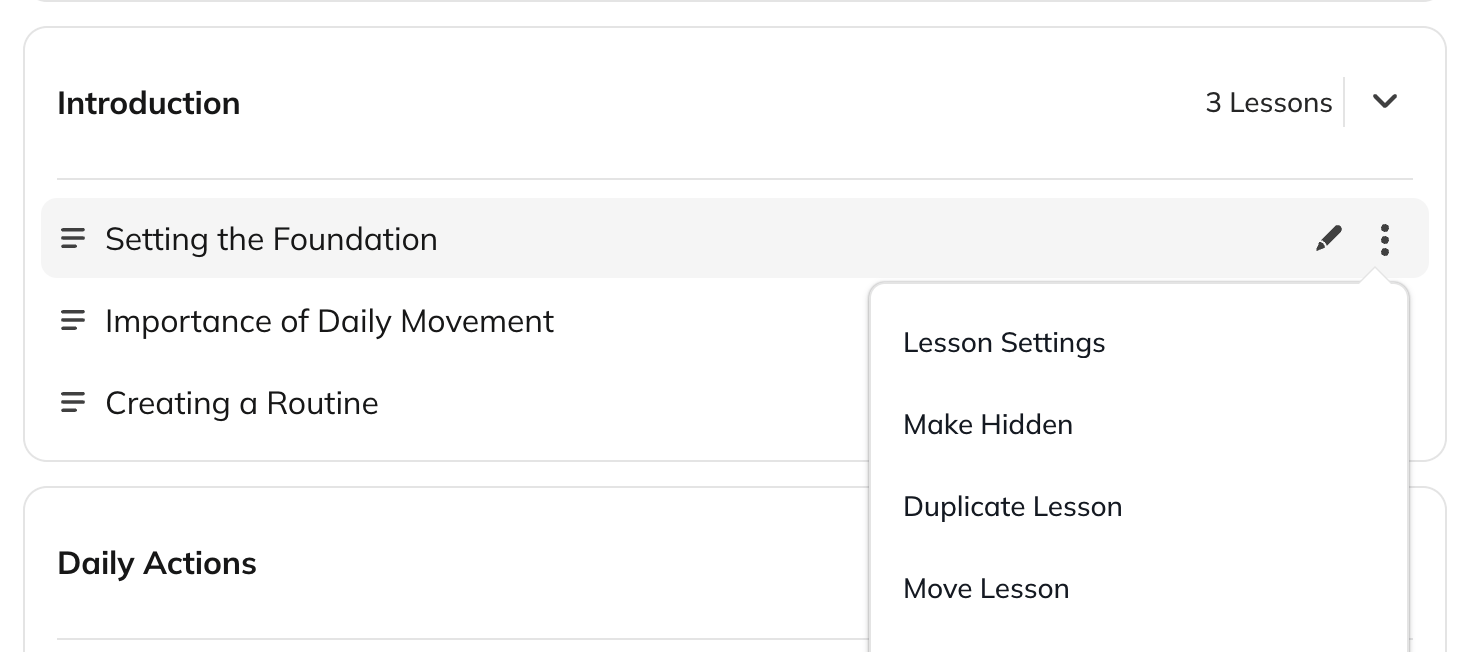
1. Open the **three-dot menu** for the item.
2. Select **Move Lesson**, **Move Section**, or **Move Quiz**.
3. Choose the Space you want to move it to.
[
](/images/for-hosts/content-and-messaging/how-do-i-move-content-between-spaces/Screenshot-2025-11-21-at-1_57_13-PM.png)
### About Moving Events
* Only the **event creator** can move an Event.
* When moving an Event, the creator will see the option to **keep RSVPs**.
* You can duplicate an Event and change the Space if needed.
### Scheduled posts
Scheduled posts cannot be moved.To move a scheduled post:
1. Copy the content into a new Post, Article, or Question.
2. Reschedule the new post.
3. Delete the original.
## Move Lessons, Sections, and Quizzes
You can move **[Lessons](https://docs.mightynetworks.com/for-hosts/courses/how-do-i-organize-my-course-with-overviews-sections-and-lessons)**, [Sections,](https://docs.mightynetworks.com/for-hosts/courses/how-do-i-organize-my-course-with-overviews-sections-and-lessons) and **[Quizzes](https://docs.mightynetworks.com/for-hosts/courses/how-do-i-add-a-quiz-to-my-course)** to another Space.
1. Open the **three-dot menu** for the item.
2. Select **Move Lesson**, **Move Section**, or **Move Quiz**.
3. Choose the Space you want to move it to.
[ ](/images/for-hosts/content-and-messaging/how-do-i-move-content-between-spaces/Screenshot-2025-11-21-at-2_00_36-PM.png)
### What transfers when you move course content
* Content and settings
* Comments
* Member progress (see details below)
* Quiz responses
* Automations
* Any links to the content (Articles, Pages, Landing Pages, or emails) will continue to work
### About Moving Course Content
* The destination Space must have the **[Course](https://docs.mightynetworks.com/for-hosts/setting-up-your-network/how-do-i-add-features-to-a-space)** feature enabled, and you must have permission to create Lessons there.
* If you move a Section, **all Lessons in the Section** move with it.
* You **cannot** move the Course Overview.
* Moved content appears at the bottom of the list. You can reorder it after moving.Content cannot be moved in bulk at this time.
### Member Progress
* If a member is already in the destination Space, their progress moves with the content.
* If they are not in the Space, their progress will appear once they join.
## Move Multiple Posts
You can move multiple posts from one Space to another. This feature is available to both **Space Hosts** and **Network Hosts**.
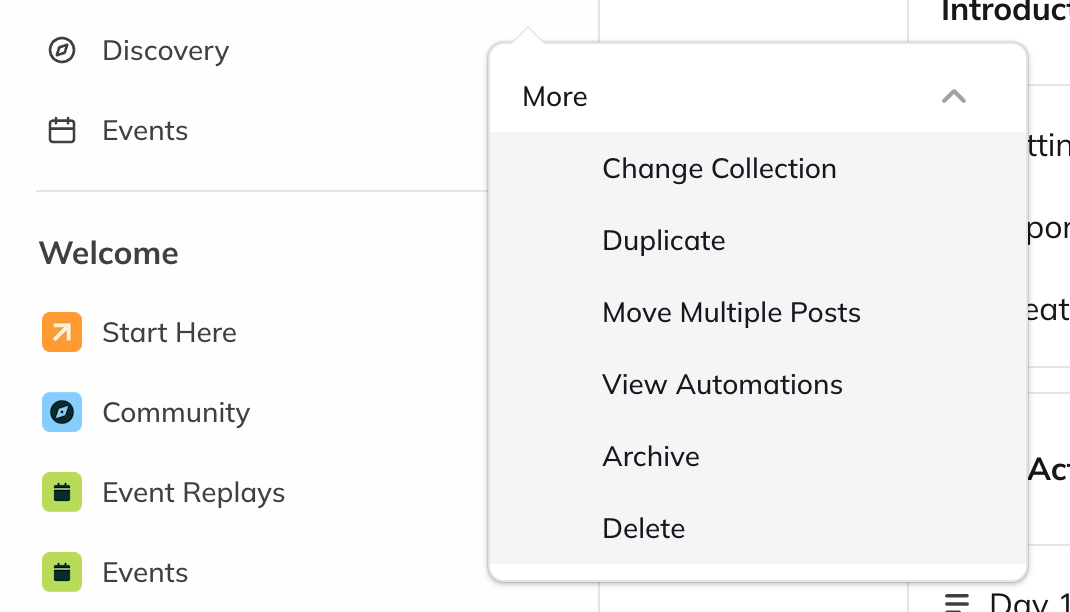
1. Open the **three-dot menu** next to the Space in the left navigation.
2. Select **More > Move Multiple Posts**.
* If you are a **Network Host** but not a Space Host, you will be prompted to become a Space Host first before proceeding with the bulk move.
3. Choose whether you want to move **All Posts** or posts with a **specific hashtag**.
* This is helpful for reorganizing content across Spaces or updating your hashtag structure.
4. Select the destination Space.
* You can only move posts to a Space where you are a **Host**.
5. Click **Move Posts**.
[
](/images/for-hosts/content-and-messaging/how-do-i-move-content-between-spaces/Screenshot-2025-11-21-at-2_00_36-PM.png)
### What transfers when you move course content
* Content and settings
* Comments
* Member progress (see details below)
* Quiz responses
* Automations
* Any links to the content (Articles, Pages, Landing Pages, or emails) will continue to work
### About Moving Course Content
* The destination Space must have the **[Course](https://docs.mightynetworks.com/for-hosts/setting-up-your-network/how-do-i-add-features-to-a-space)** feature enabled, and you must have permission to create Lessons there.
* If you move a Section, **all Lessons in the Section** move with it.
* You **cannot** move the Course Overview.
* Moved content appears at the bottom of the list. You can reorder it after moving.Content cannot be moved in bulk at this time.
### Member Progress
* If a member is already in the destination Space, their progress moves with the content.
* If they are not in the Space, their progress will appear once they join.
## Move Multiple Posts
You can move multiple posts from one Space to another. This feature is available to both **Space Hosts** and **Network Hosts**.
1. Open the **three-dot menu** next to the Space in the left navigation.
2. Select **More > Move Multiple Posts**.
* If you are a **Network Host** but not a Space Host, you will be prompted to become a Space Host first before proceeding with the bulk move.
3. Choose whether you want to move **All Posts** or posts with a **specific hashtag**.
* This is helpful for reorganizing content across Spaces or updating your hashtag structure.
4. Select the destination Space.
* You can only move posts to a Space where you are a **Host**.
5. Click **Move Posts**.
[ ](/images/for-hosts/content-and-messaging/how-do-i-move-content-between-spaces/Screenshot-2025-11-21-at-2_03_05-PM.png)
### About Moving Multiple Posts
* Reactions, comments, and interactions will move with the posts.
* If you don’t see certain posts, check whether their **[content types](https://docs.mightynetworks.com/for-hosts/setting-up-your-network/how-do-i-add-features-to-a-space)** are enabled in the destination Space.
](/images/for-hosts/content-and-messaging/how-do-i-move-content-between-spaces/Screenshot-2025-11-21-at-2_03_05-PM.png)
### About Moving Multiple Posts
* Reactions, comments, and interactions will move with the posts.
* If you don’t see certain posts, check whether their **[content types](https://docs.mightynetworks.com/for-hosts/setting-up-your-network/how-do-i-add-features-to-a-space)** are enabled in the destination Space.