> ## Documentation Index
> Fetch the complete documentation index at: https://docs.mightynetworks.com/llms.txt
> Use this file to discover all available pages before exploring further.
# Can I View My Mighty Network in Dark Mode?
[ ](/images/for-hosts/content-and-messaging/can-i-view-my-mighty-network-in-dark-mode/Screen_Shot_2021-10-21_at_4_38_35_PM.png)
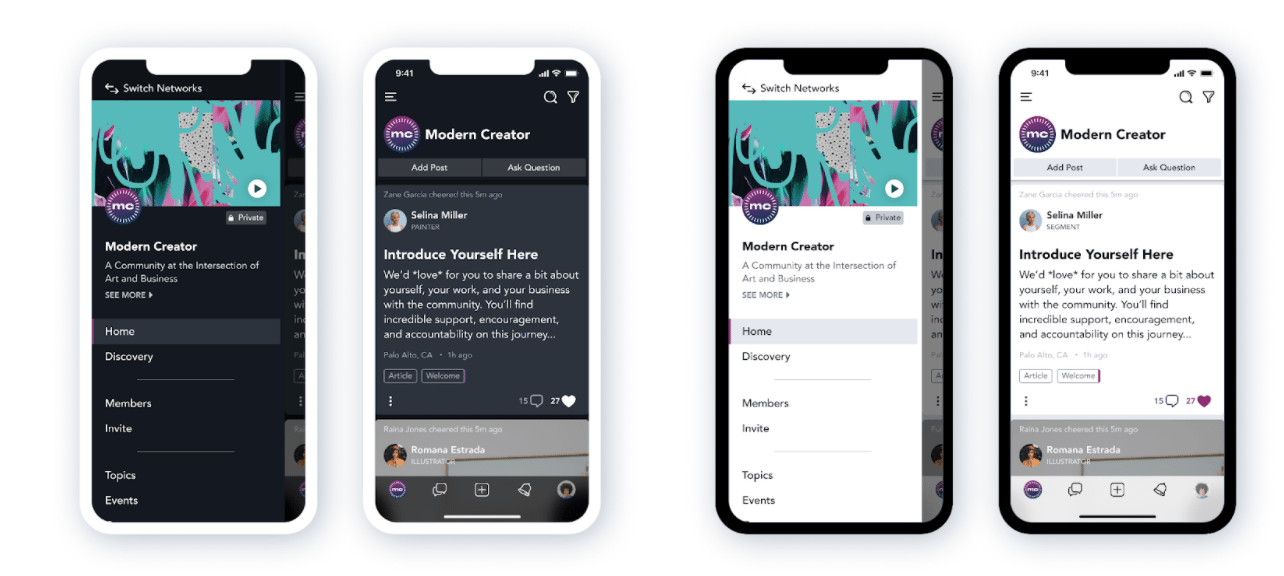
Members can view your Mighty Network in **Light Mode** or **Dark Mode** on both mobile and web.
## Mobile App (iOS and Android)
Members using the iOS or Android app will see your Mighty Network in Light or Dark Mode based on their **device settings**.
## iOS
**Settings > Display & Brightness > Appearance**
## Android
**Settings > Display > Dark theme**
Hosts cannot disable Dark Mode or set a default mode for the entire Network. However, members can adjust their device settings to prevent automatic switching.
## Web
Dark Mode is also available on the web.
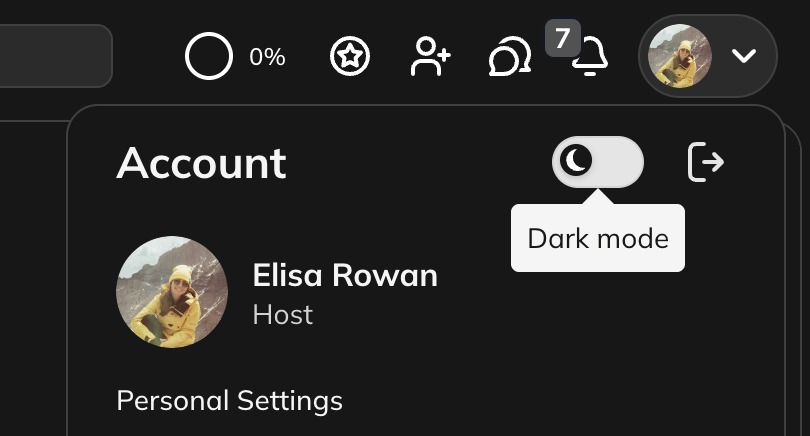
Members can switch between Light and Dark Mode by:
* Clicking their **profile icon** and toggling the Dark Mode icon, or
* Going to **Personal Settings > Appearance and Sounds**.
[
](/images/for-hosts/content-and-messaging/can-i-view-my-mighty-network-in-dark-mode/Screen_Shot_2021-10-21_at_4_38_35_PM.png)
Members can view your Mighty Network in **Light Mode** or **Dark Mode** on both mobile and web.
## Mobile App (iOS and Android)
Members using the iOS or Android app will see your Mighty Network in Light or Dark Mode based on their **device settings**.
## iOS
**Settings > Display & Brightness > Appearance**
## Android
**Settings > Display > Dark theme**
Hosts cannot disable Dark Mode or set a default mode for the entire Network. However, members can adjust their device settings to prevent automatic switching.
## Web
Dark Mode is also available on the web.
Members can switch between Light and Dark Mode by:
* Clicking their **profile icon** and toggling the Dark Mode icon, or
* Going to **Personal Settings > Appearance and Sounds**.
[ ](/images/for-hosts/content-and-messaging/can-i-view-my-mighty-network-in-dark-mode/Screenshot-2025-11-21-at-3_51_03-PM.png)
## Light and Dark Mode Imagery
You can upload **different images** for Light Mode and Dark Mode in your Network branding settings to ensure your visuals look great in both themes.
To learn more, **[check out this article](https://docs.mightynetworks.com/for-hosts/setting-up-your-network/how-do-i-set-up-my-network-branding)**.
](/images/for-hosts/content-and-messaging/can-i-view-my-mighty-network-in-dark-mode/Screenshot-2025-11-21-at-3_51_03-PM.png)
## Light and Dark Mode Imagery
You can upload **different images** for Light Mode and Dark Mode in your Network branding settings to ensure your visuals look great in both themes.
To learn more, **[check out this article](https://docs.mightynetworks.com/for-hosts/setting-up-your-network/how-do-i-set-up-my-network-branding)**.