> ## Documentation Index
> Fetch the complete documentation index at: https://docs.mightynetworks.com/llms.txt
> Use this file to discover all available pages before exploring further.

# How Can I Set Up Automations in My Mighty Network?

Available on the [**Launch Plan**](https://docs.mightynetworks.com/for-hosts/meet-mighty/whats-included-in-the-mighty-networks-courses-plan) and above, Automations let you automatically perform actions in your Mighty Network based on specific triggers.

You can use Automations to:

* Unlock rewards like secret courses, challenges, or 1:1 calls
* Open or close Event RSVPs
* Invite or remove people from Spaces or Plans
* Reward active members based on their engagement
* Celebrate members who attend Events
* …and much more!

## Triggers

The triggers you have available depend on the Mighty Plan you're on.

## **Here is a full list of Triggers:**

| Trigger                                        | What it Does                                                                                                                                                                                                                                                                        | Configuration                                                                                                                                                                                                                                                                                                                                                                                                        |   |
| :--------------------------------------------- | :---------------------------------------------------------------------------------------------------------------------------------------------------------------------------------------------------------------------------------------------------------------------------------- | :------------------------------------------------------------------------------------------------------------------------------------------------------------------------------------------------------------------------------------------------------------------------------------------------------------------------------------------------------------------------------------------------------------------- | - |
| **Completed Lesson**                           | Fires when a member completes a [<u>Lesson</u>](https://faq.mightynetworks.com/en/articles/3825263-what-are-sections-and-lessons-in-a-course) with completion turned on.                                                                                                            | Select the Space and specific Lesson.                                                                                                                                                                                                                                                                                                                                                                                |   |
| **Completed Section**                          | Fires when a member completes all visible Lessons (with completion turned on) in a [<u>Section</u>](https://faq.mightynetworks.com/en/articles/3825263-what-are-sections-and-lessons-in-a-course).                                                                                  | Select the Space and specific Section.                                                                                                                                                                                                                                                                                                                                                                               |   |
| **Completed Quiz**                             | Fires when a member completes a [<u>quiz</u>](https://faq.mightynetworks.com/en/articles/9140714-how-do-i-add-a-quiz-to-my-course), including those requiring a passing score. Does **not** fire if the member fails.                                                               | Select the Space and specific quiz.                                                                                                                                                                                                                                                                                                                                                                                  |   |
| **Failed Quiz**                                | Fires when a member fails a quiz that requires a passing score.                                                                                                                                                                                                                     | —                                                                                                                                                                                                                                                                                                                                                                                                                    |   |
| **Completed Welcome Checklist**                | Fires when a member completes the [<u>Welcome Checklist.</u>](https://faq.mightynetworks.com/en/articles/3825300-how-do-i-set-up-a-welcome-checklist)                                                                                                                               | —                                                                                                                                                                                                                                                                                                                                                                                                                    |   |
| **Responded to Custom Field**                  | Fires when a member submits a response to a [<u>Custom Field</u>](https://faq.mightynetworks.com/en/articles/9578096-how-do-i-add-custom-fields). "Any Response" triggers only once on the first response; "Specific Response" triggers when the response meets defined conditions. | Select a Field; choose **Any Response** or **Specific Response**; set conditions if needed.                                                                                                                                                                                                                                                                                                                          |   |
| **Removed Response to Custom Field**           | Fires when a member removes their response to a [<u>Custom Field</u>](https://faq.mightynetworks.com/en/articles/9578096-how-do-i-add-custom-fields). Can trigger on entire response removal or specific conditions no longer being met.                                            | Select a Field; choose **Entire Response** or **Specific Response**.                                                                                                                                                                                                                                                                                                                                                 |   |
| **Joined Space**                               | Fires when a member joins a Space, including via a plan.                                                                                                                                                                                                                            | Select the Space.                                                                                                                                                                                                                                                                                                                                                                                                    |   |
| **Left Space**                                 | Fires when a member leaves or is removed from a Space.                                                                                                                                                                                                                              | —                                                                                                                                                                                                                                                                                                                                                                                                                    |   |
| **Joined the Network**                         | Fires when a member joins the Network, including via a plan.                                                                                                                                                                                                                        | —                                                                                                                                                                                                                                                                                                                                                                                                                    |   |
| **Left the Network**                           | Fires when a member leaves or is removed from the Network.                                                                                                                                                                                                                          | —                                                                                                                                                                                                                                                                                                                                                                                                                    |   |
| **Enabled Mobile Push Notifications**          | Fires the first time a member enables mobile push notifications.                                                                                                                                                                                                                    | —                                                                                                                                                                                                                                                                                                                                                                                                                    |   |
| **Signed in on Mobile App**                    | Fires the first time a member signs in on iOS or Android.                                                                                                                                                                                                                           | —                                                                                                                                                                                                                                                                                                                                                                                                                    |   |
| **Member Inactive**                            | Fires when a member is inactive for a set number of days (based on Last Active). Sends to full and limited members.                                                                                                                                                                 | Select Entire Network or Space; set days (1–365).                                                                                                                                                                                                                                                                                                                                                                    |   |
| **Purchased (or Accessed) Plan**               | Fires when a member accesses a [<u>plan</u>](https://faq.mightynetworks.com/en/articles/3825215-how-do-i-create-a-plan), including starting a free trial.                                                                                                                           | Select the plan.                                                                                                                                                                                                                                                                                                                                                                                                     |   |
| **Redeemed Promo Code**                        | Fires when a member redeems a [<u>promo code</u>](https://faq.mightynetworks.com/en/articles/3825265-how-do-i-set-up-promo-codes).                                                                                                                                                  | —                                                                                                                                                                                                                                                                                                                                                                                                                    |   |
| **Converted Free Trial of Plan**               | Fires when a trialing member completes payment.                                                                                                                                                                                                                                     | Select the plan.                                                                                                                                                                                                                                                                                                                                                                                                     |   |
| **Canceled Subscription to Plan**              | Fires when a member cancels a subscription (including canceling during a free trial).                                                                                                                                                                                               | Select the plan; choose trialing (any / yes / no).                                                                                                                                                                                                                                                                                                                                                                   |   |
| **Removed from Plan**                          | Fires when access to a plan ends due to cancellation, lapsed payment, or Host removal.                                                                                                                                                                                              | Select the plan.                                                                                                                                                                                                                                                                                                                                                                                                     |   |
| **Host Received Private Message**              | Fires when a specific Host receives a private message.                                                                                                                                                                                                                              | Select any Network Host.                                                                                                                                                                                                                                                                                                                                                                                             |   |
| **Commented on Post**                          | Fires when a member comments on a post. Growth Plan and up can choose "Any Post."                                                                                                                                                                                                   | Select the Space and specific post (or Any Post).                                                                                                                                                                                                                                                                                                                                                                    |   |
| **Answered Poll**                              | Fires when a member answers a Poll.                                                                                                                                                                                                                                                 | Select the Space, Poll, and—if multiple choice—the answer (or any answer).                                                                                                                                                                                                                                                                                                                                           |   |
| **Attended Livestream**                        | Fires when a member attends a [<u>livestream</u>](https://faq.mightynetworks.com/en/articles/9140703-can-i-livestream-from-my-mighty-network).                                                                                                                                      | Select Any Livestream, Network-wide, or Space-specific.                                                                                                                                                                                                                                                                                                                                                              |   |
| **RSVPed to Event**                            | Fires when a member RSVPs (Going / Maybe / Not Going).                                                                                                                                                                                                                              | Select Space, event, and RSVP Status.                                                                                                                                                                                                                                                                                                                                                                                |   |
| **Event Reached Number of RSVPs**              | Fires once when total RSVPs meet the target number.                                                                                                                                                                                                                                 | Select Space; RSVP Status; condition (≥ or \<); target number.                                                                                                                                                                                                                                                                                                                                                       |   |
| **Reached Number of Chat Messages in a Space** | Fires when total Chat messages in a Space reach a threshold. Applies individually for member actions or to the whole Space for group actions.                                                                                                                                       | Set message threshold.                                                                                                                                                                                                                                                                                                                                                                                               |   |
| **Reached Number of Contributions**            | Fires when a member reaches a specified number of contributions.                                                                                                                                                                                                                    | Select Entire Network or Space; target count; contribution types <ul><li>Posts</li><li>Comments and Answers</li><li>Poll Votes</li><li>RSVPs</li><li>Reactions</li><li>Space Chat Messages (including replies)</li></ul>                                                                                                                                                                                             |   |
| **Reached Ambassador Level**                   | Fires when a member reaches a specific [<u>Ambassador Level</u>](https://faq.mightynetworks.com/en/articles/3825219-how-do-i-use-the-mighty-networks-ambassador-program).                                                                                                           | Select the level (Gold, Silver, Bronze).                                                                                                                                                                                                                                                                                                                                                                             |   |
| **Added Badge**                                | Fires when a member receives a [<u>Badge</u>](https://faq.mightynetworks.com/en/articles/9140641-how-do-i-add-custom-badges-and-tags-for-my-members).                                                                                                                               | —                                                                                                                                                                                                                                                                                                                                                                                                                    |   |
| **Removed Badge**                              | Fires when a Badge is removed from a member.                                                                                                                                                                                                                                        | —                                                                                                                                                                                                                                                                                                                                                                                                                    |   |
| **Added Tag**                                  | Fires when a [<u>Tag</u>](https://faq.mightynetworks.com/en/articles/9140641-how-do-i-add-custom-badges-and-tags-for-my-members) is added to a member.                                                                                                                              | —                                                                                                                                                                                                                                                                                                                                                                                                                    |   |
| **Removed Tag**                                | Fires when a Tag is removed from a member.                                                                                                                                                                                                                                          | —                                                                                                                                                                                                                                                                                                                                                                                                                    |   |
| **Reached Streak Milestone**                   | Fires when a member reaches a [<u>streak milestone</u>](https://faq.mightynetworks.com/en/articles/10362403-how-does-gamification-work-in-my-mighty-network).                                                                                                                       | Select one or multiple milestones.                                                                                                                                                                                                                                                                                                                                                                                   |   |
| **Reached Leaderboard**                        | Fires when a member earns a spot on a leaderboard                                                                                                                                                                                                                                   | Select Leaderboard Type<br />- Recognitions Received<br />- Top Recognizer<br />Select Community Value<br />Select Rank (up to 10)                                                                                                                                                                                                                                                                                   |   |
| **Reached Number of Points**                   | Fires the first time someone earns a specific number of points                                                                                                                                                                                                                      | **Select Target Number of Points**<br />***Note:***\_ This trigger fires once per automation when a member's points meet or exceed<br />the number you set. It's not retroactive, and it won't fire again if a member later drops below <br />the threshold and reaches it again.\_                                                                                                                                  |   |
| **Added Custom Profile Photo**                 | Fires the first time someone adds a custom profile photo                                                                                                                                                                                                                            |                                                                                                                                                                                                                                                                                                                                                                                                                      |   |
| **Member Milestone**                           | Fires the first time someone reaches a specific milestone since joining                                                                                                                                                                                                             | Select <br />- Entire Network<br />- Specific Space <br />Select Days Since Joining (between 1-1200)<br />***Note:***\_ This trigger fires once per automation when a member reaches the milestone <br />based on their join date and timezone. <br />Checks run multiple times per day (about every 3 hours). Members who already passed the <br />milestone before the automation was created, won't trigger it.\_ |   |

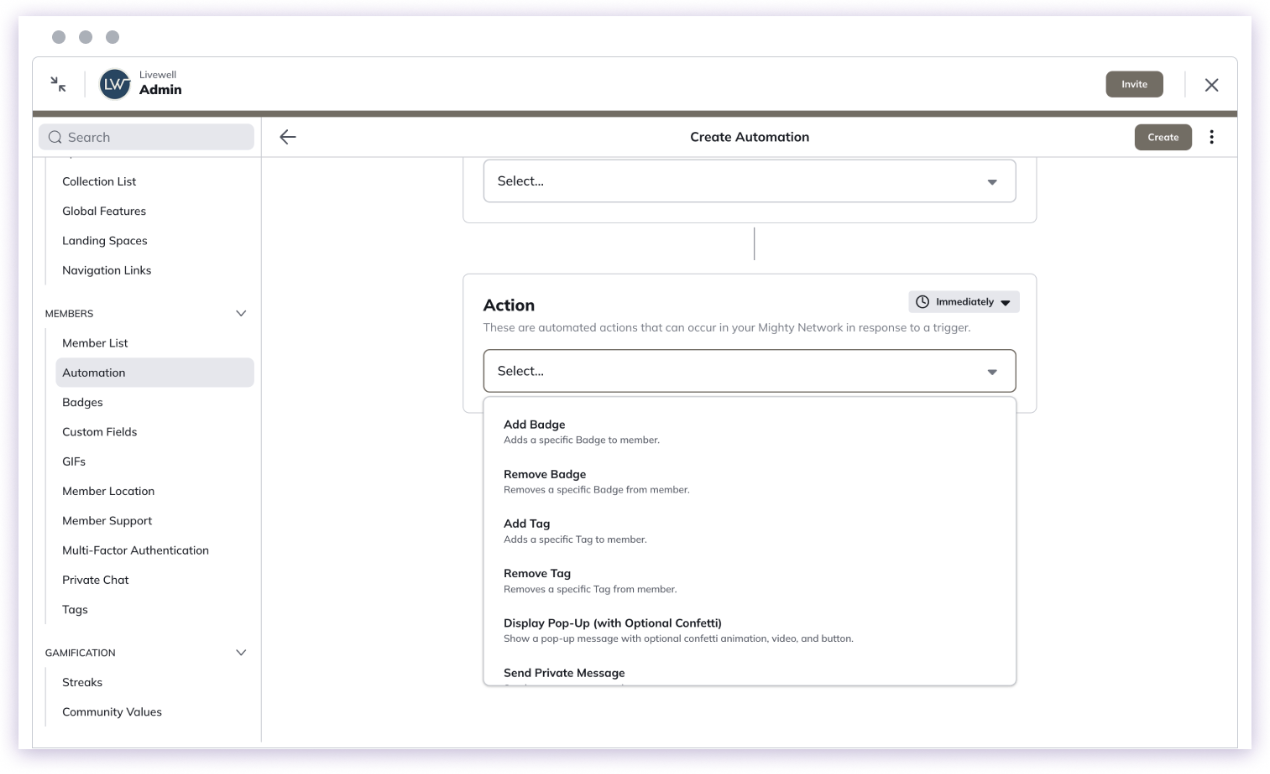
## **Here is a full list of Actions:**

| **Action**                                  | **What It Does**                                                                                                                                                                                                              | **Configuration**                                                                                     |
| :------------------------------------------ | :---------------------------------------------------------------------------------------------------------------------------------------------------------------------------------------------------------------------------- | :---------------------------------------------------------------------------------------------------- |
| **Add Badge**                               | Adds a specific [<u>Badge</u>](https://faq.mightynetworks.com/en/articles/9140641-how-do-i-add-custom-badges-and-tags-for-my-members) to a member. Members receive email, in-app, and mobile push notifications (if enabled). | Select the Badge.                                                                                     |
| **Remove Badge**                            | Removes a specific Badge from a member.                                                                                                                                                                                       | Select the Badge.                                                                                     |
| **Add Tag**                                 | Adds a specific [<u>Tag</u>](https://faq.mightynetworks.com/en/articles/9140641-how-do-i-add-custom-badges-and-tags-for-my-members) to a member. Members do **not** receive a notification.                                   | Select the Tag.                                                                                       |
| **Remove Tag**                              | Removes a specific Tag from a member.                                                                                                                                                                                         | Select the Tag.                                                                                       |
| **Display Pop-Up (with Optional Confetti)** | Shows a pop-up with optional confetti animation, an image or external video, and an optional button. Appears on web and mobile.                                                                                               | Add Title (required), Description, Confetti (optional), image or video, and optional CTA button/link. |
| **Send Private Message**                    | Sends a private message to a member.                                                                                                                                                                                          | Select the sender (any Network Host) and write the message.                                           |
| **Welcome New Member**                      | Sends an automated welcome message when someone joins. Includes limited members.                                                                                                                                              | —                                                                                                     |
| **Add to Network**                          | Adds [<u>limited members</u>](https://faq.mightynetworks.com/en/articles/11508714-what-is-a-full-vs-limited-membership) to the Network immediately, skipping the invite flow.                                                 | —                                                                                                     |
| **Add to Space(s)**                         | Adds [<u>full members</u>](https://faq.mightynetworks.com/en/articles/11508714-what-is-a-full-vs-limited-membership) to one or more Spaces immediately, skipping the invite flow.                                             | Select Space(s).                                                                                      |
| **Invite to Space**                         | Sends a [<u>Space invite</u>](https://faq.mightynetworks.com/en/articles/9140615-how-do-i-invite-members-to-a-space) to a member.                                                                                             | Select the Space, sender (any Network Host), and optional message.                                    |
| **Remove from Space**                       | Removes a member from a Space immediately (excluding Spaces included in a plan).                                                                                                                                              | Select the Space.                                                                                     |
| **Invite to Plan**                          | Sends a [<u>plan invite</u>](https://faq.mightynetworks.com/en/articles/11818871-how-do-i-invite-directly-to-a-plan) to a member.                                                                                             | Select the plan, sender (any Network Host), and optional message.                                     |
| **Remove from Plan**                        | Removes a member from a plan.                                                                                                                                                                                                 | Select the plan and removal timing (immediately or end of billing cycle).                             |
| **Close Event RSVPs**                       | Disables RSVPs for an Event.                                                                                                                                                                                                  | Select the Space and event.                                                                           |
| **Open Event RSVPs**                        | Enables RSVPs for an Event.                                                                                                                                                                                                   | Select the Space and event.                                                                           |
| **Award Points**                            | Awards [<u>points</u>](https://faq.mightynetworks.com/en/articles/10362403-how-does-gamification-work-in-my-mighty-network) to a member.                                                                                      | Enter point amount.                                                                                   |

## How Do Automations Work?

Each Automation includes two parts:

* **Trigger** — What starts the Automation (e.g., a member completes a quiz or joins a Space)
* **Action** — What happens next (e.g., award a badge or send a message)

**Note:** Automations only apply from the moment they're created. They do not work retroactively, except for the [Member Inactive](#:~:text=the%20Android%20app-,Member%20Inactive,-Occurs%20when%20a) trigger, which applies based on general inactivity.

## How to Create an Automation

1. Go to **Admin > Automation > Create Automation** — the direct path is `/admin/automation`.
2. Give your Automation a clear, descriptive name.
3. Choose a **Trigger** (when something happens).
4. Choose an **Action** (what you want to happen).
5. Click **Create** — and your Automation goes live!
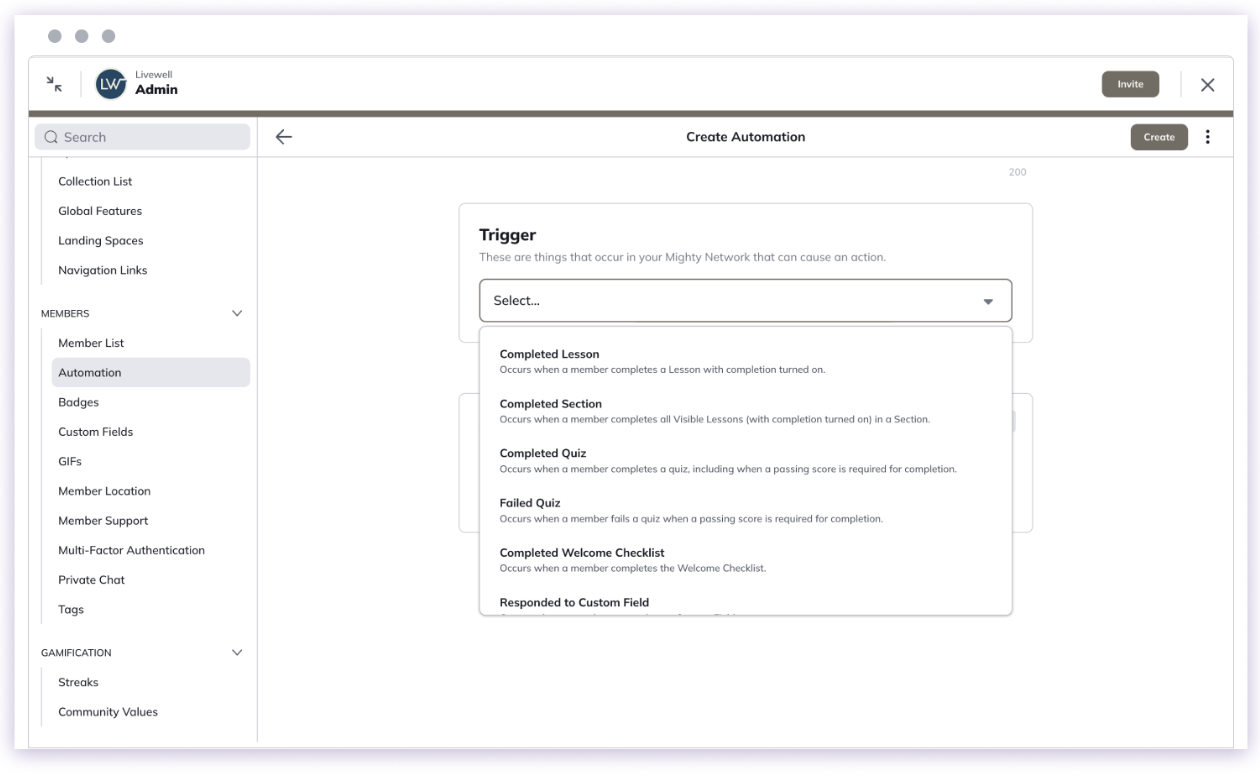
<img src="https://mintcdn.com/mightynetworks/thXPk-w3If2ZMlc6/images/Screenshot2025-12-12at8.29.43AM.png?fit=max&auto=format&n=thXPk-w3If2ZMlc6&q=85&s=ef18c503eea561ec2b970357e3c23cd4" alt="Screenshot2025 12 12at8 29 43AM Pn" width="1260" height="776" data-path="images/Screenshot2025-12-12at8.29.43AM.png" />

<img src="https://mintcdn.com/mightynetworks/thXPk-w3If2ZMlc6/images/Screenshot2025-12-12at8.33.47AM.png?fit=max&auto=format&n=thXPk-w3If2ZMlc6&q=85&s=dfb6bd56be40a0a1401c22d948e30584" alt="Screenshot2025 12 12at8 33 47AM Pn" width="1270" height="774" data-path="images/Screenshot2025-12-12at8.33.47AM.png" />

## Filters

You can filter Triggers by selecting the "+" icon under Triggers:

* **Audience Filters** — [Launch plan](https://docs.mightynetworks.com/for-hosts/meet-mighty/whats-included-in-the-mighty-networks-courses-plan) and up - available on all Triggers except *Event Reached Number of RSVPs*.
* **AI Filters** —[Growth plan](https://docs.mightynetworks.com/for-hosts/meet-mighty/whats-included-in-the-mighty-networks-growth-plan) and up - available on *Commented on Post* and *Host Received Private Message*.

## Multiple Actions

Available on the [Launch plan](https://docs.mightynetworks.com/for-hosts/meet-mighty/whats-included-in-the-mighty-networks-courses-plan) and up, you can add **up to 3 actions** to a single Trigger.

Each action can include its own delay. They will run independently, so a failure in one won't stop the others.
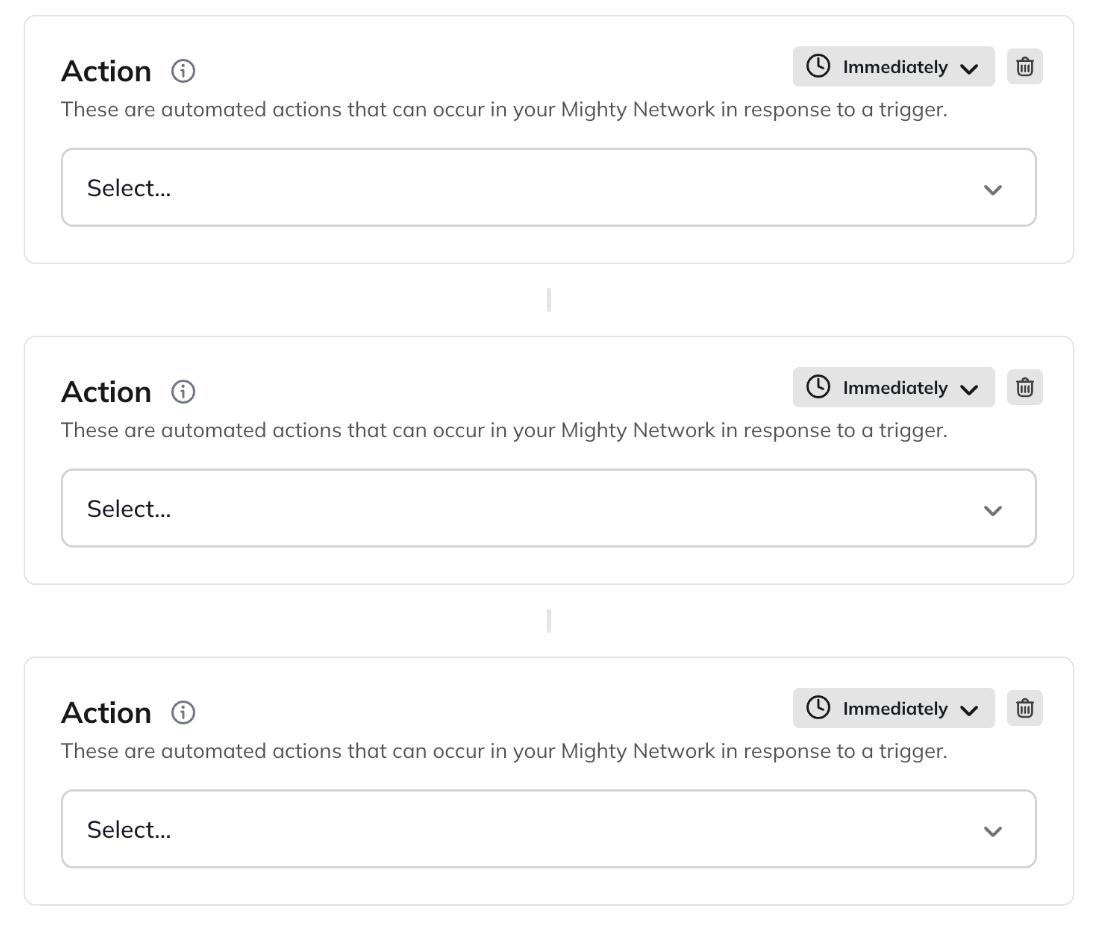
<img src="https://mintcdn.com/mightynetworks/thXPk-w3If2ZMlc6/images/Screenshot2025-12-12at8.32.50AM.png?fit=max&auto=format&n=thXPk-w3If2ZMlc6&q=85&s=826f4a3d75787c828381214c174b7edb" alt="Screenshot2025 12 12at8 32 50AM Pn" width="1110" height="926" data-path="images/Screenshot2025-12-12at8.32.50AM.png" />

## Add Delays to Actions

You can delay when an Action happens. Choose from:

* Immediately
* After 1, 3, 5, 10, or 30 minutes
* After 1 hour
* After 1 day
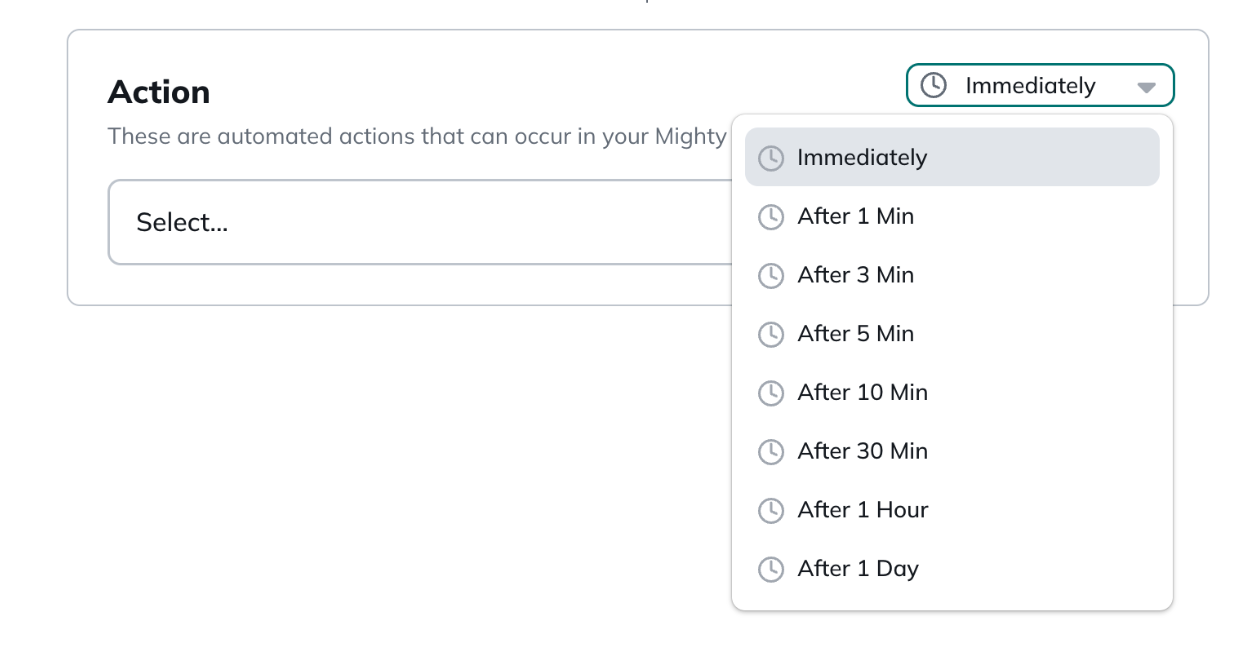
<img src="https://mintcdn.com/mightynetworks/thXPk-w3If2ZMlc6/images/Screenshot2025-12-12at8.29.17AM.png?fit=max&auto=format&n=thXPk-w3If2ZMlc6&q=85&s=5fe29c718e2ab18745d269be9a71287d" alt="Screenshot2025 12 12at8 29 17AM Pn" width="1254" height="662" data-path="images/Screenshot2025-12-12at8.29.17AM.png" />

Here are a few examples of how you can use the delay feature:

* **Welcome and Introductions:** Delay introducing new members to Spaces or upcoming events, giving them time to settle in and complete their [Welcome Checklist](https://docs.mightynetworks.com/for-hosts/setting-up-your-network/how-do-i-set-up-a-welcome-checklist).
* **Staggered Onboarding:** Create a phased onboarding experience by revealing resources or sending follow-up messages at specific intervals to avoid overwhelming new members.
* **Course Completion Badges:** Delay awarding a course completion badge to allow for review or a special congratulatory message.

## Managing Automations

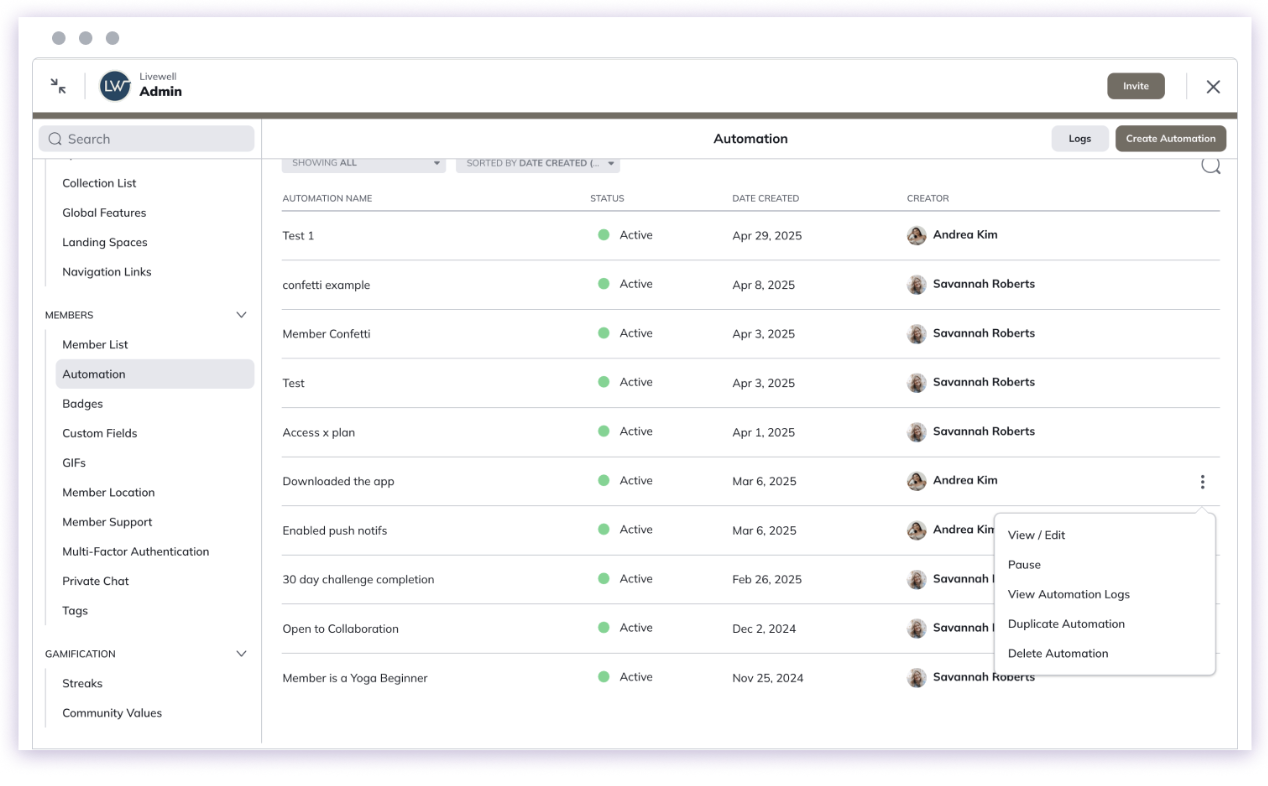
You can manage existing Automations using the **three-dot menu** next to each Automation:

* **View/Edit** – Update any details.
* **Pause/Activate** – Temporarily stop or resume the Automation.
* **View Logs** – See up to 200 logs from the past 48 hours (includes timestamps, member names, and actions).
* **Delete** – Permanently remove the Automation.

You can also **search**, **filter**, and **sort** Automations by:

* **Status:** Active, Paused, Suspended, or Disabled
* **Space:** View Automations tied to specific Spaces
* **Date Created** or **Name** (A–Z or Z–A)
<img src="https://mintcdn.com/mightynetworks/thXPk-w3If2ZMlc6/images/Screenshot2025-12-12at8.34.20AM.png?fit=max&auto=format&n=thXPk-w3If2ZMlc6&q=85&s=216dfe223be091dc93ac27a32971c5fa" alt="Screenshot2025 12 12at8 34 20AM Pn" width="1268" height="786" data-path="images/Screenshot2025-12-12at8.34.20AM.png" />

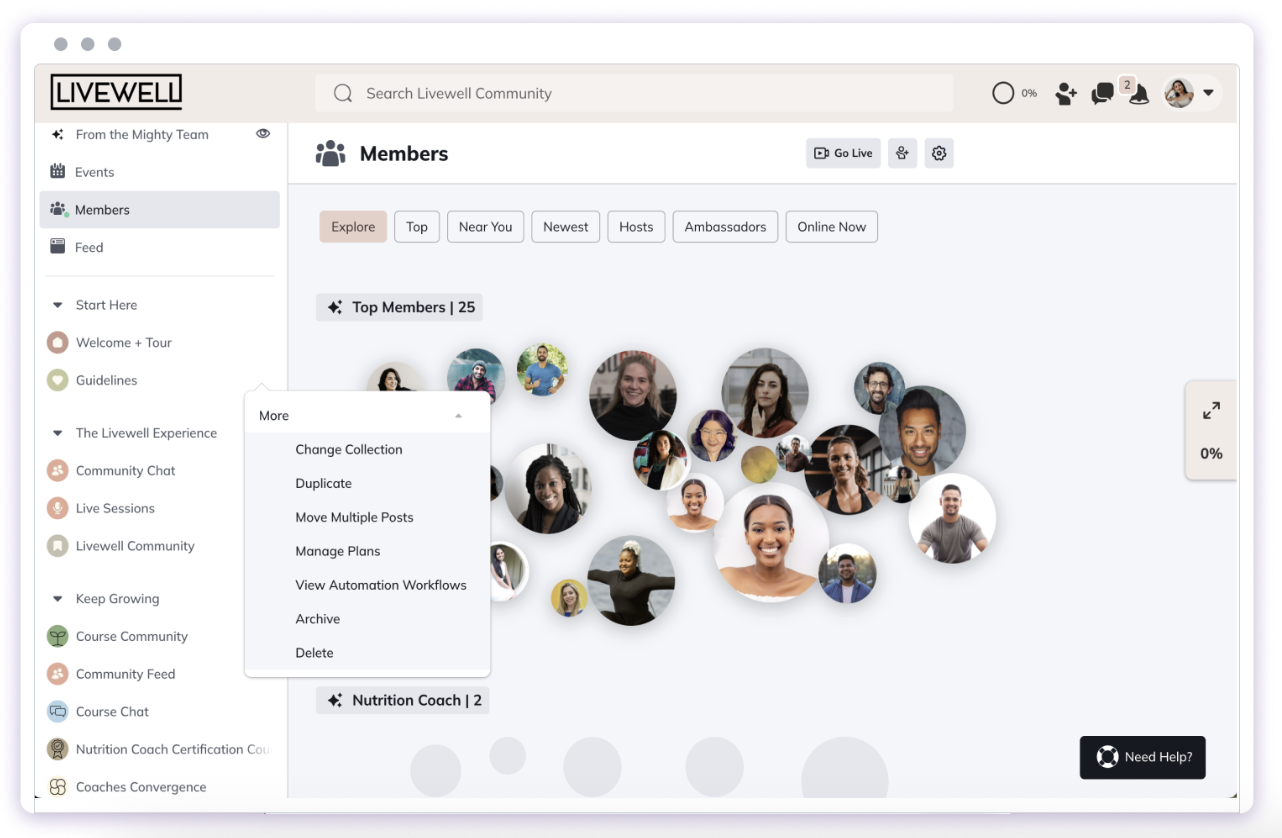
To see Automations for a specific Space: Go to the **three-dot menu > More > View Automation Workflows**.
<img src="https://mintcdn.com/mightynetworks/thXPk-w3If2ZMlc6/images/Screenshot2025-12-12at8.34.52AM.png?fit=max&auto=format&n=thXPk-w3If2ZMlc6&q=85&s=f92a74c2d8a778b32e4683a353560b85" alt="Screenshot2025 12 12at8 34 52AM Pn" width="1282" height="838" data-path="images/Screenshot2025-12-12at8.34.52AM.png" />

## Here are some suggestions to try out!

**Award engagement on a post**

Trigger: Comment on Post

Action: Add a Badge

**Close Event RSVPs after the maximum number has been reached.**

Trigger: Event Reached Number of RSVPs

Action: Close Event RSVPs

**Track your members who convert from a free trial**

Trigger: Converted Free Trial of Plan

Action: Add Tag

**Offer a Badge to members who complete quizzes**

Trigger: Completed Quiz

Action: Add Badge

**Reach out to members who cancel to increase retention**

Trigger: Canceled Subscription to Plan

Action: Send Private Message
