> ## Documentation Index
> Fetch the complete documentation index at: https://docs.mightynetworks.com/llms.txt
> Use this file to discover all available pages before exploring further.
# How Do I View and Manage My Members?
## Accessing Your Member Lists
### Network Member List
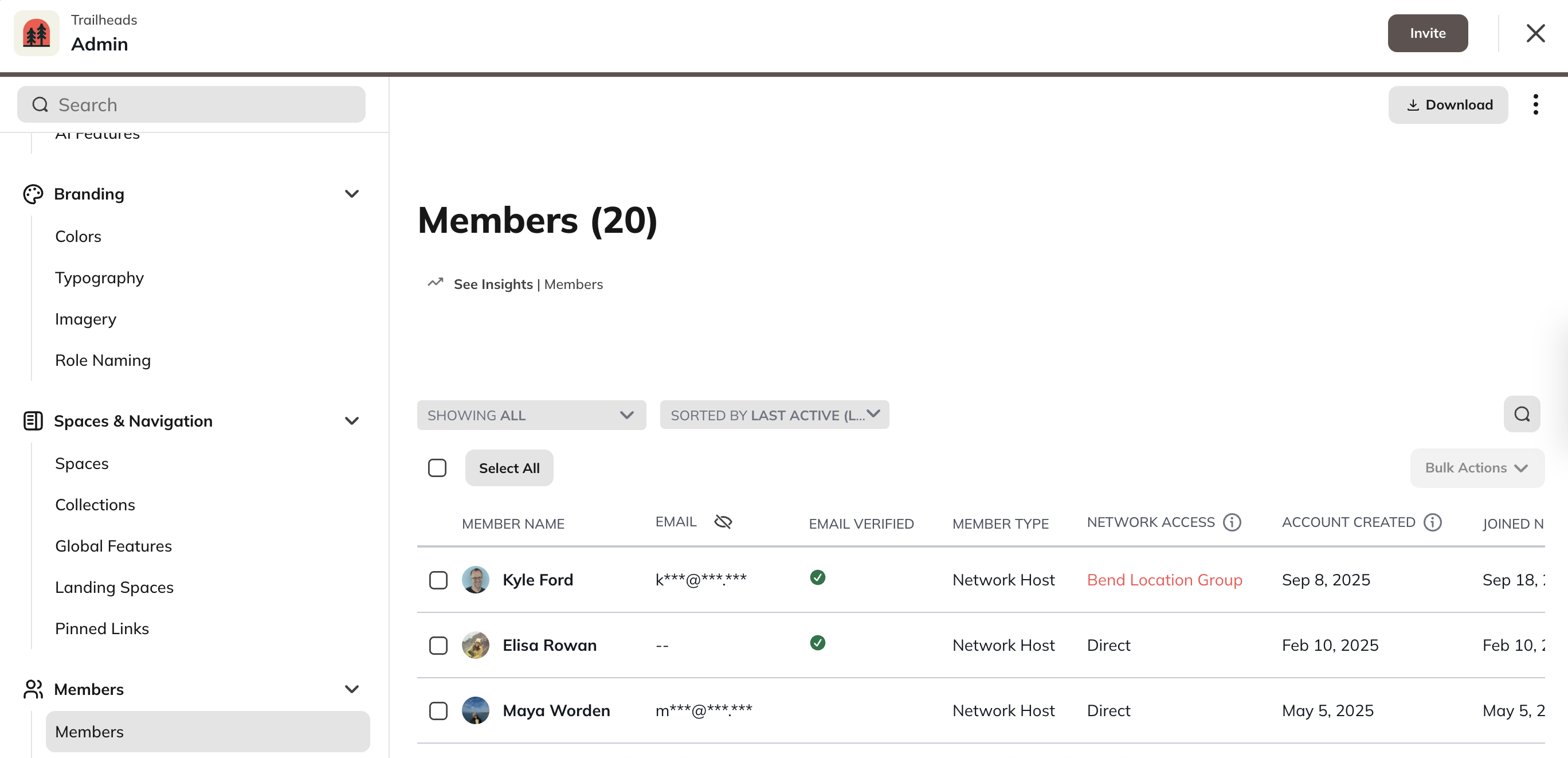
* To see a full list of members in your Mighty Network go to **Admin > Members**
### Space Member List
* To see a full list of members in a Space, click into the Space and go to **Manage > Members**
If you’re on the [**Launch Plan**](https://docs.mightynetworks.com/for-hosts/meet-mighty/whats-included-in-the-mighty-networks-courses-plan#whats-included-in-the-mighty-networks-launch-plan) or higher, you’ll also see a **“See Insights”** button. Clicking this takes you to the **Members tab** in [**Mighty Insights**](https://docs.mightynetworks.com/for-hosts/analytics-and-integrations/what-is-mighty-insights), where you can view analytics like **Contributions**, **Contributing Members**, and more.
You can also use the **search bar** (upper right corner) to find members by name or email.
## Member List Columns
The member list includes these columns:
* Member Name
* Email
* [Email Verified](/for-hosts/privacy-security-accessibility/how-do-i-enable-multi-factor-authentication-and-email-verification)
* Member Type
* Network Host
* Network moderator
* [Full member](https://docs.mightynetworks.com/for-hosts/payments-and-access/what-is-a-full-vs-limited-membership)
* [Limited member](https://docs.mightynetworks.com/for-hosts/payments-and-access/what-is-a-full-vs-limited-membership)
* Network/Space Access
* Plan Name
* Multiple Plans
* Direct
* Invite
* Auto Join
* Anyone Can Join
* Account Created
* The date the account was created. This could be different from the join date if you have [approvals](https://docs.mightynetworks.com/for-hosts/payments-and-access/can-i-set-up-questions-and-approval-for-my-members) turned on or if the account creation was abandoned at any point.
* Joined Network Date
* Last Active
## Filters
You can filter your list by:
* **Spaces:** Shows which members belong to a specific Space.
* **Plans:** Shows which members are part of specific Plans.
* **Member Type:** Host, Moderator, Full Member, or Limited Member.
* [**Tags and Badges:**](https://docs.mightynetworks.com/for-hosts/gamification/how-do-i-add-custom-badges-and-tags-for-my-members) Available on the [**Launch Plan**](https://docs.mightynetworks.com/for-hosts/meet-mighty/whats-included-in-the-mighty-networks-courses-plan)\*\* \*\*and higher.
* **Audience:** Filter by an audience you’ve defined for promotional banners.
* **Inactive Members:** Shows members who haven’t logged in within the last 30 days.
* You can re-engage them using **Activity Assist** (learn more in this article).
* **Add Filter:** Sort by specific **Custom Fields** you’ve created.
## Sorting Options
You can sort your member list by:
* **Name:** A–Z or Z–A
* **Role**
* **Date Joined:** Earliest or Latest
* **Last Active:** Earliest or Latest
## Menu Options
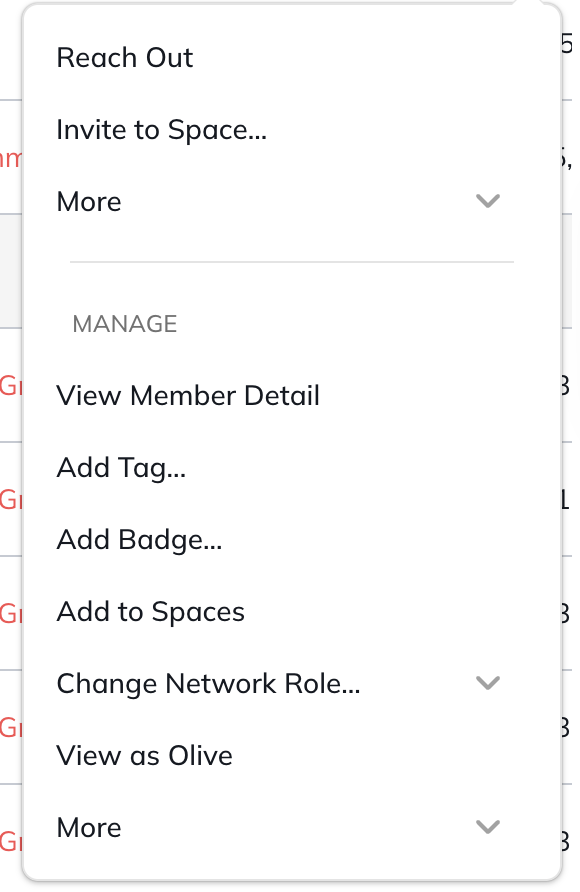
In the three dot menu next to the member's name, you have options to:
* Reach out: opens a DM with the person
* Invite to Space
* More
* [Block Member](https://docs.mightynetworks.com/for-hosts/admin-and-moderation/what-content-and-moderation-tools-do-i-have-in-my-mighty-network#blocking-or-reporting-a-member)
* [Report Member](https://docs.mightynetworks.com/for-hosts/admin-and-moderation/what-content-and-moderation-tools-do-i-have-in-my-mighty-network#blocking-or-reporting-a-member)
* [View Member Detail](https://docs.mightynetworks.com/for-hosts/admin-and-moderation/what-is-the-member-detail-page#what-is-the-member-detail-page)
* [Add Tag](https://docs.mightynetworks.com/for-hosts/gamification/how-do-i-add-custom-badges-and-tags-for-my-members#how-do-i-add-custom-badges-and-tags-for-my-members)
* [Add Badge](https://docs.mightynetworks.com/for-hosts/gamification/how-do-i-add-custom-badges-and-tags-for-my-members#how-do-i-add-custom-badges-and-tags-for-my-members)
* Change Network Role
* [View as Member](for-hosts/admin-and-moderation/How-Do-I-View-as-a-Member)
* More
* [Remove from Everything ](https://docs.mightynetworks.com/for-hosts/admin-and-moderation/what-content-and-moderation-tools-do-i-have-in-my-mighty-network#blocking-or-reporting-a-member)
* [Ban from Network](https://docs.mightynetworks.com/for-hosts/admin-and-moderation/what-content-and-moderation-tools-do-i-have-in-my-mighty-network#blocking-or-reporting-a-member)
## Bulk Actions
From your **Network** or **Space** member list, you can perform bulk actions, such as:
* Sending a message to multiple members
* Adding or removing [**Tags**](https://docs.mightynetworks.com/for-hosts/gamification/how-do-i-add-custom-badges-and-tags-for-my-members) [and Badges](https://docs.mightynetworks.com/for-hosts/gamification/how-do-i-add-custom-badges-and-tags-for-my-members)
* [Adding to Networks and Space(s](https://intercom.help/mighty-networks/en/articles/12573318-how-do-i-directly-add-members-to-my-network-or-spaces))
**Note:** To perform bulk actions, you must be a [**Network Host/Moderator**](https://docs.mightynetworks.com/for-hosts/admin-and-moderation/what-permissions-do-network-hosts-and-network-moderators-have) or a [**Space Host/Moderator**](https://docs.mightynetworks.com/for-hosts/admin-and-moderation/what-permissions-do-space-hosts-and-space-moderators-have) for that specific Space.
 ## Member List Columns
The member list includes these columns:
* Member Name
* Email
* [Email Verified](/for-hosts/privacy-security-accessibility/how-do-i-enable-multi-factor-authentication-and-email-verification)
* Member Type
* Network Host
* Network moderator
* [Full member](https://docs.mightynetworks.com/for-hosts/payments-and-access/what-is-a-full-vs-limited-membership)
* [Limited member](https://docs.mightynetworks.com/for-hosts/payments-and-access/what-is-a-full-vs-limited-membership)
* Network/Space Access
* Plan Name
* Multiple Plans
* Direct
* Invite
* Auto Join
* Anyone Can Join
* Account Created
* The date the account was created. This could be different from the join date if you have [approvals](https://docs.mightynetworks.com/for-hosts/payments-and-access/can-i-set-up-questions-and-approval-for-my-members) turned on or if the account creation was abandoned at any point.
* Joined Network Date
* Last Active
## Filters
You can filter your list by:
* **Spaces:** Shows which members belong to a specific Space.
* **Plans:** Shows which members are part of specific Plans.
* **Member Type:** Host, Moderator, Full Member, or Limited Member.
* [**Tags and Badges:**](https://docs.mightynetworks.com/for-hosts/gamification/how-do-i-add-custom-badges-and-tags-for-my-members) Available on the [**Launch Plan**](https://docs.mightynetworks.com/for-hosts/meet-mighty/whats-included-in-the-mighty-networks-courses-plan)\*\* \*\*and higher.
* **Audience:** Filter by an audience you’ve defined for promotional banners.
* **Inactive Members:** Shows members who haven’t logged in within the last 30 days.
* You can re-engage them using **Activity Assist** (learn more in this article).
* **Add Filter:** Sort by specific **Custom Fields** you’ve created.
## Sorting Options
You can sort your member list by:
* **Name:** A–Z or Z–A
* **Role**
* **Date Joined:** Earliest or Latest
* **Last Active:** Earliest or Latest
## Menu Options
In the three dot menu next to the member's name, you have options to:
## Member List Columns
The member list includes these columns:
* Member Name
* Email
* [Email Verified](/for-hosts/privacy-security-accessibility/how-do-i-enable-multi-factor-authentication-and-email-verification)
* Member Type
* Network Host
* Network moderator
* [Full member](https://docs.mightynetworks.com/for-hosts/payments-and-access/what-is-a-full-vs-limited-membership)
* [Limited member](https://docs.mightynetworks.com/for-hosts/payments-and-access/what-is-a-full-vs-limited-membership)
* Network/Space Access
* Plan Name
* Multiple Plans
* Direct
* Invite
* Auto Join
* Anyone Can Join
* Account Created
* The date the account was created. This could be different from the join date if you have [approvals](https://docs.mightynetworks.com/for-hosts/payments-and-access/can-i-set-up-questions-and-approval-for-my-members) turned on or if the account creation was abandoned at any point.
* Joined Network Date
* Last Active
## Filters
You can filter your list by:
* **Spaces:** Shows which members belong to a specific Space.
* **Plans:** Shows which members are part of specific Plans.
* **Member Type:** Host, Moderator, Full Member, or Limited Member.
* [**Tags and Badges:**](https://docs.mightynetworks.com/for-hosts/gamification/how-do-i-add-custom-badges-and-tags-for-my-members) Available on the [**Launch Plan**](https://docs.mightynetworks.com/for-hosts/meet-mighty/whats-included-in-the-mighty-networks-courses-plan)\*\* \*\*and higher.
* **Audience:** Filter by an audience you’ve defined for promotional banners.
* **Inactive Members:** Shows members who haven’t logged in within the last 30 days.
* You can re-engage them using **Activity Assist** (learn more in this article).
* **Add Filter:** Sort by specific **Custom Fields** you’ve created.
## Sorting Options
You can sort your member list by:
* **Name:** A–Z or Z–A
* **Role**
* **Date Joined:** Earliest or Latest
* **Last Active:** Earliest or Latest
## Menu Options
In the three dot menu next to the member's name, you have options to:
 * Reach out: opens a DM with the person
* Invite to Space
* More
* [Block Member](https://docs.mightynetworks.com/for-hosts/admin-and-moderation/what-content-and-moderation-tools-do-i-have-in-my-mighty-network#blocking-or-reporting-a-member)
* [Report Member](https://docs.mightynetworks.com/for-hosts/admin-and-moderation/what-content-and-moderation-tools-do-i-have-in-my-mighty-network#blocking-or-reporting-a-member)
* [View Member Detail](https://docs.mightynetworks.com/for-hosts/admin-and-moderation/what-is-the-member-detail-page#what-is-the-member-detail-page)
* [Add Tag](https://docs.mightynetworks.com/for-hosts/gamification/how-do-i-add-custom-badges-and-tags-for-my-members#how-do-i-add-custom-badges-and-tags-for-my-members)
* [Add Badge](https://docs.mightynetworks.com/for-hosts/gamification/how-do-i-add-custom-badges-and-tags-for-my-members#how-do-i-add-custom-badges-and-tags-for-my-members)
* Change Network Role
* [View as Member](for-hosts/admin-and-moderation/How-Do-I-View-as-a-Member)
* More
* [Remove from Everything ](https://docs.mightynetworks.com/for-hosts/admin-and-moderation/what-content-and-moderation-tools-do-i-have-in-my-mighty-network#blocking-or-reporting-a-member)
* [Ban from Network](https://docs.mightynetworks.com/for-hosts/admin-and-moderation/what-content-and-moderation-tools-do-i-have-in-my-mighty-network#blocking-or-reporting-a-member)
## Bulk Actions
From your **Network** or **Space** member list, you can perform bulk actions, such as:
* Sending a message to multiple members
* Adding or removing [**Tags**](https://docs.mightynetworks.com/for-hosts/gamification/how-do-i-add-custom-badges-and-tags-for-my-members) [and Badges](https://docs.mightynetworks.com/for-hosts/gamification/how-do-i-add-custom-badges-and-tags-for-my-members)
* [Adding to Networks and Space(s](https://intercom.help/mighty-networks/en/articles/12573318-how-do-i-directly-add-members-to-my-network-or-spaces))
**Note:** To perform bulk actions, you must be a [**Network Host/Moderator**](https://docs.mightynetworks.com/for-hosts/admin-and-moderation/what-permissions-do-network-hosts-and-network-moderators-have) or a [**Space Host/Moderator**](https://docs.mightynetworks.com/for-hosts/admin-and-moderation/what-permissions-do-space-hosts-and-space-moderators-have) for that specific Space.
* Reach out: opens a DM with the person
* Invite to Space
* More
* [Block Member](https://docs.mightynetworks.com/for-hosts/admin-and-moderation/what-content-and-moderation-tools-do-i-have-in-my-mighty-network#blocking-or-reporting-a-member)
* [Report Member](https://docs.mightynetworks.com/for-hosts/admin-and-moderation/what-content-and-moderation-tools-do-i-have-in-my-mighty-network#blocking-or-reporting-a-member)
* [View Member Detail](https://docs.mightynetworks.com/for-hosts/admin-and-moderation/what-is-the-member-detail-page#what-is-the-member-detail-page)
* [Add Tag](https://docs.mightynetworks.com/for-hosts/gamification/how-do-i-add-custom-badges-and-tags-for-my-members#how-do-i-add-custom-badges-and-tags-for-my-members)
* [Add Badge](https://docs.mightynetworks.com/for-hosts/gamification/how-do-i-add-custom-badges-and-tags-for-my-members#how-do-i-add-custom-badges-and-tags-for-my-members)
* Change Network Role
* [View as Member](for-hosts/admin-and-moderation/How-Do-I-View-as-a-Member)
* More
* [Remove from Everything ](https://docs.mightynetworks.com/for-hosts/admin-and-moderation/what-content-and-moderation-tools-do-i-have-in-my-mighty-network#blocking-or-reporting-a-member)
* [Ban from Network](https://docs.mightynetworks.com/for-hosts/admin-and-moderation/what-content-and-moderation-tools-do-i-have-in-my-mighty-network#blocking-or-reporting-a-member)
## Bulk Actions
From your **Network** or **Space** member list, you can perform bulk actions, such as:
* Sending a message to multiple members
* Adding or removing [**Tags**](https://docs.mightynetworks.com/for-hosts/gamification/how-do-i-add-custom-badges-and-tags-for-my-members) [and Badges](https://docs.mightynetworks.com/for-hosts/gamification/how-do-i-add-custom-badges-and-tags-for-my-members)
* [Adding to Networks and Space(s](https://intercom.help/mighty-networks/en/articles/12573318-how-do-i-directly-add-members-to-my-network-or-spaces))
**Note:** To perform bulk actions, you must be a [**Network Host/Moderator**](https://docs.mightynetworks.com/for-hosts/admin-and-moderation/what-permissions-do-network-hosts-and-network-moderators-have) or a [**Space Host/Moderator**](https://docs.mightynetworks.com/for-hosts/admin-and-moderation/what-permissions-do-space-hosts-and-space-moderators-have) for that specific Space.