> ## Documentation Index
> Fetch the complete documentation index at: https://docs.mightynetworks.com/llms.txt
> Use this file to discover all available pages before exploring further.
# How Does Search Work?
Mighty’s search tool helps you quickly find the content, members, and Spaces you’re looking for. It scans your Network based on where you search and the filters you apply, making it easy to discover relevant posts, Events, members, and more.
On the [Scale plan and up](https://docs.mightynetworks.com/for-hosts/meet-mighty/whats-included-in-the-mighty-networks-business-plan#whats-included-in-the-mighty-networks-scale-plan), you have access to our semantic search and AI summaries features.
**Semantic Search** understands meaning and intent, helping surface relevant content even when the exact words don't match.
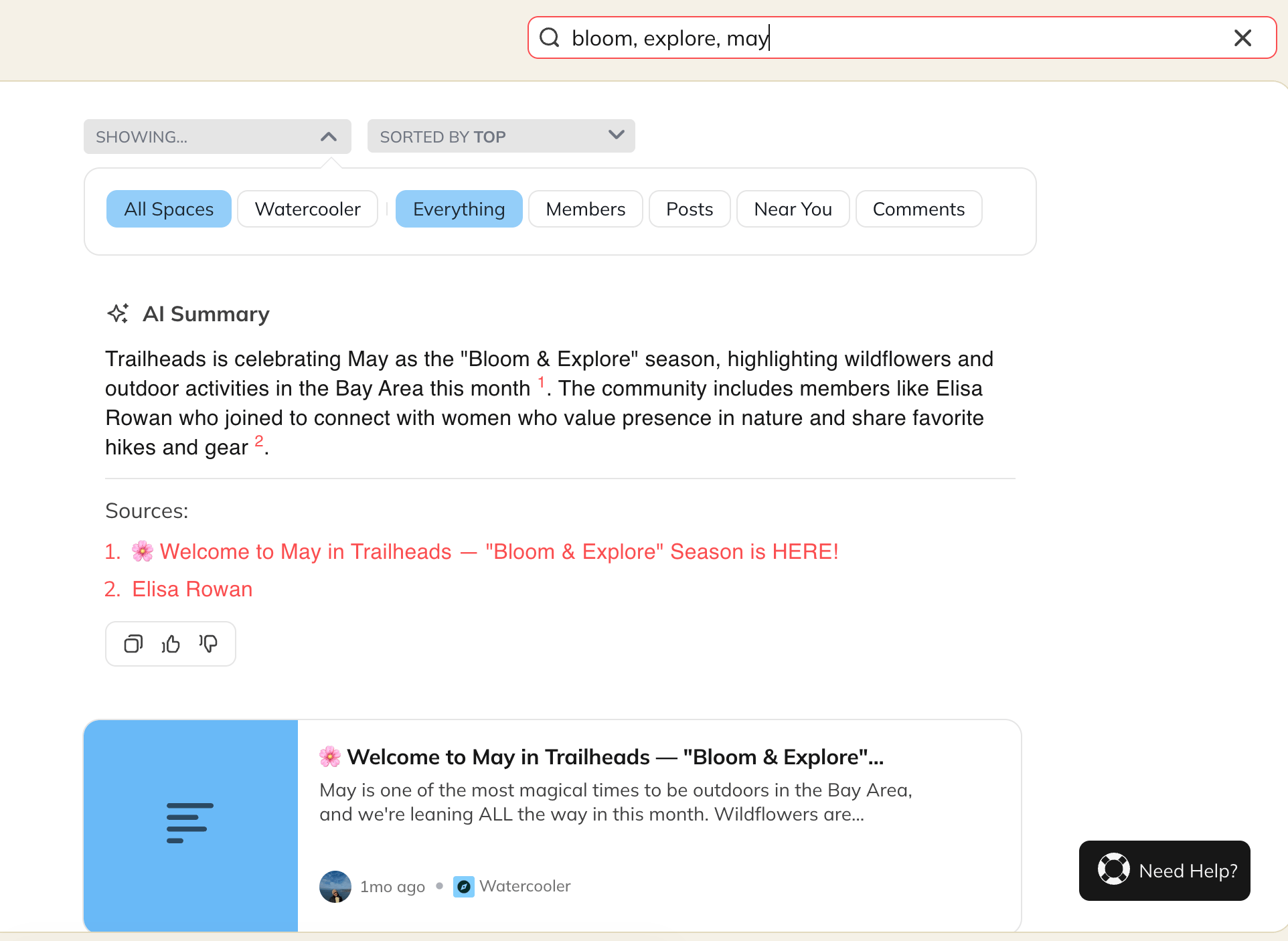
[**AI Summaries**](https://docs.mightynetworks.com/for-hosts/marketing-features/what-ai-features-does-mighty-networks-have#what-ai-features-does-mighty-networks-have) provide a quick overview of key takeaways at the top of search results, helping members get answers faster. This feature is on by default and will appear for search terms that are three words or longer.
If you prefer to not have AI summaries, you can toggle them off by going to **[Admin > AI Features](https://docs.mightynetworks.com/for-hosts/marketing-features/what-ai-features-does-mighty-networks-have#what-ai-features-does-mighty-networks-have).**
 ## Global Search vs. Space Search
## Global Search
Global Search scans content across your entire Mighty Network, including:
* All Spaces you’re a member of
* Spaces you’re not a member of (Spaces set to **Anyone Can See Content Inside**)
This allows you to find information from across your Network in one place.
## Space Search
Space Search looks only within a specific Space. When you’re using Space Search, you’ll see a **Space: \[Space Name]** filter under the search bar. This helps you narrow results to a single Space without content from elsewhere in your Network.
## How to Use the Search Bar
Start typing into the search bar and results will automatically populate. You can then sort by:
* **Top**
* **Newest**
* **Oldest**
You can also refine your results using filters such as:
* Space
* Everything
* Members
* Posts
* Your Activity
* Near You
* Events
* Comments
* Custom field
These filters help you quickly find the most relevant content.
## Types of Searches
## Plaintext Search
Use any word or phrase without a hashtag. Mighty will return content containing matches or partial matches.Examples:
* “running team”
* “Michael”
* “Thursday brunch”
## Hashtag Exact-Match Search
Search for a single hashtag to get results containing that exact hashtag.Examples:
* **#resources**
* **#news**
* **#Marathon2025**
## Combined Search
Use hashtags and text together to narrow results.Example: **#marathon Boston** returns posts tagged **#marathon** that also include “Boston.”
## Search Scenarios and Examples
* **Search for a single hashtag:#dog** → Content tagged with **#dog**
* **Search for a hashtag + text:#dog poodle** → Posts tagged with **#dog** that also include “poodle”
* **Search for multiple hashtags:#dog #cat** → Posts containing **both** hashtags
* **Search for text only:dogs** → Fuzzy matches, such as “dogs,” “dogsAreTheBest,” or posts with **#dogs**
## How Mighty Orders Results
Search results are ranked so the most helpful content appears first. Mighty prioritizes results in this order:
1. **Space name matches**
2. **Active Spaces** (more members and recent activity)
3. **Your Spaces** (Spaces you created or belong to)
4. **Member name/username matches**
5. **Post matches**
6. **Comment matches**
This ranking ensures you see the most relevant Spaces, members, and posts before lower-priority matches.
By understanding how search works, you can quickly find what you need and help keep your Network organized for easy discovery.
## Global Search vs. Space Search
## Global Search
Global Search scans content across your entire Mighty Network, including:
* All Spaces you’re a member of
* Spaces you’re not a member of (Spaces set to **Anyone Can See Content Inside**)
This allows you to find information from across your Network in one place.
## Space Search
Space Search looks only within a specific Space. When you’re using Space Search, you’ll see a **Space: \[Space Name]** filter under the search bar. This helps you narrow results to a single Space without content from elsewhere in your Network.
## How to Use the Search Bar
Start typing into the search bar and results will automatically populate. You can then sort by:
* **Top**
* **Newest**
* **Oldest**
You can also refine your results using filters such as:
* Space
* Everything
* Members
* Posts
* Your Activity
* Near You
* Events
* Comments
* Custom field
These filters help you quickly find the most relevant content.
## Types of Searches
## Plaintext Search
Use any word or phrase without a hashtag. Mighty will return content containing matches or partial matches.Examples:
* “running team”
* “Michael”
* “Thursday brunch”
## Hashtag Exact-Match Search
Search for a single hashtag to get results containing that exact hashtag.Examples:
* **#resources**
* **#news**
* **#Marathon2025**
## Combined Search
Use hashtags and text together to narrow results.Example: **#marathon Boston** returns posts tagged **#marathon** that also include “Boston.”
## Search Scenarios and Examples
* **Search for a single hashtag:#dog** → Content tagged with **#dog**
* **Search for a hashtag + text:#dog poodle** → Posts tagged with **#dog** that also include “poodle”
* **Search for multiple hashtags:#dog #cat** → Posts containing **both** hashtags
* **Search for text only:dogs** → Fuzzy matches, such as “dogs,” “dogsAreTheBest,” or posts with **#dogs**
## How Mighty Orders Results
Search results are ranked so the most helpful content appears first. Mighty prioritizes results in this order:
1. **Space name matches**
2. **Active Spaces** (more members and recent activity)
3. **Your Spaces** (Spaces you created or belong to)
4. **Member name/username matches**
5. **Post matches**
6. **Comment matches**
This ranking ensures you see the most relevant Spaces, members, and posts before lower-priority matches.
By understanding how search works, you can quickly find what you need and help keep your Network organized for easy discovery.